Wireless Intrusion Detection with HPE Networking Aruba Central
Introduction
For network visibility, some bury their head in the sand like an ostrich. In today's security landscape though visibility is everything so flying high like an eagle with a wide view of attack surfaces is paramount to delivering the best security for your organsiation.
The world continues to use wireless more and more as its primary connection method for clients. HPE Aruba Networking uses Zero Trust Security (ZTS) key principals to promote and ensure security. The principals include:
- Control over internal access
- Role and context-based control
- Continuous monitoring and assessment.
In this post I will touch on the third point of monitoring and assessment but related to Wireless Intrusion Detection System (WIDS). Visibility is fundamental in security and you can only security something if you know it's there and understand what attacks are possible.
Central WIDS
Central offers WIDS as well as RAPIDS (Rogue Access Point Intrusion Detection System) and both are disabled by default. Enabling RAPIDS globally allows you to classify Rogue devices with custom classification rules to help with taking actions. WIDS gets enabled in the AP group and allows logging of behaviour picked up by access points monitoring the air. There is also the option to use dedicated APs that don't service clients called Air Monitors (AMs) to continuously monitor channels. Without AMs deployed, the other APs must stop serving clients intermittently to scan a channel and then return to servicing client traffic. Using a normal AP will mean potential security events could be missed which is why Aruba recommends a 4:1 AP to AM deployment for high security environments to ensure channel scanning is constant for security threats. Aruba also offers WIPS or Wireless intrusion Protection which will not only monitor and log events like WIDS, but proactively act on security events and sending de-authentication frames to clients of the Rogue APs as an example which is essentially a denial-of-service attack. Using WIPS can have legal consequences though and as intrusion detection is prone to false positives, it is not usually recommended to use it in production. Using any intrusion detection features should be decided in conjunction with security teams to ensure the right amount of security is implemented and what actions should be taken.
Enabling WIDS
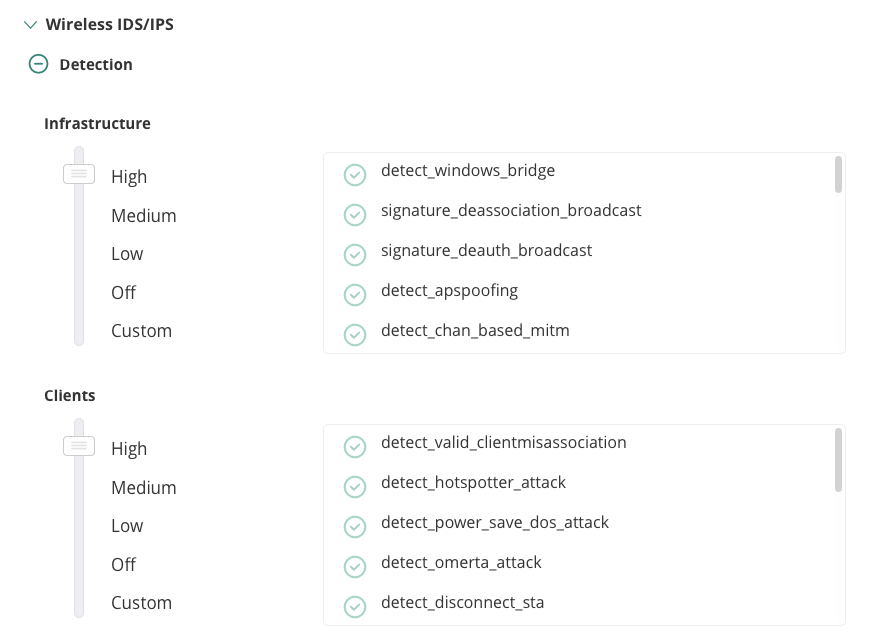
To enable WIDS in Aruba Central, navigate to AP Group > Devices Configure toggle > Security tab > Expands Wireless IDS/IPS > Then expand Detection. By default, detection is off. There are multiple levels of logging so depending on what your requirements are will depend on what level you want to enable. For this post I have enabled mine to High to ensure all checks are done. The Protection section or WIPS is below Detection and enables actions to be taken to disable clients connections from rogue access points by using de-authentication frames. Again, there can be legal consequences to disabling Wi-Fi access and false positives do happen so protection should generally be disabled. There is also the likelihood of increased airtime if WIPS is triggered and sending de-authentication packets which can also affect your clients connection if not using AMs. Enabling of security features should always be thoroughly understood and agreed to within your organisation. Using WIDS without WIPS also gives the administrators time to act and ensure there I no false positive before deciding to investigate and remove the concern. Its also possible you are in close proximity to wireless networks used by emergency services for example so having a false positive and triggering WIPS containment on one of those networks could cause more impact than just wireless access.
Below is how I configured my WIDS for this post:
 Enabling RAPIDS
To enable RAPIDS classification rules, navigate to Global > Security > Config > Security and toggle the Enable RAPIDS button.
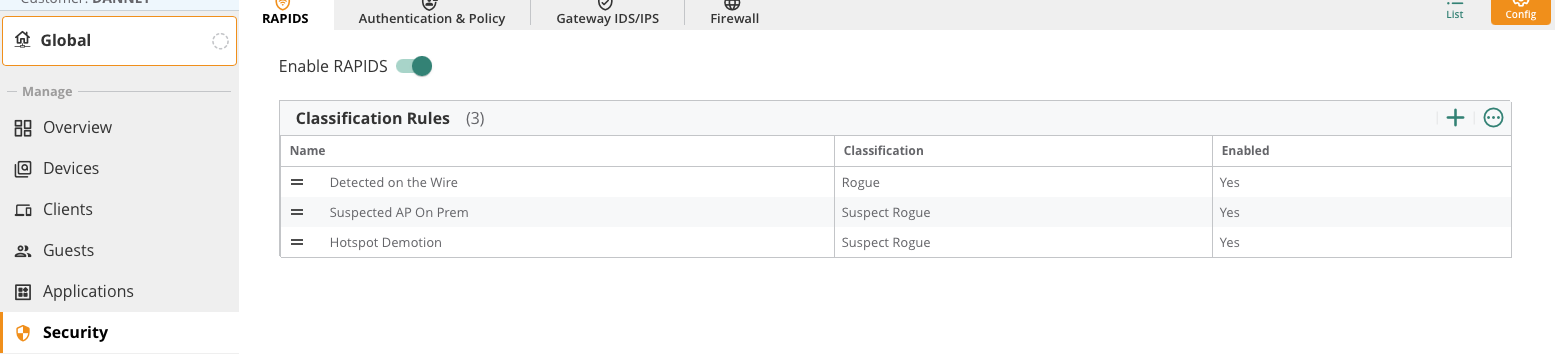
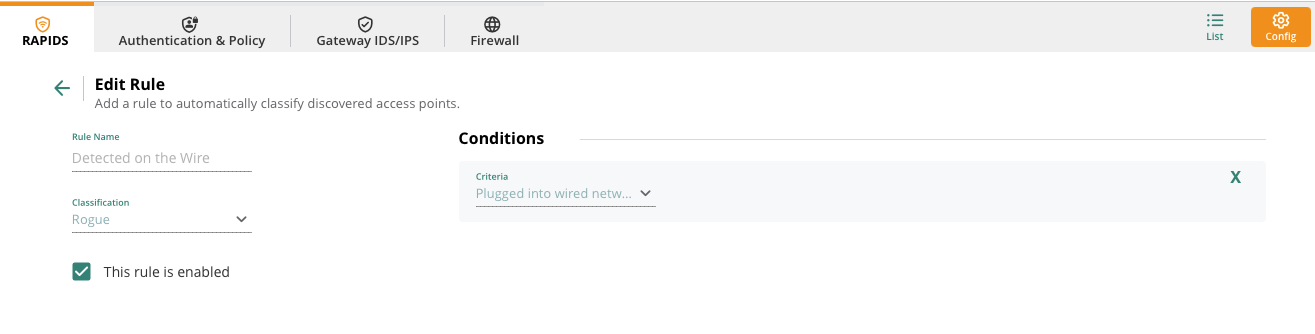
There are three classification rules configured by default.
The detected on the wire is where there is a MAC from the wired side (distribution system) is seen in wireless frames. This would be cause for concern as either something malicious. Even if its a companies user (shadow IT) then it should still be investigated as a security breach. This rule will classify those APs as Rogues.
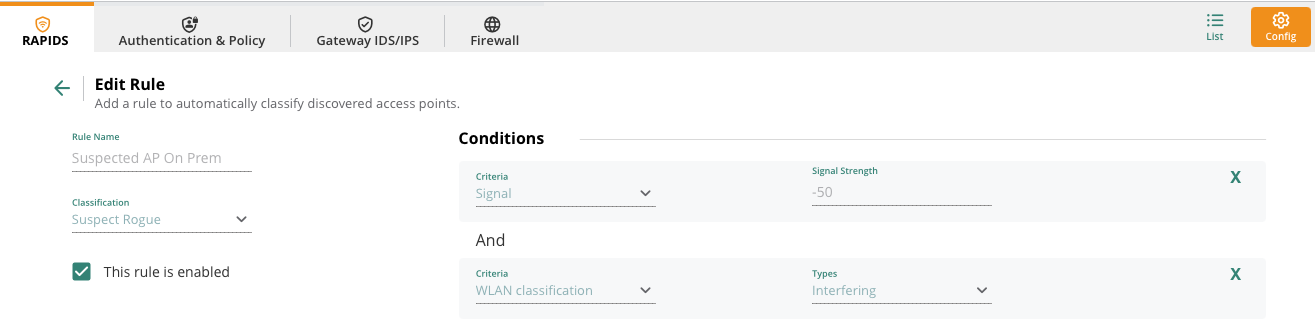
The suspected AP on Prem classifies an AP as Rogue when its signal strength is seen by your APs at -50 and the AP is seen as interfering with yours.
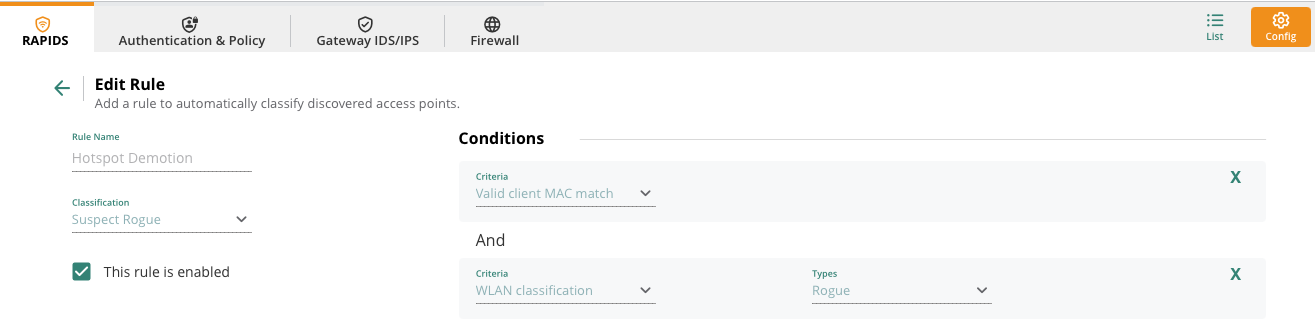
Finally the Hotspot Demotion classifies an AP as Suspect Rogue when a Valid client MAC match is seen that has previously been classified as Rogue.
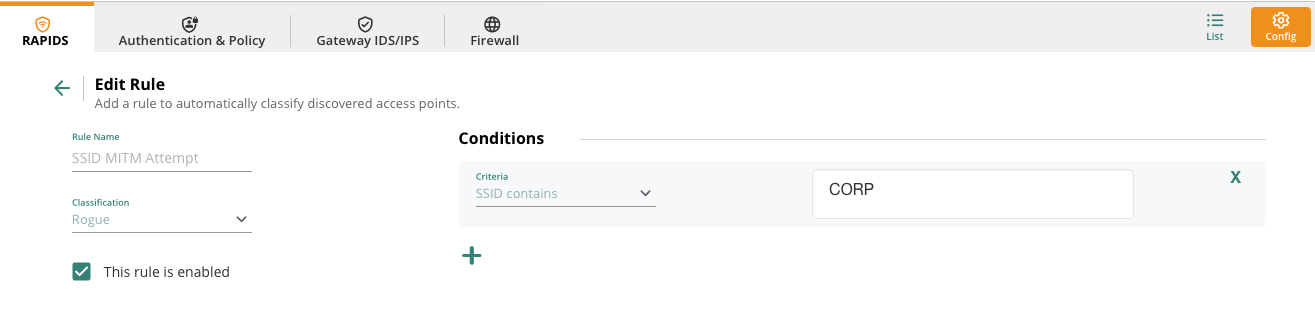
Rules can be granular depending on your requirements. As an example, I have configured a rule below for if another access point is seen broadcasting SSIDs the same as mine or close to in a possible attempt to use a MITM attack. Note that I have just used CORP in the SSID naming so anything CORP can be classified as rogue. Again, this still could cause false positives as it is a common name.
Testing
Now that RAPIDS and WIDS are enabled its time to test.
For testing I am using the following:
- Aruba Central
- Aruba 515 AOS10 broadcasting my test SSID
- Aruba 303H as an Air Monitor
- Test client (iPhone)
- WiFi Pineapple (A wireless penetration testing tool from Hak5)
- MacBook (monitor mode) with Wireshark
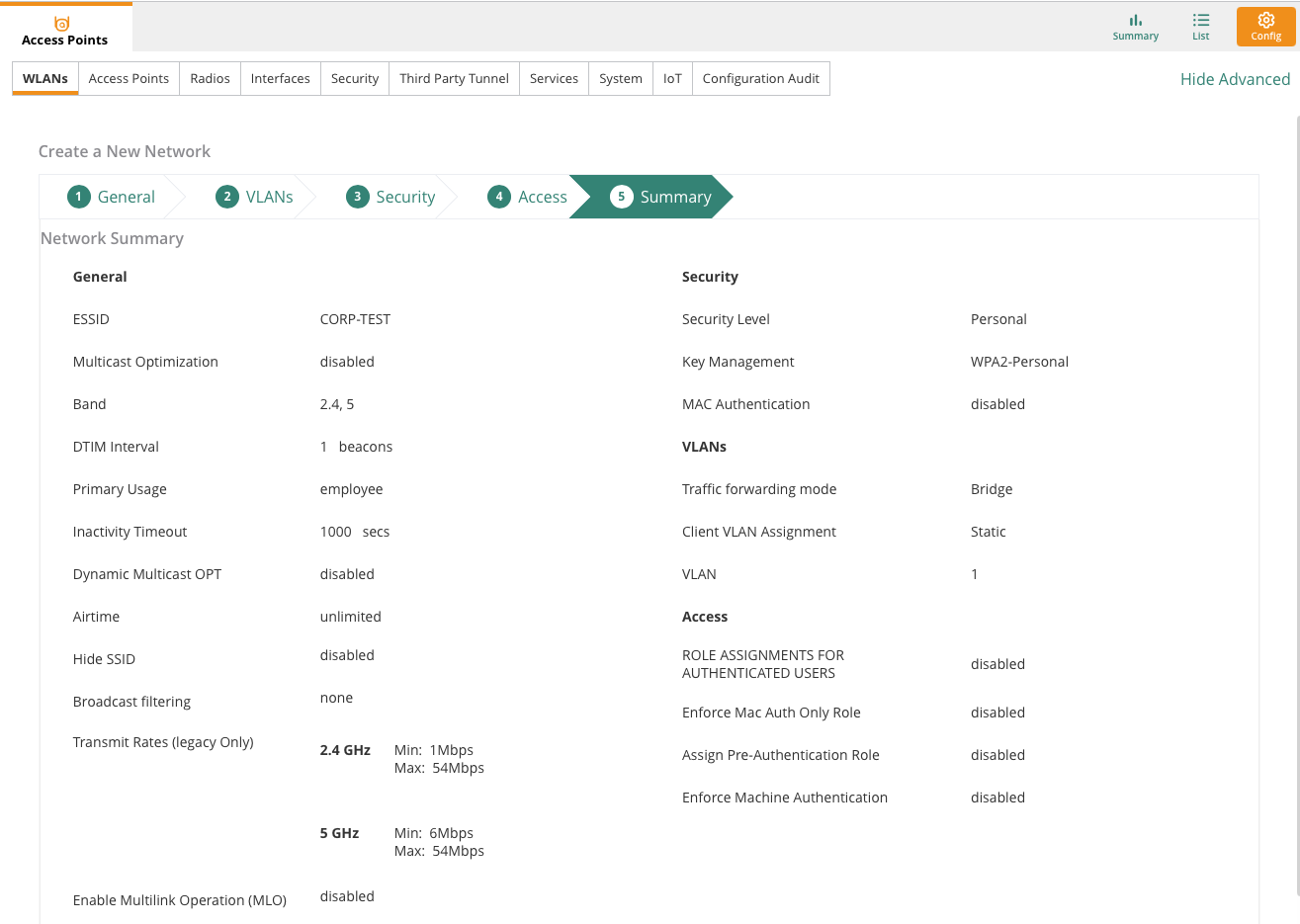
I will create a test SSID called CORP-TEST using a WPA2-Personal passphrase with the rest of the settings default. The BSSID for CORP-TEST is A8:5B:F7:59:B8:52 and I have connected a client (iPhone) with MAC B2:3F:0A:4A:3E:D5.
Now over to the WiFI Pineapple which I am going to use to attempt a de-authentication attack of my client from the wireless SSID.
--- Important. This is in a lab and not a production network. Be mindful of legal consequences when testing with penetration testing tools ---
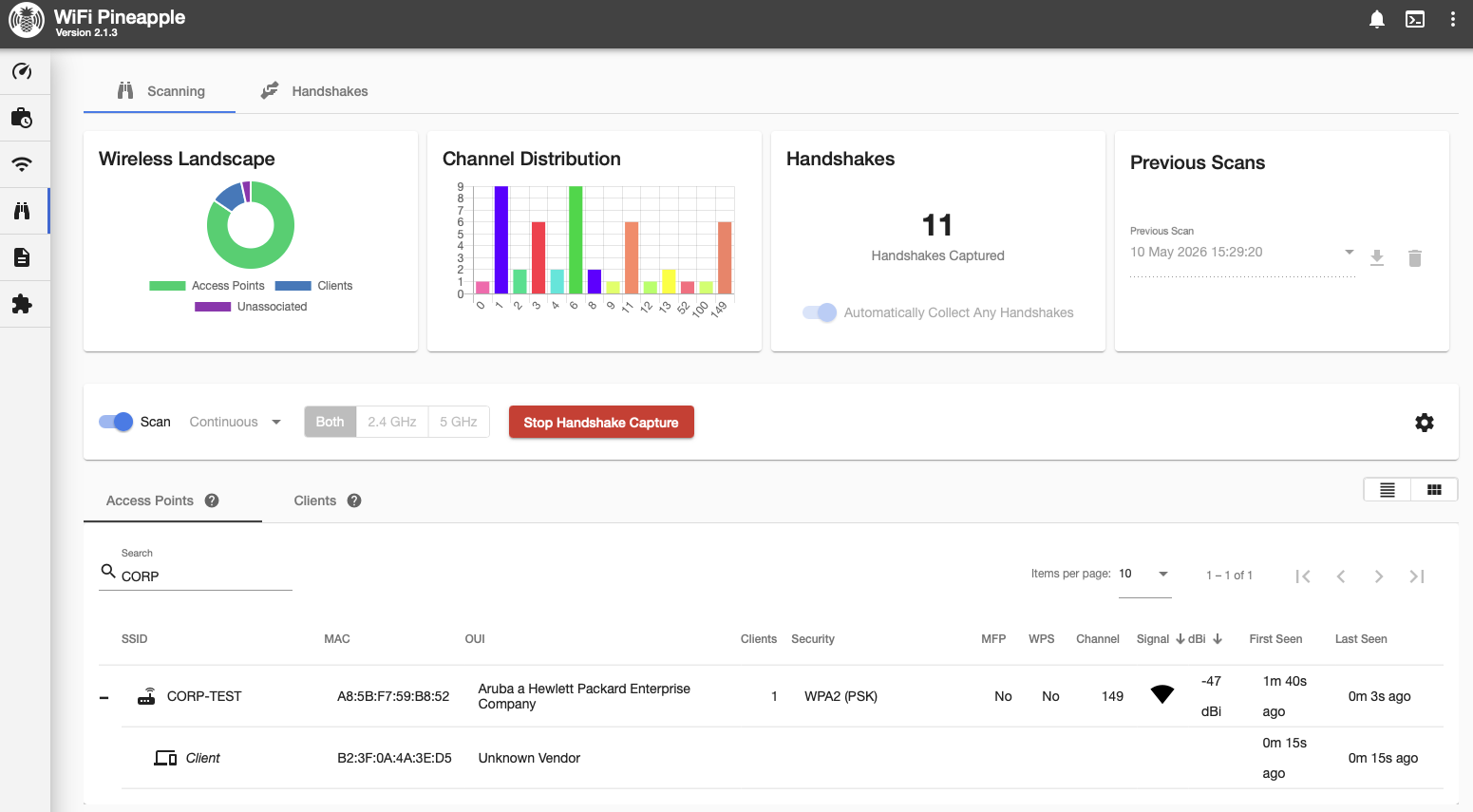
In the WiFi Pineapple I can see my SSID with my client seen as associated to my test SSID. I will then select the client to send a de-authentication attack so hopefully generate a WIDS alert. Over in Wireshark on the MacBook I started a monitor mode capture to see what the de-authentication attack looks like in the air:
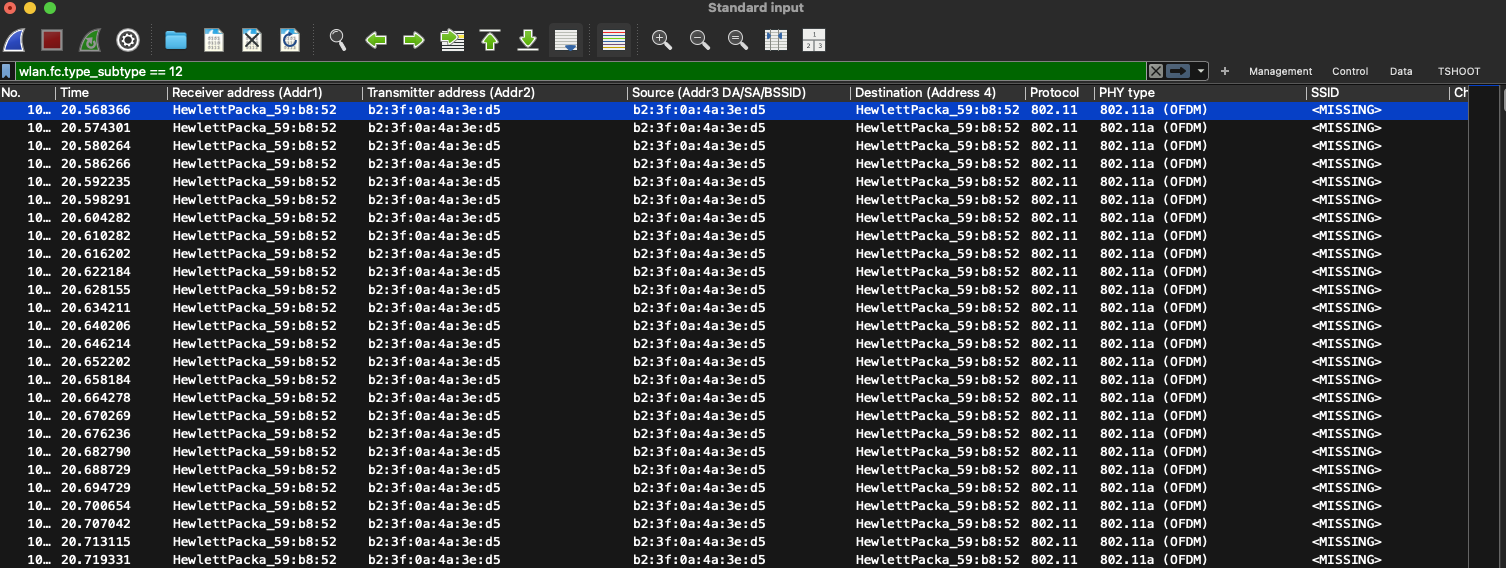
In total the WiFI Pineapple sent 250 de-authentication frames masquerading as my client to the AP. A client would send a single de-authentication frame to an AP legitimately when it warned to disconnect from the AP so this frame count was a lot higher to try and trigger my client to disconnect.
Then another 250 de-authentication frames were sent straight from the WiFi Pineapple but this time the masquerading as the AP sending to the client. This again would be a usual frame for an AP to remove a client.
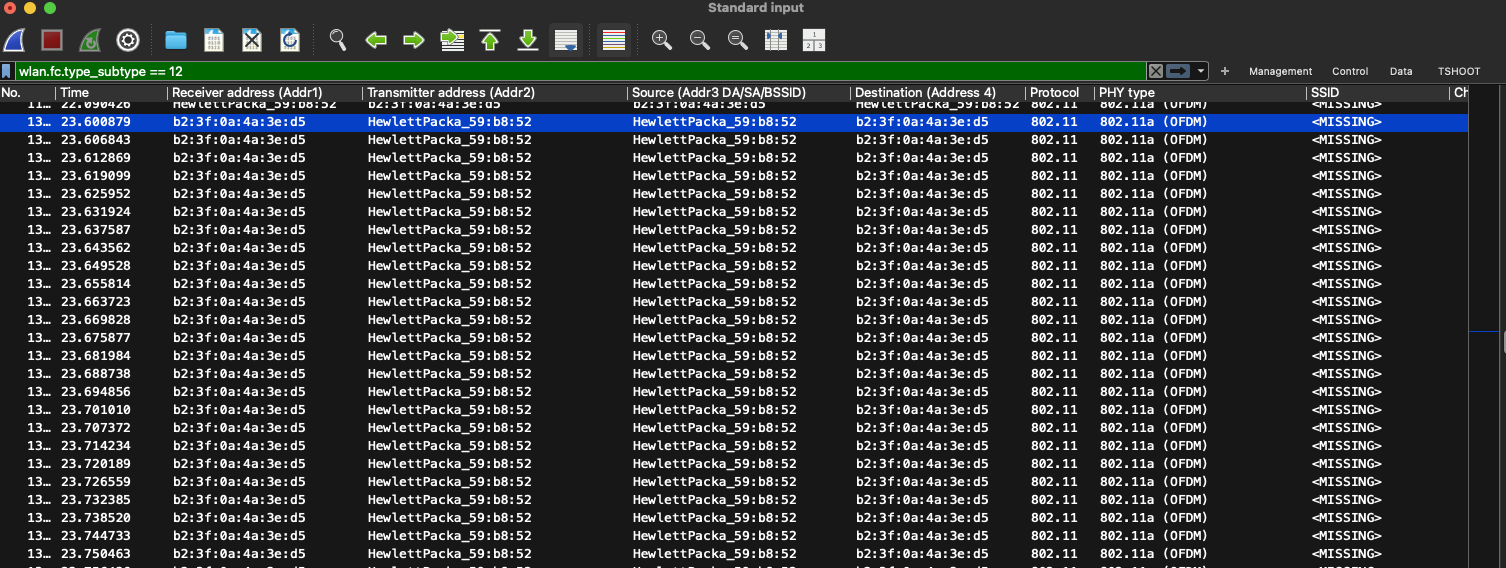
So what happened to my client? It disconnected from the SSID and when it reconnected the WiFi Pineapple captured the 4-way handshake.

Once the 4-way handshake frames are captured and saved as a pcap file it can be used with tools like Aircrack-NG to start to crack with an offline dictionary attack. There are many blogs that show how this can be achieved but this blog is focused on WIDS and Aruba Central. The reason to mention this type of attack is for practical knowledge of how these de-authentications attacks happen and the usual tools used by attackers are important to be aware of. I am using this tool in a controlled way and there is plenty of capabilities with this tool and others to keep de-authentication attacks going constantly and also perform additional attacks.
Now lets check on the logs to see if Aruba Central picked up on this attack.
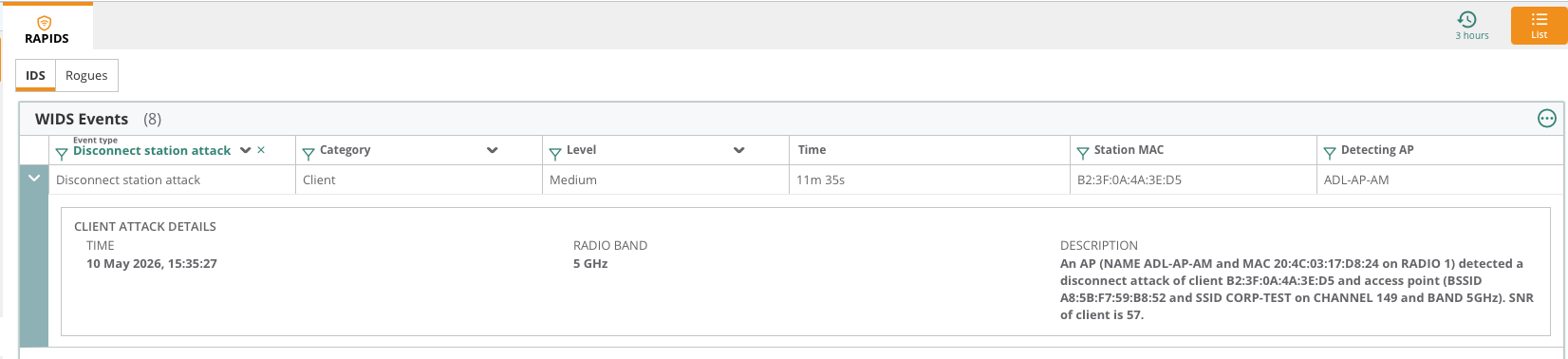
As you can see above under AP group > Security > IDS the disconnect station attack was picked up by my AM ADL-AP-AM. This log could then be investigated by security teams.
Finally as a last test I thought I'd use the WiFi Pineapple to also broadcast the same SSID to see if Central would log it.
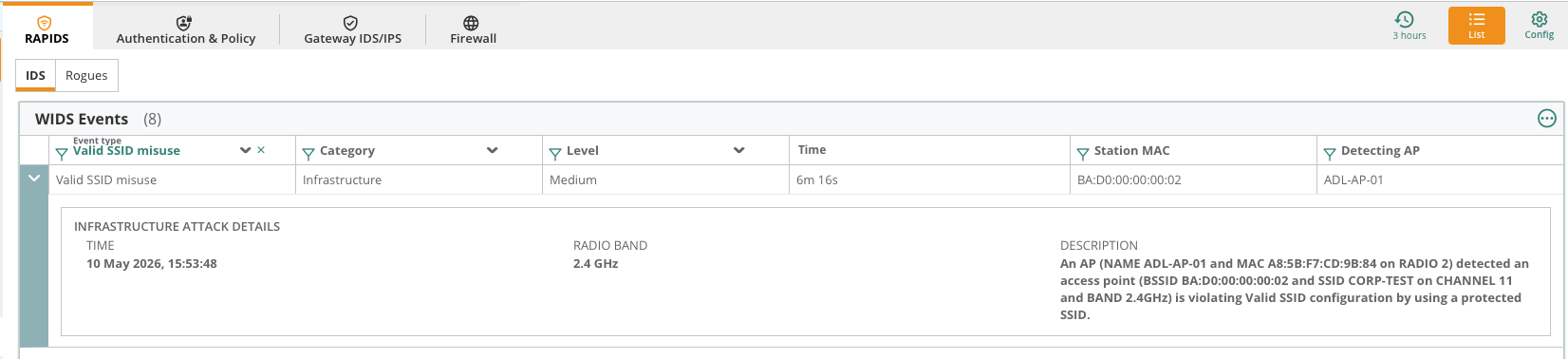
As you can see above the log came through. In this case I am only using the same SSID and not the same BSSID which on the WIFi Pineapple I set to be BA:D0:00:00:00:00.
Conclusion
When it comes to wireless security we need to try to be an eagle instead of an ostrich. Visibility and logging important in maintaining a high security network. Reviewing configuration of intrusion detection and your security in general is something that is constant rather than a set and forget. The simulated attack in this blog example could have been stopped immediately by enabling management frame protection (MFP) which is mandatory for WPA3. In MFP, there is a message integrity check (MIC) in management frames so the client and AP trust each others frames so masquerading as an AP or client in a de-authentication attack won't work. Using WPA3 transition mode is handy if you are testing client compatibility but is not something recommended to leave enabled as access is only as strong as your weakest client. So if some clients are sing WPA2 and some WPA3 then breaching WPA2 clients could still allow access to the network. Using WIDS and mutual authentication like EAP-TLS will keep your security posture high and keep your clients and infrastructure protected. Also starting to test your clients functionality with WPA3 is important to start now to increase security posture especially if you sill required a passphrase network over 802.1X.
Thanks for reading.
References
For a more detailed of HPE Aruba Central WIPS, please read the AOS10 deployment guide here:
https://arubanetworking.hpe.com/techdocs/aos/wifi-design-deploy/security/wids-wips/