Got it, for now, I'll leave it as it is, but I'm really curious to test or tweak it in our environment. Thanks for the correction and explanation!
-------------------------------------------
Original Message:
Sent: Jan 09, 2026 03:53 AM
From: Herman Robers
Subject: 2.4 GHz High Channel Utilization
Basic rates are for the management traffic; transmit rates for the user traffic (see also here).
What is most important is to cut out the lower data-rates; and the settings I shared are the defaults from Central (I think the 'balanced' compatibility profile) which has been based on the data collected over time.
I'm not 100% certain, but 6, 12, 24 are mandatory basic-rates, so rates that every client must support. The other values are optional, and for management traffic it's important to keep as much compatibility with as many clients. Note that there may be clients that don't like cutting out the 6 Mbps, but testing will show out; as well you need enough signal strength as mentioned earlier and range may be lower because far away clients can't go down to 1 or 2 Mbps, which causes a lot of 'airtime' being used and the reason to disable those low rates. It's a balance between overall performance of your WiFi network (high data rates) and range (low data rates).
------------------------------
Herman Robers
------------------------
If you have urgent issues, always contact your HPE Aruba Networking partner, distributor, or Aruba TAC Support. Check https://www.arubanetworks.com/support-services/contact-support/ for how to contact HPE Aruba Networking TAC. Any opinions expressed here are solely my own and not necessarily that of Hewlett Packard Enterprise or HPE Aruba Networking.
In case your problem is solved, please invest the time to post a follow-up with the information on how you solved it. Others can benefit from that.
------------------------------
Original Message:
Sent: Jan 08, 2026 04:24 PM
From: ivanav
Subject: 2.4 GHz High Channel Utilization
I just found this new "Transit Rates" feature and wanted to clarify something. You mentioned "Basic Rates 12 + 24," and then again "Basic Rates 12 through 54." I'm a bit confused-instead of basic rates should the transmit rates be from 12 through 54, or am I misunderstanding how this works? Could you please clarify?
Original Message:
Sent: Jan 06, 2026 11:28 AM
From: Herman Robers
Subject: 2.4 GHz High Channel Utilization
I would try to enable broadcast filtering (ARP should work in most cases), and setting the Basic rates to 12+24 and Basic Rates 12 through 54.
Note that with broadcast filter ARP applications that use broadcast or multicast to find each other between devices on the same network (Airplay/Airprint/mDNS/some IoT devices) may stop to work.
Increasing the data rates may decrease the range of your AP; clients that are far away may drop from the network.
------------------------------
Herman Robers
------------------------
If you have urgent issues, always contact your HPE Aruba Networking partner, distributor, or Aruba TAC Support. Check https://www.arubanetworks.com/support-services/contact-support/ for how to contact HPE Aruba Networking TAC. Any opinions expressed here are solely my own and not necessarily that of Hewlett Packard Enterprise or HPE Aruba Networking.
In case your problem is solved, please invest the time to post a follow-up with the information on how you solved it. Others can benefit from that.
Original Message:
Sent: Jan 06, 2026 10:30 AM
From: JM11
Subject: 2.4 GHz High Channel Utilization
Sorry it's taken me a bit to respond with all the Holidays going on. Appreciate the response. It's given me some things to look at. I'll try to come back and update this if I find any resolutions.
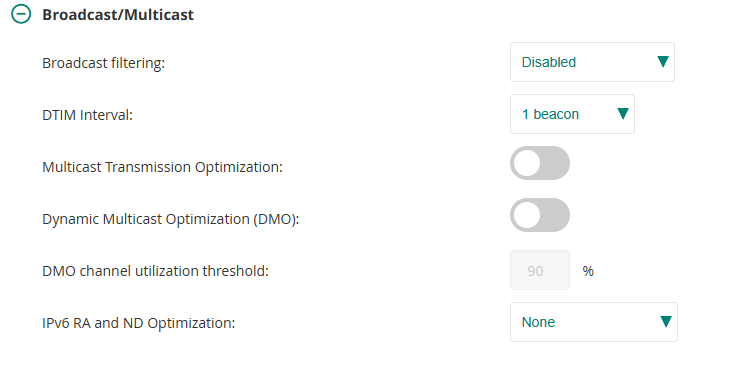
So It looks like I don't have broadcast filtering enabled:
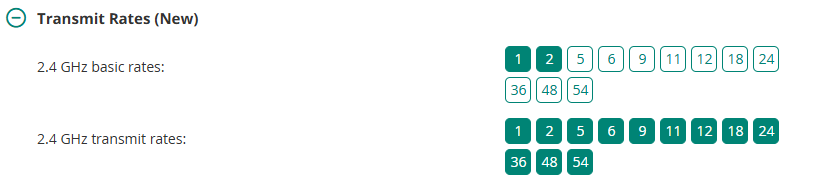
Here's what I have set for transmission rates. Just the defaults:
Original Message:
Sent: Dec 10, 2025 02:46 AM
From: Herman Robers
Subject: 2.4 GHz High Channel Utilization
It's hard to get proper performance on 2.4GHz and in most places I see that that band is considered 'best-effort'; and the SSID scheme that you have with the 'important' networks on 5GHz only reflect the same. In many cases, I see 2.4 GHz only used for IoT.
From the graph, you can see it's mostly Wi-Fi, not so much other interference. I would try to find out what is the actual traffic. Also, because on 2.4GHz there is only 3 non-overlapping channels, you may have a lot of airtime used by beacons and broadcasts from neighboring APs. Some things that may help are: disable the 2.4GHz on some APs (with an 'every room design', you may start by disabling 2.4GHz on half of them), another thing you should check is if broadcast filtering is enabled and if the lower data-rates are disabled; probably a minimum data-rate of 12 or 18 Mbps are fine for most devices. But if you know what is causing the high channel utilization, you may have better directions what may help.
Also make sure the VLAN for your clients is not shared with wired clients.
------------------------------
Herman Robers
------------------------
If you have urgent issues, always contact your HPE Aruba Networking partner, distributor, or Aruba TAC Support. Check https://www.arubanetworks.com/support-services/contact-support/ for how to contact HPE Aruba Networking TAC. Any opinions expressed here are solely my own and not necessarily that of Hewlett Packard Enterprise or HPE Aruba Networking.
In case your problem is solved, please invest the time to post a follow-up with the information on how you solved it. Others can benefit from that.