Hi Ahmed,
you can use something similar as to create an ACL:
8320(config)# access-list ip TEST-ACL
8320(config-acl-ip)# permit udp any any eq dhcp-client (allows communication on udp port 68)
8320(config-acl-ip)# permit udp any any eq dhcp-server (allows communication on udp port 67)
This will do it for the DHCP ports, for AD i saw the following port numbers on a Microsoft web page:
https://docs.microsoft.com/en-us/troubleshoot/windows-server/identity/config-firewall-for-ad-domains-and-trusts
These port numbers can be allowed with the following commands:
8320(config-acl-ip)# permit tcp any any gt 1024 (gt means any port number greater than 1024)
8320(config-acl-ip)# permit tcp any any lt 65535 (lt means any port number less than 65535)
(You can however not take these port numbers for granted, but double check which client port numbers are used or not used in your AD implementation)
Also keep in mind that anything else that you do not allow explicitly will be blocked. I'm not sure what other services you mean by "etc.", but you can check if they use TCP or UDP and their respective port number and you can allow them with commands similar like the ones above. Also you can replace the "any any" keywords for the respective source and destination IP addresses in your topology. I used any any to avoid any misunderstandings, because I didn't quite understand the IP addressing in your topology.
Also here is the OS-CX ACL Guide:
https://www.arubanetworks.com/techdocs/AOS-CX/10.08/PDF/acls_832x.pdf
Hope this helps.
------------------------------
------------------------------
Toni Andreev
------------------------------
------------------------------
Original Message:
Sent: Oct 27, 2021 07:12 AM
From: Ahmed Fares
Subject: ACL at CX 8320
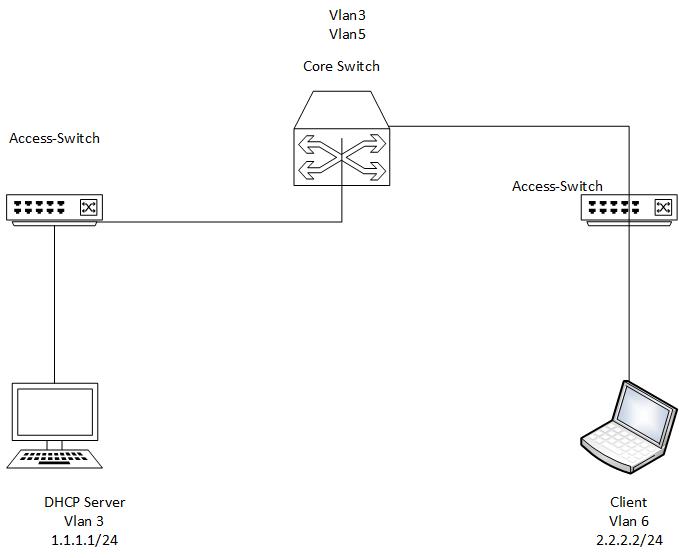
hello guys ,
i'm now need to make ACL with vlan 6 with ip 2.2.2.2/24
connected with DHCP server vlan 1.1.1.1/24
i'm doing this
interface 1/1/1
no shutdown
no routing
vlan trunk allowed 3,6
interface 1/1/2
no shutdown
no routing
vlan trunk allowed 3,6
at the right access only allowed vlan 6
at left one allowed vlan 3
the vlan 6 can access all servers and service at vlan 6
need to make it only allowed service ports for DHCP, Active Directory ,etc
how i can make this configuration
------------------------------
Ahmed Fares
------------------------------