Hello Scott, which version of Airwave is this?
In the 8.2.8.1, that i tested, is we could put a device in Planned downtime, the device will stay up in airwave, even if the device goes time in reality, therefore, no alerts. we could click on the group or folder list, Click on the pencil icon, select the device's you want to put it in Planned downtime mode and choose the drop down list to select Planned down time.
Then click on Enable, you will see a page like below,
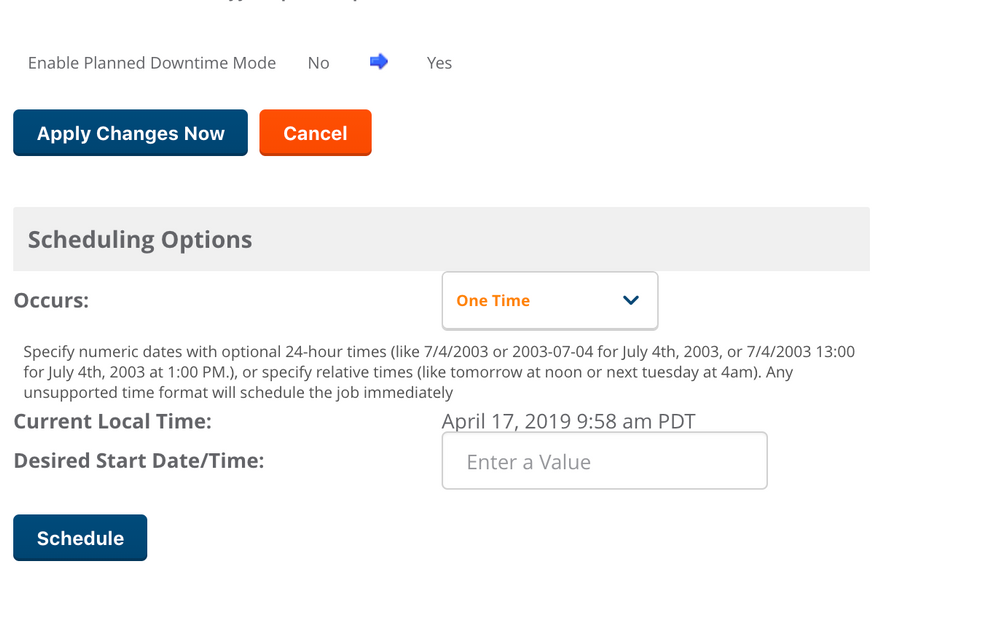
you could either start right away or schedule a time to start the down time. I guess you will need to manaully remove it from the down time later by disabling or schedule it accordingly, in the same way described.
excerpt from the User guide :
Planned Downtime Mode When you select this action, you must select either Enable or Disable to change the downtime mode for the selected devices. When this option is enabled, the selected devices are put into Planned Maintenance mode. When this mode is enabled, no AP Down triggers will be deployed on these devices. Users will not be able to delete folders that contain devices in Planned Maintenance. The devices in Planned Maintenance will show the Up status, but will not be tracked in historical graphs and logs as Up.
hope this helps..
--