You could try to fetch this from the CLI/SHH interface.
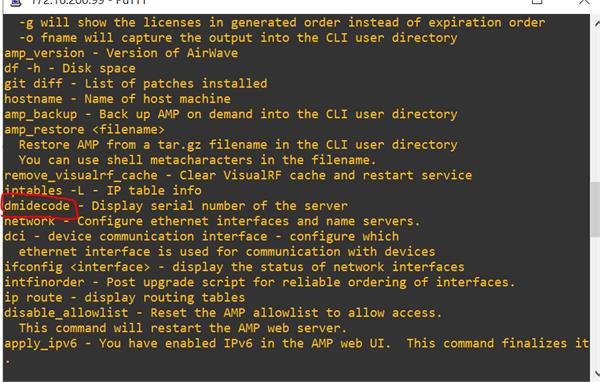
1. Login with SSH username ampadmin
2. Go to option 8 (Advanded)
3. Go to option 2 (Enter commands)
4. Type "dmidecode" to Display serial number of the server
It didn't work on my 8.2.12.0 virtual appliance and think this command can only be used for the hardware appliance, give it a try.
------------------------------
Marcel Koedijk | MVP Expert 2020 | ACMP | ACCP | Ekahau ECSE
------------------------------
Original Message:
Sent: Dec 22, 2020 04:02 AM
From: Herman Robers
Subject: Airwave Hardware device serial number
I don't think that the hardware serial number is exposed in the WebUI or CLI. If you have 'only one' you might check the delivery slip or box if you still have that, or check with your partner, Aruba sales team, or Aruba support (TAC) if they may be able to look up which serial number has been shipped to you. Also, TAC may through support access get access to a command to extract the serial number from the device itself.
Is this for your own administration or in order to get support? If it is to get support, I would call in by phone (link to numbers in my signature below) and explain the issue.
------------------------------
Herman Robers
------------------------
If you have urgent issues, always contact your Aruba partner, distributor, or Aruba TAC Support. Check https://www.arubanetworks.com/support-services/contact-support/ for how to contact Aruba TAC. Any opinions expressed here are solely my own and not necessarily that of Hewlett Packard Enterprise or Aruba Networks.
Original Message:
Sent: Dec 21, 2020 12:06 PM
From: John Reilly
Subject: Airwave Hardware device serial number
Is there a way to see the Airwave appliance serial number in the WebGui.
I need to get it but is sandwiched between two other devices so I will have to remove it from the rack.
Simple question but I have looked everywhere and cannot find it.
Thanks
------------------------------
John Reilly
------------------------------