Network Management

 View Only
  • 1.  AMP Inventory Report failing

    Posted Sep 25, 2025 05:38 AM

    Hi all,

    We set up a monthly inventory report ages ago and it has happily run without issue until about 2/3 months back.

    Now we just get (under Reports > Generated) "Failed". I have tried cloning it and also re-creating it as a brand new report but it just continues to fail. The original selected options are still available when I re-create the report, but no joy. Other reports continue to run.

    My presumption is that something has changed or no longer is "valid", but we are only selecting the following:
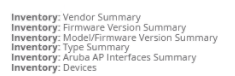
    Any thoughts on the why, or what we can do to resolve this?


    ------------------------------
    Stuart D
    ------------------------------


  • 2.  RE: AMP Inventory Report failing

    Posted Sep 25, 2025 11:02 AM

    Hi Stuart,

    The report with mentioned selections works in my lab. My lab AirWave is 8.3.0.4. I do not see any open defects too. it would be best to open a TAC case to debug report log and check the reason.


    ------------------------------
    Regards
    Gowri Amujuri
    ------------------------------


  • 3.  RE: AMP Inventory Report failing

    Posted Sep 26, 2025 03:35 AM

    Thank you for looking Gowri.

    By a process of removing one aspect at a time we have found that it is the 'Devices' that causes the report to fail. I also checked on AMP/Status page and note that the 'Devices Event Collector' is showing as down and wonder of that is related?

    I will escalate internally to the team that has access to raising TAC cases.


    ------------------------------
    Stuart D
    ------------------------------


  • 4.  RE: AMP Inventory Report failing

    Posted Sep 26, 2025 09:12 AM

    Hi Stuart,

    Device_events are syslog and trap messages. Is AirWave set as syslog receiver for the devices? From System > Performance page, you can check the syslog and trap graphs. The table may got overwhelmed if there were any issue on network that caused surge in the syslog messages.  The device_event table is tied to AP table for AP ID. So, can be the issue

    You can try 'Restart AMP' or reboot for the process to kick up the device  event table and check.


    ------------------------------
    Regards
    Gowri Amujuri
    ------------------------------