Since you are new, we distinguish between several different AP types. The ones for the Desk Mount are the Hospitality Series, like the AP-505H
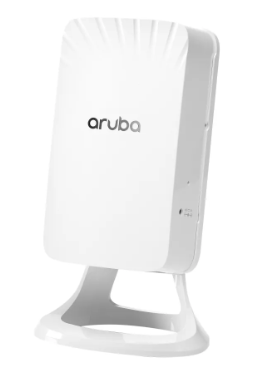 Here you will find Information about the LED Status - https://www.arubanetworks.com/techdocs/hardware/DocumentationPortal/Content/ArubaTopics/APs/ap-500.htm
It always depend on how you look to the AP which is left / right
Depending on the OS Version you are using, you will find User Guides here - https://www.arubanetworks.com/techdocs/ArubaDocPortal/content/cons-instant-home.htm
This is the Ordering Guide - https://www.hpe.com/psnow/doc/a00081688enw
That is the cable you will need for serial access -
Part Number - JY728A // AP-CBL-SERU Micro-USB TTL3.3V to USB2.0 AP Console Adapter Cable // Drivers available on the HPE Aruba Networking Support Center
you can ask an Aruba Partner or search the Internet for purchase
And this community is always a good place to raise questions and get information.
Original Message:
Sent: Oct 18, 2024 09:46 AM
From: AhmedSaad
Subject: Aruba ap 505 Access Point
Dears,
Good Day,
I'm new with Aruba AP 505 Access Point, and I have some questions and will be more than grateful for your answers:
1- how to upgrade AP505 firmware?
2-can I install AP505 on a desk not wall mounted?
3- If I ceiling-mounted the APs how do I install them so they can intersect so users don't disconnect and reconnect after they reach the other AP radius?
4- I noticed that when I powered up 4 APs they started to flash the left LED with green and after 4 minutes only one of them started flashing the right LED with green, what does this mean?
5- also noticed that the left LED flashed red for a second and became green once again. and the switch log that the connected device powered off and powered on again?
6- I noticed that in the back there is a port (micro-sub) labelled console and I connected it to the PC with an old phone cable and tried to use (puTTY) to connect to AP but had no luck, how do I do so? and is there a special cable?
7- any useful information will be highly appreciated
Thank you so much for your help and please have a good day