Cloud Managed Networks

 View Only
  • 1.  Aruba CX switches and default admin password?

    Posted Jan 12, 2026 11:05 AM

    What/how is the default admin account on Aruba CX switches managed in New Central?

    In classic central I was asked to create an admin password on the configuration group.
    A new group where New Central can overwrite everything has no provisions for setting an admin password, and in New Central configuration there is nothing asking for the admin password - is it set for something random? How do I use console on the switch then?

    If I make a user administration policy and set the admin user and a password and assign it to fx. access switches in a site collection, then not only will the switches no longer sync configuration, but I cannot unassign that policy again because it contains the admin user - regardless if no devices are in the scope context.....
    Luckily I assigned it to a Site collection, so the only way I could delete the policy was by deleting the Site-collection first (Thus it lost its assignment and could be deleted).

    Any best practices on this? The documentation does not mention anything about this (as far as I can find)


    -------------------------------------------


  • 2.  RE: Aruba CX switches and default admin password?

    Posted Jan 12, 2026 12:14 PM

    What works for me for CX switches, is to create a 'local profile' at global level (or on site/site-collection/device-group) to set the switch admin password:
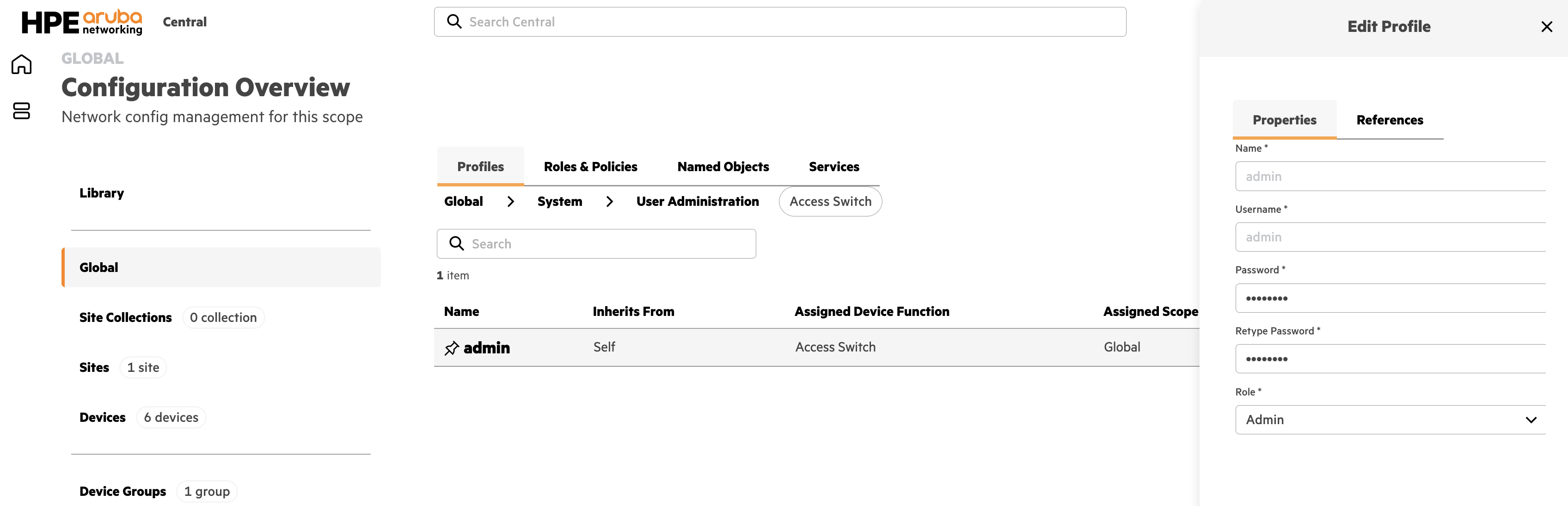
    Note the 'pin' that it's a local profile, but assigned global.


    ------------------------------
    Herman Robers
    ------------------------
    If you have urgent issues, always contact your HPE Aruba Networking partner, distributor, or Aruba TAC Support. Check https://www.arubanetworks.com/support-services/contact-support/ for how to contact HPE Aruba Networking TAC. Any opinions expressed here are solely my own and not necessarily that of Hewlett Packard Enterprise or HPE Aruba Networking.

    In case your problem is solved, please invest the time to post a follow-up with the information on how you solved it. Others can benefit from that.
    ------------------------------


  • 3.  RE: Aruba CX switches and default admin password?

    Posted Jan 12, 2026 02:59 PM

    Okay… But why is there no mention of the need to do this to actually control the password?
    Since things work even though you do not create such a policy, what is the password then set as?
    No password like @ factory default or?


  • 4.  RE: Aruba CX switches and default admin password?
    Best Answer

    Posted Jan 14, 2026 01:37 PM

    Okay - I have been testing things further, and the password policy does work. But one should really be aware that once you have created it you cannot get rid of it again unless you are able to delete the group, site or site collection you assigned it to (you cannot unassigned the policy).

    Also - the switch simply stays without a password (blank)  if you do not create a policy - that does not seem like a good solution!

    Last point - If you factory reset a switch, then Central does not detect it, and the switch then becomes unable to sync or function until you manually connect to the switch and set the password you have in the policy.

    This really does seem a little half baked at this point in time.

    -------------------------------------------