Hi all
I am currently trying to export information about the endpoints that has been profiled by Clearpass. I have tried using the RESTful-API, but the problem I have is that the information that has been found from the DHCP-request is missing, like hostname and IP-address.
Using the API, the only information I have been able to get is the following (Using the API-exporer here, but I have accessed the information using the API remotely as well):
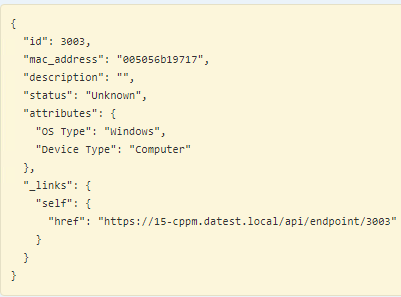
However, when I use the export-functionality in Configuration/Identity/endpoints, and export the endpoint i recieve all information about the endpoint:
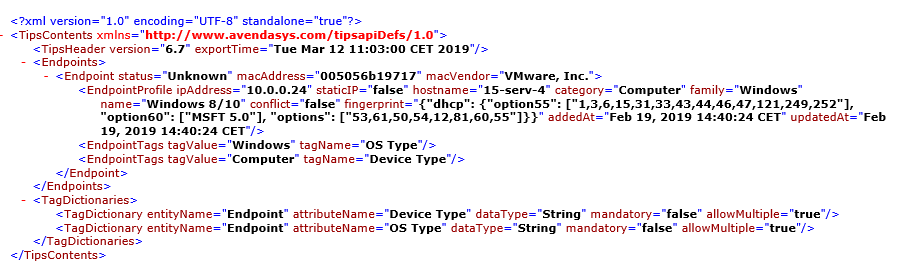
The relevant information here that I am looking to access remotely is the EndpointProfile information, like IP, hostname and OSFamily, etc.
The results from the export looks a lot like the result from an XML-api call, like the legacy-api that CPPM had, which has now been replaced by the RESTful-API, which does not include endpoint profile information.
I am looking into using this information in addition with some other data-sources to analyze the endpoints on the network, and in order to do this I need the information that is stored by Clearpass, but isnt accessible through clearpasserver.local/api/endpoint.
As far as I see I have a couple of options as to how I can access this data remotely, and I want to know if any of you know the best way to do it.
Option 1: Using the API
If there is a way to access the information I am looking for through the API, that would be the best option, but as far as I can see the new API does not support exporting the information. If however there is a way, please reply and let me know
Option 2: Using the legacy API / calling for the export remotely
As the information you recieve by manually exporting is very similar to an XML-api response, if there is a way to use the legacy-API and get the XML-file with the endpoint-information, that would work, but I have not found any documentation letting me access the XML. IF there is a way to use this, please let me know.
Option 3: Automatically export the endpoints to a remote server
The information recieved from manually exporting to an XML-file contains what I need, a way to automatically export the file would work. I have however not found any documentation showing me that automating the export is possible.
Option 4: Some other way of retrieving the information
If there is a way any of you know that would let me retrieve this information from a remote location, that does not use any of the mentioned methods, like directly querying the database, I would gladly try it out.
Also, if this is not the correct place for this question, sorry, and please direct me to where I should post it.
Thanks in advance
Marius Myhre