Cloud Managed Networks

 View Only
  • 1.  Basic Rates Configuration

    Posted 23 days ago

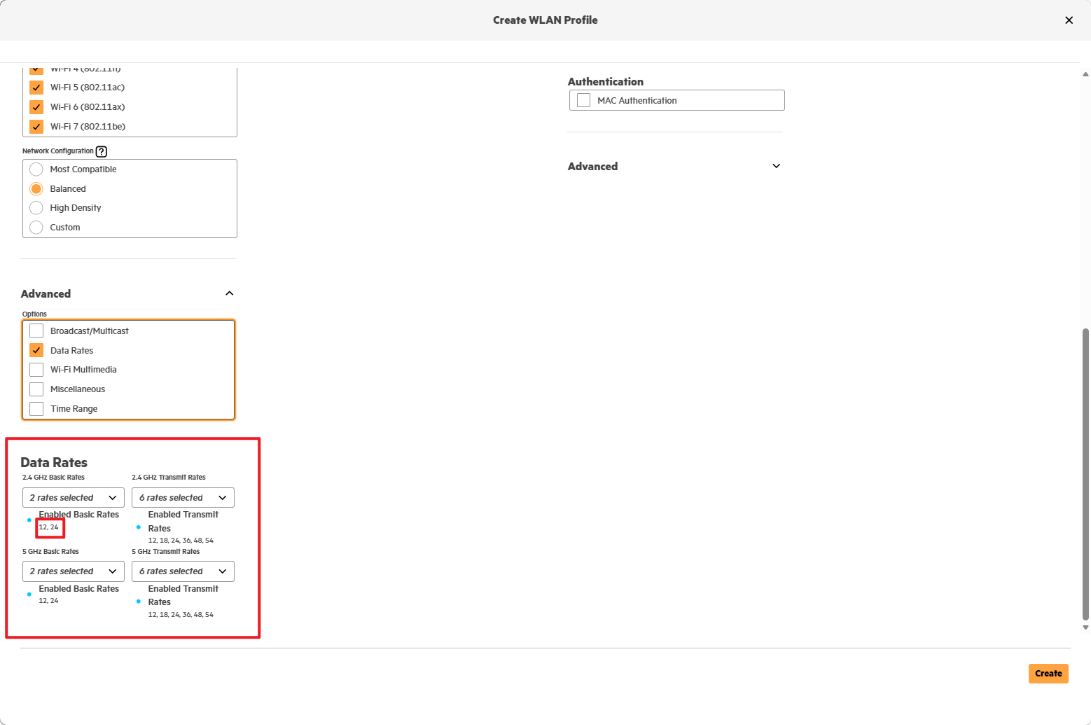
    hello everyone. I want to ask the question about Basic Rates.When I create reate WLAN profile in New Central. Network Configuration is balanced.In the Picture1, Basic Rates choose 12M、24M as its basic mode.But when i create a new WLAN in Classical Central, the Picture 2 shows2.4G Basic Rates choose 1M、2M,  5G Basic Rates choose 6M、12M、24M.

    WHY this difference?Can someone explain the reason why the New Central set this configuration ? Would this configuration cause any access risks? 
    image

    image


  • 2.  RE: Basic Rates Configuration

    Posted 23 days ago

    Classic central has all rates enabled by default.

    New central has "better" defaults trimming the BPSK rates with the "balanced" option. There are minimal to no risks here.

    See more here https://arubanetworking.hpe.com/techdocs/aos/aos10/design/bc-mc/transmit-data-rates/


  • 3.  RE: Basic Rates Configuration

    Posted 23 days ago

    So the New Central Basic Rates' configuration won't make stations inaccessible. And it won't make stations lose connection or others.In my test, if the basic rate sets higher, it may cause access risks. Thank you so much for replying my question.


  • 4.  RE: Basic Rates Configuration

    Posted 22 days ago
    Edited by HR-abaef5 22 days ago

    There is a nuance in here. Removing the lower datarates will make the network inaccessible if the signal strength is so low that it can't receive the higher datarate. Higher datarates need more signal-to-noise, so need a higher signal strength.

    However, the purpose of cutting out lower datarates is to improve your network performance, and you (probably) don't want clients to connect at 1, 2, 6 Mbps eating up all the 'airtime'. And higher data rates improve roaming as clients can't slow down below the minimum data rate and have no other option than to find a stronger AP signal.

    So yes, you rule out clients that are far away and have a signal that's too weak to connect, but that's a good thing to protect your network.

    PS: there may be some very old/specific devices that only support the lowest data rates, like cheap IoT devices, but you probably would rather not have those on the network as they jeopardize the overall network performance. 

    ------------------------------
    Herman Robers
    ------------------------
    If you have urgent issues, always contact your HPE Aruba Networking partner, distributor, or Aruba TAC Support. Check https://www.arubanetworks.com/support-services/contact-support/ for how to contact HPE Aruba Networking TAC. Any opinions expressed here are solely my own and not necessarily that of Hewlett Packard Enterprise or HPE Aruba Networking.

    In case your problem is solved, please invest the time to post a follow-up with the information on how you solved it. Others can benefit from that.
    ------------------------------


  • 5.  RE: Basic Rates Configuration

    Posted 18 days ago

    also note that trimming data rates effectively shrinks your effective cell size, which is fine if you have good overlap design. it also reduces channel utilization and it improves roaming.


    ------------------------------
    If my post was useful accept solution and/or give kudos.
    Any opinions expressed here are solely my own and not necessarily that of HPE or Aruba.
    ------------------------------


  • 6.  RE: Basic Rates Configuration

    Posted 22 days ago

    I agree with JS, look at the documentation.

    Unless a full audit of all clients happens. Its hard to answer that question 100%. What I can say is that most modern designs are fine. When we are using transmit rates 1-11 this dates back to late 90's. 802.11b and 802.11a offered these rates under these IEEE amendment's. I personally haven not seen anything that is older then 802.11n in quite some time. 802.11n can be both 2.4 and 5ghz. It doesn't mean these devices dont exist, it just means you should audit what is connecting before going and just changing. The CWNA book does a good job at talking about the IEEE and amendments. 

    The general trend that I have been using since 2010 is removing rates lower then 12. Without getting to technical, this will help reduce sticky clients. It will help with roaming issues. When you have lower rates you allow the beacon frame (what announces the ssid) to be seen further. When clients are transmitting data they are normally using rates that are much faster. There are also rules for multicast and broadcast frames as to what rates they use. If you remove to many of these lower rates you may find some issues with roaming. The rates of 12,18, and 24 sometimes have to be adjusted due to the environment you are and how the AP's were placed for density reasons. There is a general range that is acceptable to most. Roaming on voice calls will require different specs vs just using data on your ipad while at desk.