Hi all,
My expertise is mainly WLAN/LAN. I want some help from the security experts.
I have some firewall experience and experience with the 9004 branch router.
Problem:
The ISP (KPN, The Netherlands) blocked me due to DDOS and UDP/53 attacks.
The conscious setting allows malicious parties to send a small command (via UDP port 53) to your connection. Your connection then returns a much larger response. When a spoofed sender address is provided when running the command, the unsuspecting owner of the spoofed address receives the big reply. A large number of these answers can almost completely shut down his connection. In the security world, we call this a DDoS attack.
On the ISP modem, UPnP is off, no port-forwarding rules have been created, and I created a DMZ rule that allows all traffic to the edge router.
Topology:
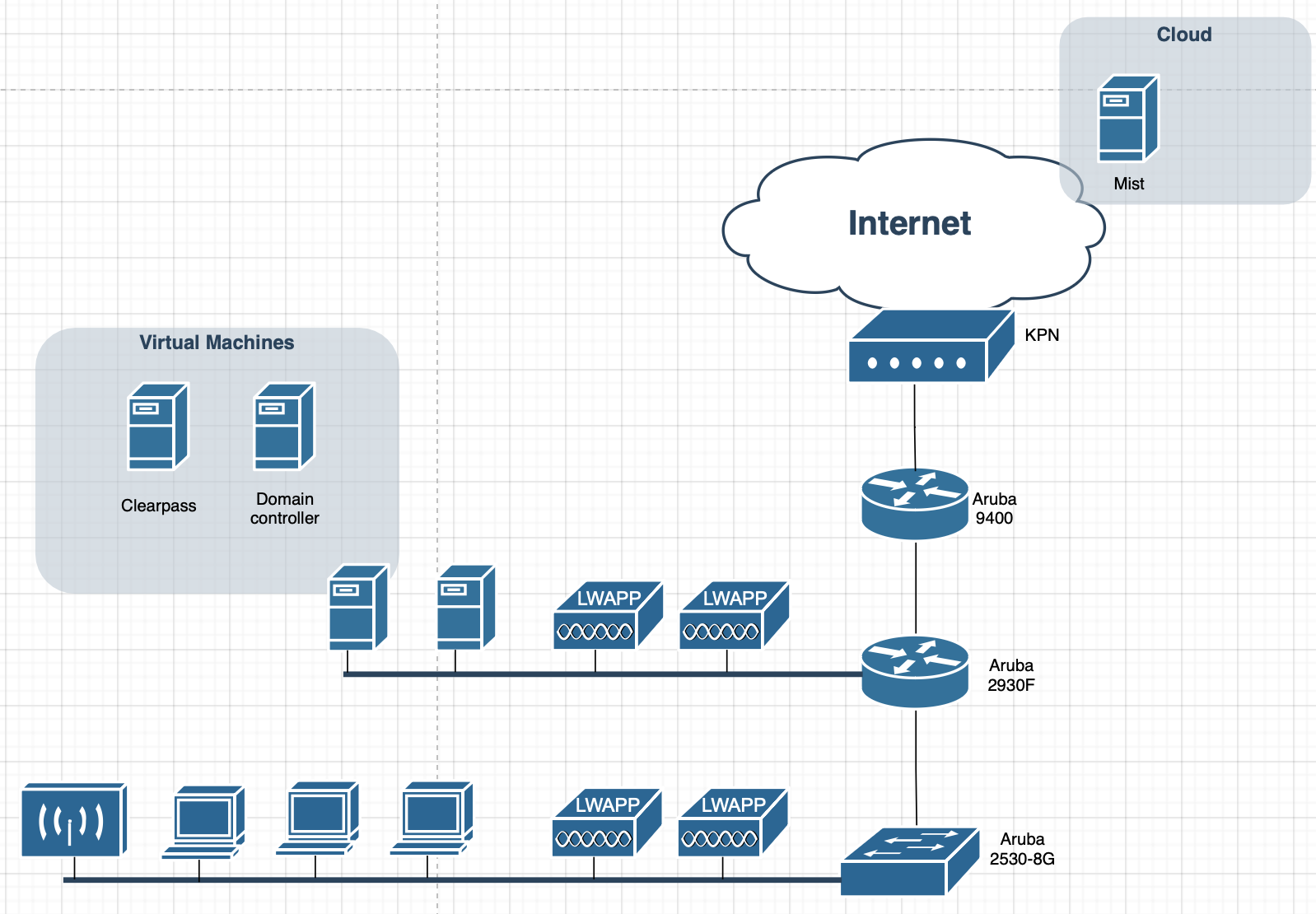
9400 branch router does NAT and static routes per VLAN internal to 2930F with a default gateway to the KPN modem
2930F L3 switch does routing and does have all the VLANs terminated, a static route to 9004.
2530 L2 switch
My Wi-Fi is Juniper Mist which is cloud-based.
Question:
How can I activate the firewall on the 9400 branch router?
How can I block DNS, but that DNS outside still works?