Wireless Access

 View Only
  • 1.  Blocking or Throttling iOS 8 updates

    Posted Sep 16, 2014 09:40 PM

    Today (9/17/14) brings iOS 8 which many of us saw cripple our networks during the rollout of iOS 7.


    Since that time, there are new features that can help you handle this traffic.


    With AOS 6.4+ and any 7 series controller with DPI enabled (under global firewall settings), you can block or throttle iOS update traffic at the global level or by user-role.


    Here are some examples:


    BLOCK - USER-ROLE


    Create a new ACL (like below) and apply it to a user-role(s). Also, make sure DPI is enabled for the user-role.

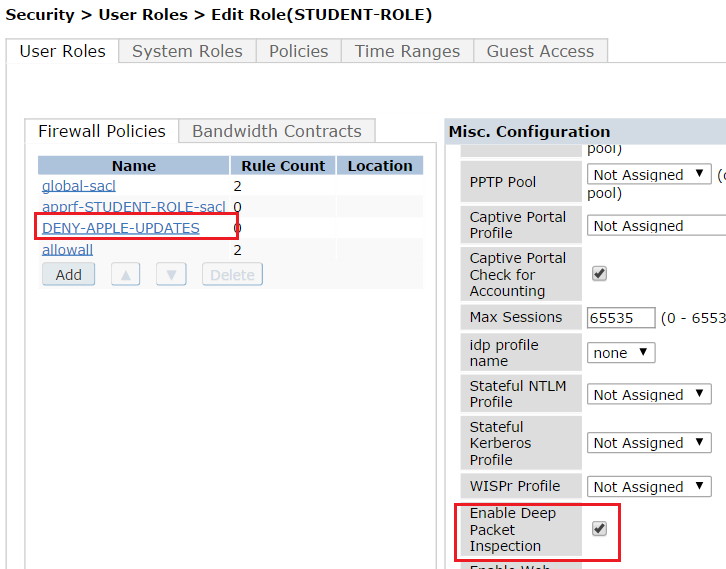
     

    ios-deny.PNG


    DENY-STUDENT.PNG


    BLOCK - GLOBALLY


    Under Security > Firewall Policies, find the "global-sacl" ACL.
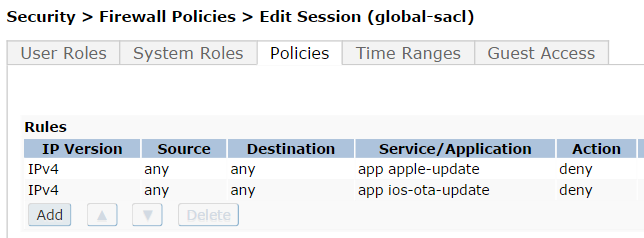


    IOS-UPDATES-GLOBAL.PNG


    THROTTLE - USER-ROLE

    (Make sure you have a bandwidth contract defined - Advanced Services > Stateful Firewall > Bandwidth Contracts. You can also create one from the drop down.)
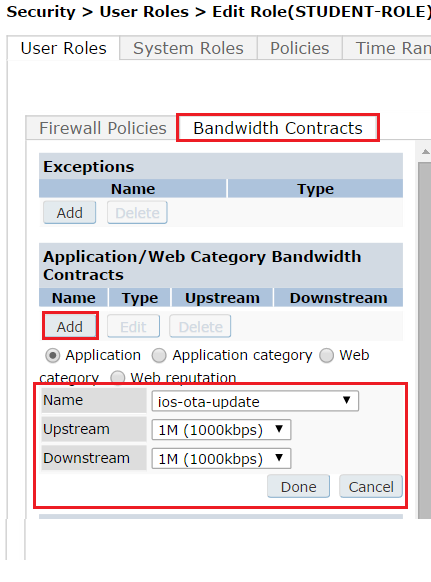
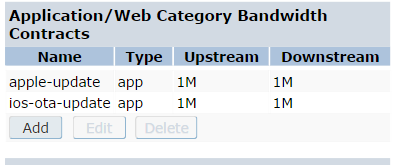
     

    STUDENT-THROTTLE.png


    role-contracts.PNG


    THROTTLE - GLOBALLY


    This must be done at the CLI level


    (config) # dpi global-bandwidth-contract app ios-ota-update downstream mbits 1
    (config) # dpi global-bandwidth-contract app ios-ota-update upstream mbits 1
    (config) # dpi global-bandwidth-contract app apple-update downstream mbits 1
    (config) # dpi global-bandwidth-contract app apple-update upstream mbits 1


  • 2.  RE: Blocking or Throttling iOS 8 updates

    Posted Sep 17, 2014 12:14 PM

    Is there any chance we have similar capabilities or options is 6.3 without a 7 series controller?


  • 3.  RE: Blocking or Throttling iOS 8 updates
    Best Answer

    Posted Sep 17, 2014 12:18 PM
    No there is not. The legacy hardware does not support deep packet inspection.

    Normally you could go in and block certain DNS names and IP ranges but there are so many CDNs in use that this is not feasible.


  • 4.  RE: Blocking or Throttling iOS 8 updates

    Posted Sep 22, 2014 12:51 PM
    What if we prioritized instead of throttled this traffic? Get it off the network as soon as possible.


  • 5.  RE: Blocking or Throttling iOS 8 updates

    Posted Sep 22, 2014 12:52 PM

    I don't think many organizations have the internet pipe to be able to make non-business traffic a priority.


  • 6.  RE: Blocking or Throttling iOS 8 updates

    Posted Sep 22, 2014 12:54 PM
    Gotcha. Solving the WAN bottleneck.


  • 7.  RE: Blocking or Throttling iOS 8 updates

    Posted Sep 22, 2014 01:11 PM

    Right. Some organizations don't have any device near the internet border that can throttle or block with this granularity.


    Also, I've always had the mindset of blocking the traffic closest to the source. Why let it go all the way through your core network just to be blocked or choked at the internet edge?