Wired Intelligent Edge

 View Only
  • 1.  Campus AP on same VLAN behind Mesh Link

    Posted Jul 10, 2019 11:51 AM

    I am attempting to get a campus AP on the same VLAN as the mesh link - and the mac isn't visible on the trunk. Appears to be tagging, but I can't work out how this should be configured. The AP registers in MM and works fine if it is in any VLAN apart from 2, shared with the mesh portal/point.


    As in the diagram, switch ports for the mesh are untagged 2, tagged other vlans. Remote WAP is untagged on 2 (untagged on 3 works). The Wired AP profile is set to bridge, trunk, native 2, permitted ALL. Should this work?

    Thanks!
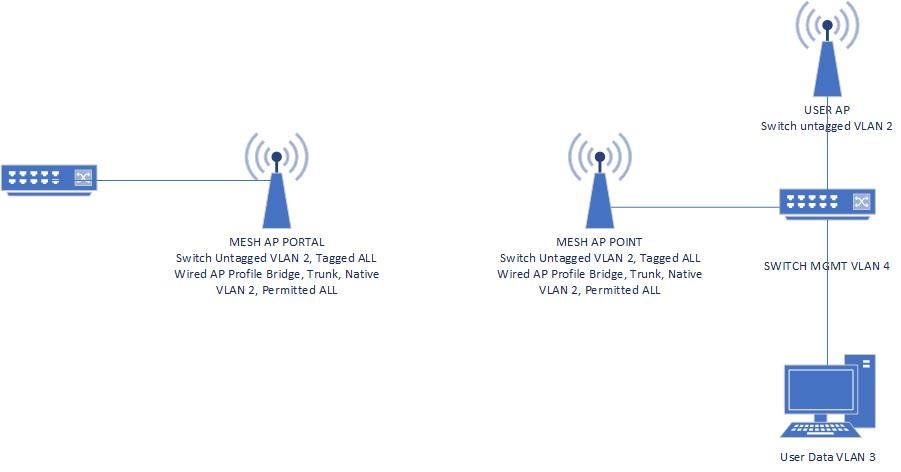
     

    Drawing1.jpg


  • 2.  RE: Campus AP on same VLAN behind Mesh Link
    Best Answer

    Posted Jul 10, 2019 01:13 PM

    What version of code? There is a bug in 8.4 that prevents mesh from carrying trunk and native at the same time, but that may be in play here (though the problem manifested itself in the trunked VLANs not being carried). Sorry I would need to dig up the specifics. But if a laptop on the mesh point's interface pulls an IP address on VLAN 2, then the AP should come up. You may also want to specifically define the native VLAN 2 in the AP system profile for those mesh APs.


  • 3.  RE: Campus AP on same VLAN behind Mesh Link

    Posted Jul 10, 2019 01:39 PM

    Code version is 8.3.5 on AP274.


    The native VLAN in the AP System profile resolved this. The mesh AP VLAN has started to pass across the link for use on the remote switch. Thank you for the prompt reply and fix!


  • 4.  RE: Campus AP on same VLAN behind Mesh Link

    Posted Jul 10, 2019 03:22 PM

    Sure thing. That is there so that if your native VLAN is not VLAN 1, OR if the native VLAN is different over the mesh than it is on the controller or whatever, that it knows how to properly transport over wifi and then which to eject on the other side. It's a long story but the mesh link is not 'VLAN aware' so we need to explicitly mark most of the time.