Security

 View Only
  • 1.  Cannot get authorization attributes from Entra id - CPPM 6.12.0

    Posted 10 days ago

    Hi all, 

    I am trying to fetch group membership info from Entra ID to assign the user to correct role/Vlan. I have followed the posts on airheads but still i am stuck on not getting any authz attributes from Entra ID. Below is all the information i have 

    1) ClearPass 6.12.0 (no patch installed)

    2) User is able to authenticate using EAP-TLS successfully. snap is also attached.

    3) I used python to check tenant ID, client ID, secret etc to make sure i am getting the correct group info etc from ENtra ID

    4) In Clearpass test connection in ENTRA ID is successful

    5) below is my filter query

    users:users/?$select=mail,userPrincipalName,id,department,accountEnabled&$filter=userPrincipalName eq %{Authentication:Username};group:/users/%{users:id}/memberOf?$select=displayName

    6) Below are snapshot of my service

     i have made the rolemappings because i read in airheads that its required to fetch the details from entra id, but in my case i am not getting authorization attributes in access tracker.

    can someone guide me what am i doing wrong?


    -------------------------------------------


  • 2.  RE: Cannot get authorization attributes from Entra id - CPPM 6.12.0

    Posted 10 days ago
    Edited by mkk 10 days ago

    I test this for you in 5 minutes and it worked with ClearPass 6.12.3. Beter not use the first major release of 6.12.0 but patch it to the latest 6.12.x version the .0 version often has many bugs.

    You can follow this guide

    Microsoft Entra ID

    • Did you set the API permissions correct in Entra ID? 
    • Did you test with the Authentication Source test button?
    • Did you first test with the default filter query?
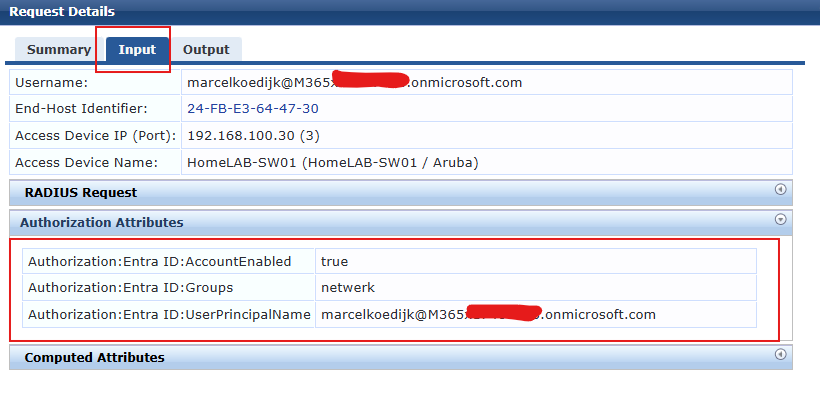
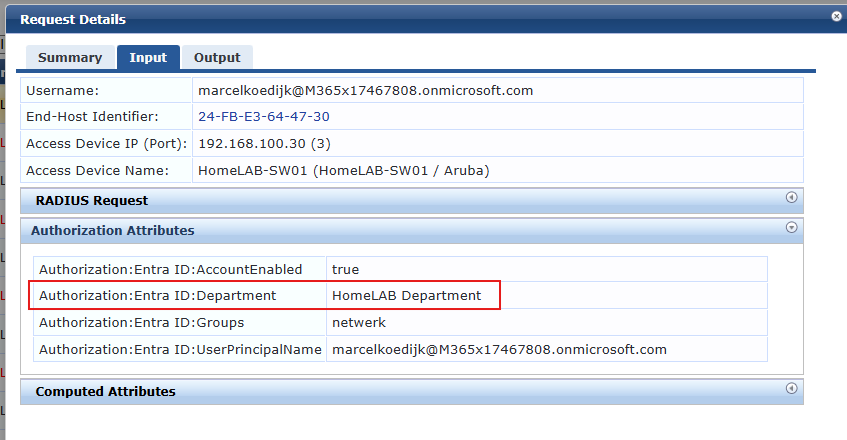
    • First check if you see the Authorization in the Access Tracker input before configure then in your role mapping

    My result example:

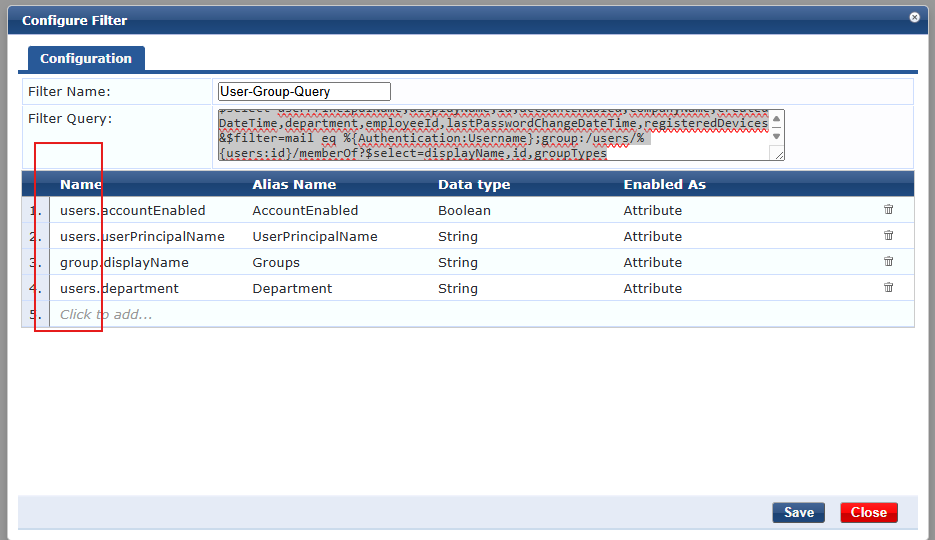
    users:users/?$select=userPrincipalName,displayName,id,accountEnabled,companyName,createdDateTime,department,employeeId,lastPasswordChangeDateTime,registeredDevices&$filter=mail eq %{Authentication:Username};group:/users/%{users:id}/memberOf?$select=displayName,id,groupTypes
    Let me know if you get solved is, config it self seems fine to me.


    ------------------------------
    Marcel Koedijk | MVP Expert 2024 | ACEP | ACMP | ACCP | ACDP | Ekahau ECSE | Not an HPE Employee | Opinions are my own
    ------------------------------


  • 3.  RE: Cannot get authorization attributes from Entra id - CPPM 6.12.0

    Posted 10 days ago
    Edited by mkk 10 days ago

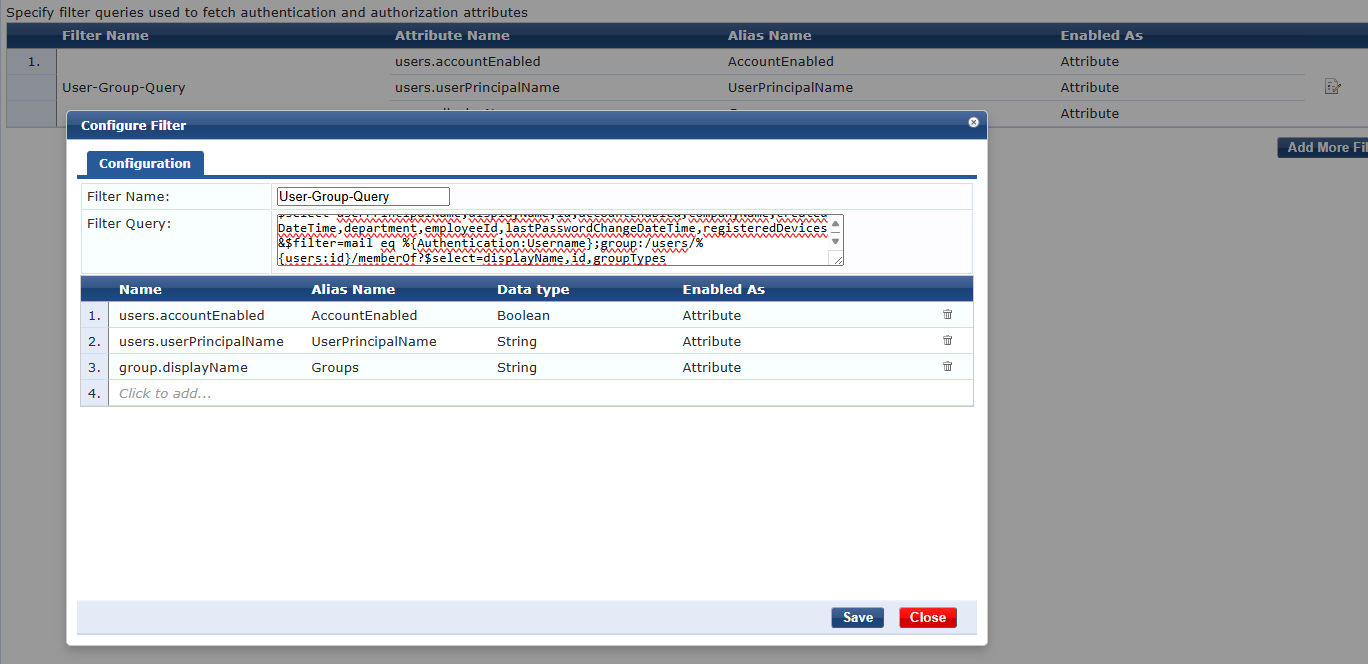
    I think your filter is incorrect.

    users:users/?$select=userPrincipalName,displayName,id,accountEnabled,companyName,createdDateTime,department,employeeId,lastPasswordChangeDateTime,registeredDevices&$filter=mail eq %{Authentication:Username};group:/users/%{users:id}/memberOf?$select=displayName,id,groupTypes


    ------------------------------
    Marcel Koedijk | MVP Expert 2024 | ACEP | ACMP | ACCP | ACDP | Ekahau ECSE | Not an HPE Employee | Opinions are my own
    ------------------------------


  • 4.  RE: Cannot get authorization attributes from Entra id - CPPM 6.12.0
    Best Answer

    Posted 10 days ago

    Dear Marcel, 

    After spending hours i found the problem and solution. Now its working fine on 6.12.0. I had to replace mail to userPrincipalName in the filter. Rest all is ok, i even removed Rolemapping policy and it worked. I did a complete fresh installation again and everything worked just fine. So "mail" was the culprit in my case

    default filter

    users:users/?$select=userPrincipalName,displayName,id,accountEnabled,companyName,createdDateTime,department,employeeId,lastPasswordChangeDateTime,registeredDevices&$filter=mail eq %{Authentication:Username};group:/users/%{users:id}/memberOf?$select=displayName,id,groupTypes

    Correct query (in my case)

    users:users/?$select=userPrincipalName,displayName,id,accountEnabled,companyName,createdDateTime,department,employeeId,lastPasswordChangeDateTime,registeredDevices&$filter=userPrincipalName eq %{Authentication:Username};group:/users/%{users:id}/memberOf?$select=displayName,id,groupTypes

    Rest everything is same, as i mentioned in my post, i tested the connection from clearpass as well as from a python script and got everything as expected. 

    Can you tell me how to write the filters? is there any guide because honestly i dont know how to relate the attribute names/alias to the filter query

    -------------------------------------------


  • 5.  RE: Cannot get authorization attributes from Entra id - CPPM 6.12.0

    Posted 10 days ago
    Edited by mkk 10 days ago

    Glad to hear you figure it out. I was using de default filter without modification in 6.12.3, where you say your default filter was based on mail instead of userpricipalname could be changed in the code after the 6.12.0 release.

    In your Filter Query the filter read from users and group attributes,

    users:users/?$select=mail,userPrincipalName,id,department,accountEnabled&$filter=userPrincipalName eq %{Authentication:Username};group:/users/%{users:id}/memberOf?$select=displayName

    So for example when you want the group:displayName

    Name: group:displayName

    Aliase Name: can be anything and will be the name of the attribute as shown in clearpass

    Datatype: String

    Enable as: Attribute

    Remember that name field is start with users: or group: and followed by the attribute that match your Filter Query.


    ------------------------------
    Marcel Koedijk | MVP Expert 2024 | ACEP | ACMP | ACCP | ACDP | Ekahau ECSE | Not an HPE Employee | Opinions are my own
    ------------------------------


  • 6.  RE: Cannot get authorization attributes from Entra id - CPPM 6.12.0

    Posted 10 days ago


    We been using this as our attributes, Working fine 

    -------------------------------------------


  • 7.  RE: Cannot get authorization attributes from Entra id - CPPM 6.12.0

    Posted 9 days ago

    I'm curious as to why you're attempting to do this with an unpatched version of ClearPass?


    ------------------------------
    Carson Hulcher, ACEX#110
    ------------------------------


  • 8.  RE: Cannot get authorization attributes from Entra id - CPPM 6.12.0

    Posted 7 days ago

    Dear Carson, 

    Thank you for coming in. I was testing in my lab and honestly the patch installation takes a lot of time, not sure why that is but i have been doing it since 6.7, and patch installation takes lot of time. For Demo/PoC in most cases i am ok with default versions. Thats why i tried without latest patch. 

    -------------------------------------------


  • 9.  RE: Cannot get authorization attributes from Entra id - CPPM 6.12.0

    Posted 6 days ago

    From My experience the time for patching is very dependent on the resources the virtual machine have and most of all the storage performance.

    I have seen the same patch take anything from about 10 minutes on physical C3010 and N3000 servers to about 2 hours on a C1000 or a virtual server with low performance disks.

    Last week one of my virtual lab servers needed 97 minutes to apply 6.11.13, plus reboot time. This machine was running in an old VMWare server just intended for lab where performance isn't high prio. In production VM Ware servers patching is normally quite fast, but not as fast as C3010 or N3000


    ------------------------------
    Best Regards
    Jonas Hammarbäck
    MVP Guru, ACEX, ACDX #1600, ACCX #1335, ACX-Network Security
    Aranya AB
    If you find my answer useful, consider giving kudos and/or mark as solution
    ------------------------------