Yeah, no matter what I try, it always ends up like this.
Switch #1 Config:
ssh server vrf mgmt
debug lag all
vlan 1
spanning-tree
interface mgmt
    no shutdown
    ip dhcp
interface lag 100
    no shutdown
    no routing
    vlan access 1
    lacp mode active
interface 1/1/1
    no shutdown
    mtu 9100
    lag 100
interface 1/1/2
    no shutdown
    mtu 9100
    lag 100
Switch #2 Config:
ssh server vrf mgmt
vlan 1
spanning-tree
interface mgmt
    no shutdown
    ip dhcp
interface lag 100
    no shutdown
    no routing
    vlan access 1
    lacp mode active
interface 1/1/1
    no shutdown
    mtu 9100
    lag 100
interface 1/1/2
    no shutdown
    mtu 9100
    lag 100
Switch #1 LACP Status:
R1# show lacp interfaces

State abbreviations :
A - Active        P - Passive      F - Aggregable I - Individual
S - Short-timeout L - Long-timeout N - InSync     O - OutofSync
C - Collecting    D - Distributing
X - State m/c expired              E - Default neighbor state

Actor details of all interfaces:
----------------------------------------------------------------------------------
Intf       Aggr       Port  Port  State   System-ID         System Aggr Forwarding
           Name       Id    Pri                             Pri    Key  State
----------------------------------------------------------------------------------
1/1/1      lag100     2     1     ALFNCD  08:00:09:03:50:ba 65534  100  up
1/1/2      lag100     3     1     ALFOE   08:00:09:03:50:ba 65534  100  lacp-block


Partner details of all interfaces:
----------------------------------------------------------------------------------
Intf       Aggr       Port  Port  State   System-ID         System Aggr
           Name       Id    Pri                             Pri    Key
----------------------------------------------------------------------------------
1/1/1      lag100     2     1     ALFNCD  08:00:09:f9:7f:ad 65534  100
1/1/2      lag100     0     0     PLFOEX  00:00:00:00:00:00 0      0
Switch #2 LACP Status:
R2# show lacp interfaces

State abbreviations :
A - Active        P - Passive      F - Aggregable I - Individual
S - Short-timeout L - Long-timeout N - InSync     O - OutofSync
C - Collecting    D - Distributing
X - State m/c expired              E - Default neighbor state

Actor details of all interfaces:
----------------------------------------------------------------------------------
Intf       Aggr       Port  Port  State   System-ID         System Aggr Forwarding
           Name       Id    Pri                             Pri    Key  State
----------------------------------------------------------------------------------
1/1/1      lag100     2     1     ALFNCD  08:00:09:f9:7f:ad 65534  100  up
1/1/2      lag100     3     1     ALFOE   08:00:09:f9:7f:ad 65534  100  lacp-block


Partner details of all interfaces:
----------------------------------------------------------------------------------
Intf       Aggr       Port  Port  State   System-ID         System Aggr
           Name       Id    Pri                             Pri    Key
----------------------------------------------------------------------------------
1/1/1      lag100     2     1     ALFNCD  08:00:09:03:50:ba 65534  100
1/1/2      lag100     0     0     PLFOEX  00:00:00:00:00:00 0      0
R2#
No matter what I try, the second interface is always in LACP block mode.
-------------------------------------------
Original Message:
Sent: Apr 26, 2026 09:55 AM
From: JulioVeas
Subject: Cannot get LAGs working properly in simulator
Hi, this is how i do it, it works perfectly (tpl ):
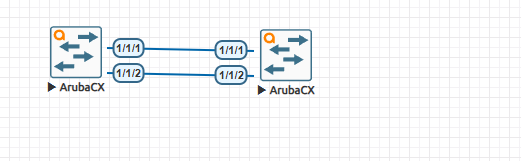
On both switches:
switch# conf t
switch(config)# int lag 1
switch(config-lag-if)# no routing
switch(config-lag-if)# no sh
switch(config-lag-if)# vlan trunk allowed all
switch(config-lag-if)# lacp mode active
switch(config-lag-if)# end
switch# conf t
switch(config)# int 1/1/1-1/1/2
switch(config-if-<1/1/1-1/1/2>)# no routing
switch(config-if-<1/1/1-1/1/2>)# no sh
switch(config-if-<1/1/1-1/1/2>)# mtu 9100
switch(config-if-<1/1/1-1/1/2>)# lag 1
switch(config-if-<1/1/1-1/1/2>)# end
switch# show lag 1
System-ID : 08:00:09:5a:84:f2
System-priority : 65534
Aggregate lag1 is up
Admin state is up
Description :
Type : normal
Lacp Fallback : n/a
MAC Address : 08:00:09:5a:84:f2
Aggregated-interfaces : 1/1/1 1/1/2
Aggregation-key : 1
Aggregate mode : active
Hash : l3-src-dst
LACP rate : slow
Speed : 2000 Mb/s
Mode : trunk
switch# show lacp interfaces
State abbreviations :
A - Active P - Passive F - Aggregable I - Individual
S - Short-timeout L - Long-timeout N - InSync O - OutofSync
C - Collecting D - Distributing
X - State m/c expired E - Default neighbor state
Actor details of all interfaces:
----------------------------------------------------------------------------------
Intf Aggr Port Port State System-ID System Aggr Forwarding
Name Id Pri Pri Key State
----------------------------------------------------------------------------------
1/1/1 lag1 2 1 ALFNCD 08:00:09:5a:84:f2 65534 1 up
1/1/2 lag1 3 1 ALFNCD 08:00:09:5a:84:f2 65534 1 up
Partner details of all interfaces:
----------------------------------------------------------------------------------
Intf Aggr Port Port State System-ID System Aggr
Name Id Pri Pri Key
----------------------------------------------------------------------------------
1/1/1 lag1 2 1 ALFNCD 08:00:09:a1:33:1c 65534 1
1/1/2 lag1 3 1 ALFNCD 08:00:09:a1:33:1c 65534 1
switch# ^C