Yes. 32768 is default. Leave it as it is if it's not a root bridge.
Original Message:
Sent: Sep 24, 2025 05:42 AM
From: willembargeman
Subject: Central / Local Configuration differences?
I believe 32768 is the default priority ( 8 * 4096 = 32768). What is needed depends on the topology and your requirements. In most cases the core layer is the root bridge (so has a lower priority)
------------------------------
Willem Bargeman
Systems Engineer Aruba
ACEX #125
------------------------------
Original Message:
Sent: Sep 24, 2025 05:37 AM
From: Notknown
Subject: Central / Local Configuration differences?
Thanks, will try that later. should i also change the default central priority from 8 to whatever the switch is showing me via STP Info (32768 for this one) or will that adapt itself after the Config push?
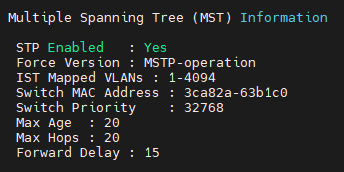
Original Message:
Sent: Sep 24, 2025 04:40 AM
From: willembargeman
Subject: Central / Local Configuration differences?
Looks like the MSTP toggle is set to disabled in your config. (based on the screenshot). Make sure to set the MSTP toggle to enable
------------------------------
Willem Bargeman
Systems Engineer Aruba
ACEX #125
Original Message:
Sent: Sep 24, 2025 04:37 AM
From: GorazdKikelj
Subject: Central / Local Configuration differences?
Looks like a loop is detected when new configuration is pushed to the switch. Try to activate oobm port for connection to central so you can check even when data plane is blocked. Also check for other LACP trunks. Maybe some are missing and you get a loop instead.
Best, Gorazd
------------------------------
Gorazd Kikelj
MVP Guru 2025
Original Message:
Sent: Sep 24, 2025 04:31 AM
From: Notknown
Subject: Central / Local Configuration differences?
yes, the "priority 4" config also appeared on its own in central after adding the trunk, i just added it to show that it shows the same as the console config.
in the logs, aside from "startup config changed by SNMP" and the switch changing around some VLANs, the only message in there i found that relates to this isue is this:
I 09/22/25 14:04:13 00057 stp: Spanning Tree Protocol disabled
this happened between the singular Central Changes and is the only thing i find in the logs between clicking "Commit" in Central and the switch losing connection where i see a relation to the issue. i am unsure on why it disabled STP but i would consider that to be the fault of the problem.
later in the automatic Config Restore Process, i see STP getting enabled again, instantly blocking all active ports, changing the CST Root (I 09/22/25 14:14:40 00839 stp: CST Root changed from 32768: (this device) to 8192: 2c233a-386534) and unblocking them one by one again,
The group STP config is the default and hasnt been touched by me yet.
Original Message:
Sent: Sep 24, 2025 03:37 AM
From: willembargeman
Subject: Central / Local Configuration differences?
Not sure why the connection is lost but I guess a interface is blocked by STP. You should check the log files for that.
The config "spanning-tree Trk1 priority 4" is automatically added when creating a trunk interface. There is no need to add this manually.
------------------------------
Willem Bargeman
Systems Engineer Aruba
ACEX #125