Hello all,
I'm creating a test environment with Central NAC and Aruba Onboarding.
I'm stuck on an issue with a client attempting to connect to my test SSID. It's downloaded the network profile through HPE Onboarding app, but when it tries to connect to the SSID it rejects the authentication certificate.
I followed the instructions shown here for the authentication profile: Authentication and Authorization
| Hpe |
remove preview |
|
| Authentication and Authorization |
| Overview of authentication and authorization policies in Central NAC |
| View this on Hpe > |
|
|
My problem is that in the instructions for the Authentication Profile, it shows EAP as an Authentication Type option. Then at the bottom you get options for selecting the Default Certificate or using a Custom one.
In my environment, I don't have just EAP as an option. I only have EAP-TLS. 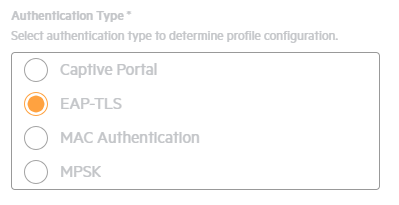 This doesn't provide options on the bottom to select a certificate. So where do I set a certificate now to provide to the client?
Thanks!