Security

 View Only
Expand all | Collapse all

Clearpass + Intune

This thread has been viewed 434 times
  • 1.  Clearpass + Intune

    Posted Feb 01, 2021 12:12 AM
    Hello all,

    Now I know this is a lot of text, but I am just trying to get as much detail in as possible. I have read Aruba guides and watched the videos countless times, but I do have a few lingering questions.

    Our org has started moving over staff devices to InTune, we still have a large presence of BYOD and student devices.

    Our setup today is pretty simple. Users log into their Windows machines and it all automatically logs them in to the wireless.


    Now with a recent directive from the powers above, we are moving devices (starting with staff) over to InTune management and are beefing up security practice. I really want to take advantage of the InTune Extension in Clearpass, as I feel that coupled with Defender ATP extension would be a great value add.

    This is a rough draft of what I would like to do with our wireless auth moving forward.


    Question1: The ATP and Palo stuff can be configured later, but I am just trying to get some questions answered on if this InTune extension and Clearpass can do what I envision in the chart? Basically, I want InTune devices only on our Staff VLAN. All other devices can go and get the student clearpass role and be put on that VLAN.

    So far I have the InTune extension installed on both nodes with sync schedules that offset each other. I do not plan on using HTTP auth mode to pull in data "live"...unless needed. I am pulling data into my Endpoint DB and can view it. Now it really comes down to making sure a cert is pushed to the devices. I will be using PKCS with an internal CA.

    Question 2: Do I need to push a user auth certificate, or machine auth? or does it not matter? What are the pros and cons?
    Question 3: Even though I am not using HTTP Auth mode, do I still need to set up an Authentication Source that points to InTune?
    Question 4: Will I be able to achieve the same setup I have today, where when a user logs into their device, they are automatically joined to the wireless (i think this is where the certs come into play)


    I appreciate any help or insight on this.


  • 2.  RE: Clearpass + Intune

    Posted Feb 04, 2021 01:25 AM
    Bump

    ------------------------------
    Zack Shore
    ------------------------------


  • 3.  RE: Clearpass + Intune

    Posted Feb 04, 2021 01:43 AM
    I assume your using V5 of the InTune Extension?? 

    Why do you have it running on two nodes, offset.... sync on one node and sync more regularly, when you sync on a SUB it will have to write the data to the PUB first. 

    Question1: The ATP and Palo stuff can be configured later, but I am just trying to get some questions answered on if this InTune extension and Clearpass can do what I envision in the chart? Basically, I want InTune devices only on our Staff VLAN. All other devices can go and get the student clearpass role and be put on that VLAN.

    So far I have the InTune extension installed on both nodes with sync schedules that offset each other. I do not plan on using HTTP auth mode to pull in data "live"...unless needed. I am pulling data into my Endpoint DB and can view it. Now it really comes down to making sure a cert is pushed to the devices. I will be using PKCS with an internal CA.
    {djj} - Yes, this workflow is achievable, in terms of using InTune data and D-ATP data as authZ content.

    Question 2: Do I need to push a user auth certificate, or machine auth? or does it not matter? What are the pros and cons?
    {djj} - This really depends on how you want to authN the user/device, if you have WIN10 and run TEAP you can do both.

    Question 3: Even though I am not using HTTP Auth mode, do I still need to set up an Authentication Source that points to InTune?
    {djj} - Not if you ingesting the endpoint into the CPPM EndpointDb and using that data as an authZ souce to make you first check, is this endpoint enrolled/known to InTune.

    Question 4: Will I be able to achieve the same setup I have today, where when a user logs into their device, they are automatically joined to the wireless (i think this is where the certs come into play)
    {djj} - Sure, that's the autHn portion, the Intune/D-ATP is more the authZ part. One of the huge benefits of CPPM is that authN & authZ can be separated to different identity stores/repositories.


    ------------------------------
    Danny Jump
    "Passionate about CPPM"
    ------------------------------


  • 4.  RE: Clearpass + Intune

    Posted Feb 04, 2021 01:55 AM

    I appreciate the response! Big fan of your advice on this forum. 


    So I think I have the cert piece down. I currently push a user and device SCEP cert to my InTune devices. Then I set up an InTune Wi-Fi profile that specifies user or machine auth. This allows our laptops to connect at the sign in screen using machine auth and then when the user logs in it uses their creds. So far this is working great  

    The issue that I'm dealing with right now is a little strange. At the end of my enforcement policy, I have it set to look at the endpoint DB, and if InTune Registered is NOT__EXIST it will bump that device to the student VLAN. This doesn't seem to work very well and won't connect my personal devices when I test. BUT it will connect them sometimes if MAC randomization is on.

    is there a better way to get my devices with no InTune registration onto that student VLAN as shown in the flow chart?


    ------------------------------
    Zack Shore
    ------------------------------


  • 5.  RE: Clearpass + Intune

    Posted Feb 04, 2021 01:58 AM
    And yes, we enroll all our devices into InTune before distribution. So they are synced to the Endpoint DB and ready by the time the user is ready to join wireless.

    ------------------------------
    Zack Shore
    ------------------------------


  • 6.  RE: Clearpass + Intune

    Posted Feb 04, 2021 01:23 PM
    Zack,

    I can't think why the mac-randomizatin would have any bearing on a device working or not, as you describe. It not like your checking for a known mac-address, or doing mac-auth. However,  if you specifically making an authZ decision on In_Tune registered, when you make this check you'll have to be looking up the endpoint with its mac-address, if randomization is enabled then you're potentially in a pickle when comparing to the physical address reported by InTune that is the Endpoint mac-address......said another way I'd have expected mac-randomization to always drop the endpoint into the student vlan/role.

    ------------------------------
    Danny Jump
    "Passionate about CPPM"
    ------------------------------


  • 7.  RE: Clearpass + Intune

    Posted Nov 28, 2022 07:42 PM
    Hi Community members,

    I am on the same situation, we are using Clearpass Intune ext v 5. Using the query filter 
    %{Connection:Client-Mac-Address-Hyphen}

    At this point, all the attributes Clearpass is getting is related to Device, not the user. If we pick one attribute, for example 'Intune Azure AD Registered' eq true--assign for example staff role, that means students getting staff vlan.

    Is there any query filter , that gets user information, so that we can use that in policy ? It's quite hard to distinguish staff and student at this point. 
    Please share your thought/view.

    -BINOD


  • 8.  RE: Clearpass + Intune

    Posted Dec 06, 2022 10:49 AM
    Hello,

    We ran into this as we are considering adding staff devices to InTune, but haven't yet. Luckily the staff and students use a different type of device, so you could make use of the attribute Endpoint:Intune Model in this case.


  • 9.  RE: Clearpass + Intune

    Posted Dec 06, 2022 11:30 AM
    You may add different attributes in the Intune deployed certificates for student vs staff and filter on that; or use a different CA to issue your certificates (may be useful for other applications as well).

    If staff devices are Corporate managed, and student devices 'personal', you could use the Intune Managed Device Owner Type to make your policy decision.

    You probably should not rely on the client MAC address, rather on the Intune DeviceID that is in the client certificate. A query like the following would do such a thing if the Intune DeviceID is set as Common Name in the certificate:
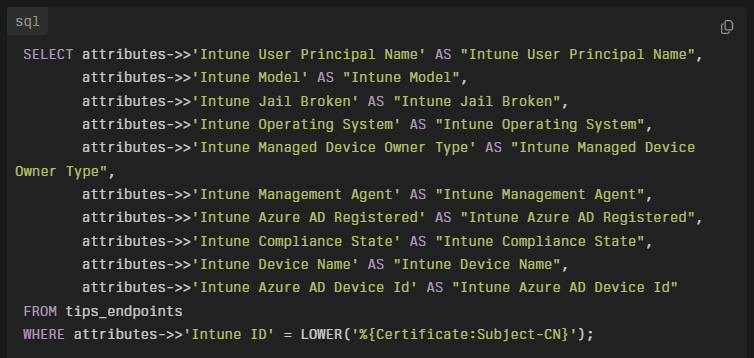
    select attributes->>'Intune User Principal Name' as "Intune User Principal Name",attributes->>'Intune Model' as "Intune Model",attributes->>'Intune Jail Broken' as "Intune Jail Broken",attributes->>'Intune Operating System' as "Intune Operating System",attributes->>'Intune Managed Device Owner Type' as "Intune Managed Device Owner Type",attributes->>'Intune Management Agent' as "Intune Management Agent",attributes->>'Intune Azure AD Registered' as "Intune Azure AD Registered",attributes->>'Intune Compliance State' as "Intune Compliance State",attributes->>'Intune Device Name' as "Intune Device Name",attributes->>'Intune Azure AD Device Id' as "Intune Azure AD Device Id" FROM tips_endpoints WHERE attributes->>'Intune ID' = LOWER('%{Certificate:Subject-CN}')​
    This approach avoids MAC spoofing attacks, as well it allows wired clients (as long as clients have at least one WiFi interface) when the lookup is done based on the DeviceID rather than on the MAC address.

    And there is a v6 version of the Intune extension; I would not deploy new systems with v5.

    With ClearPass 6.11 there now also is an Azure AD authorization source that can directly lookup Azure AD groups based on the Azure AD Username.

    ------------------------------
    Herman Robers
    ------------------------
    If you have urgent issues, always contact your Aruba partner, distributor, or Aruba TAC Support. Check https://www.arubanetworks.com/support-services/contact-support/ for how to contact Aruba TAC. Any opinions expressed here are solely my own and not necessarily that of Hewlett Packard Enterprise or Aruba Networks.

    In case your problem is solved, please invest the time to post a follow-up with the information on how you solved it. Others can benefit from that.
    ------------------------------


  • 10.  RE: Clearpass + Intune

    Posted Dec 29, 2022 05:35 AM
    hi Herman,
    this is great information as i'm just about to deploy Intune V6 in Clearpass AWS 6.10.
    i'm planning to deploy with "periodic database sync" enabled and using endpoint Intune attributes for authorization.
    Quick question do i need to tell the customer that ALL intune registered devices (Android, Apple) have to have MAC randomization
    turned OFF ?
    Cheers
    Pete


  • 11.  RE: Clearpass + Intune

    Posted Jan 02, 2023 07:44 AM
    If you use that custom query, based on the part...
    WHERE attributes->>'Intune ID' = LOWER('%{Certificate:Subject-CN}')​
    ... the lookup is done based on the Certificate:Subject-CN rather than on the connecting MAC address. That means that MAC randomization is supported for the authentication part. If you also leverage endpoint-attributes, like device profile, then it may be needed to turn off MAC randomization on those devices that have different MAC addresses each time they connect or every day. Most devices will stick to the MAC address for quite some time when connecting to the same SSID.

    ------------------------------
    Herman Robers
    ------------------------
    If you have urgent issues, always contact your Aruba partner, distributor, or Aruba TAC Support. Check https://www.arubanetworks.com/support-services/contact-support/ for how to contact Aruba TAC. Any opinions expressed here are solely my own and not necessarily that of Hewlett Packard Enterprise or Aruba Networks.

    In case your problem is solved, please invest the time to post a follow-up with the information on how you solved it. Others can benefit from that.
    ------------------------------


  • 12.  RE: Clearpass + Intune

    Posted Jan 03, 2023 05:00 AM
    hi Herman,
    once again thanks for taking the time to reply.
    I like your custom query, but i guess that would rely on authorization traffic to the cloud which is something i would like to avoid ?
    i like the "periodic database sync" because there are no latency issues.
    does that sound right ?
    cheers
    Pete


  • 13.  RE: Clearpass + Intune

    Posted Jan 03, 2023 06:00 AM
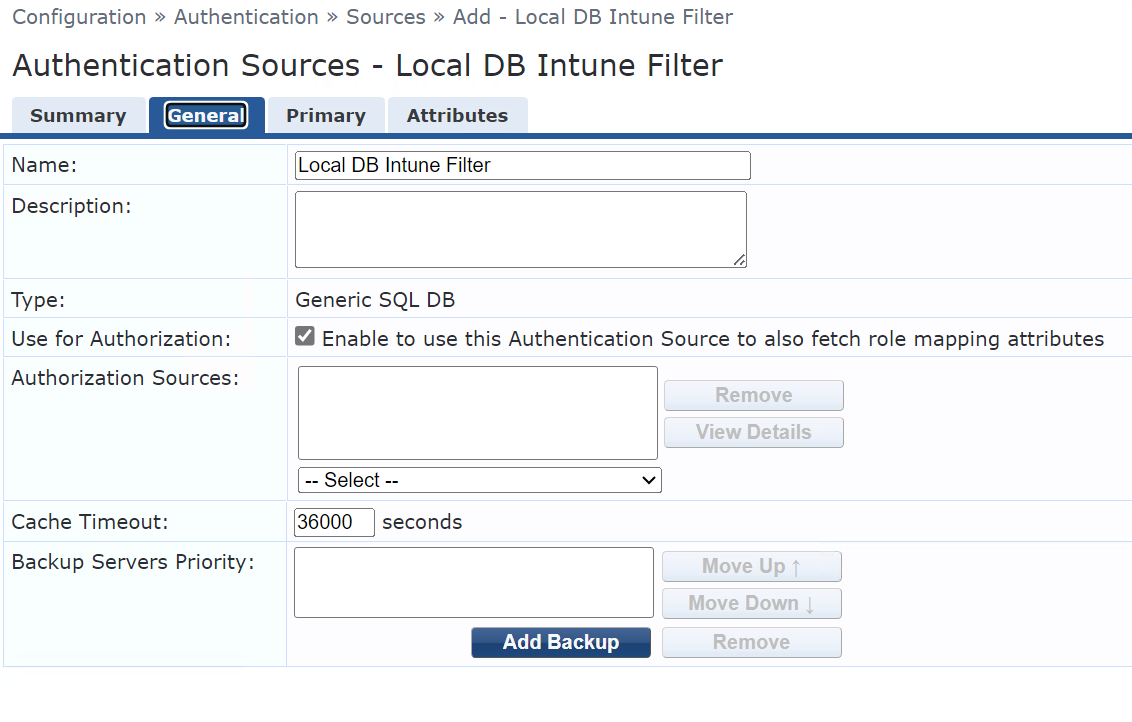
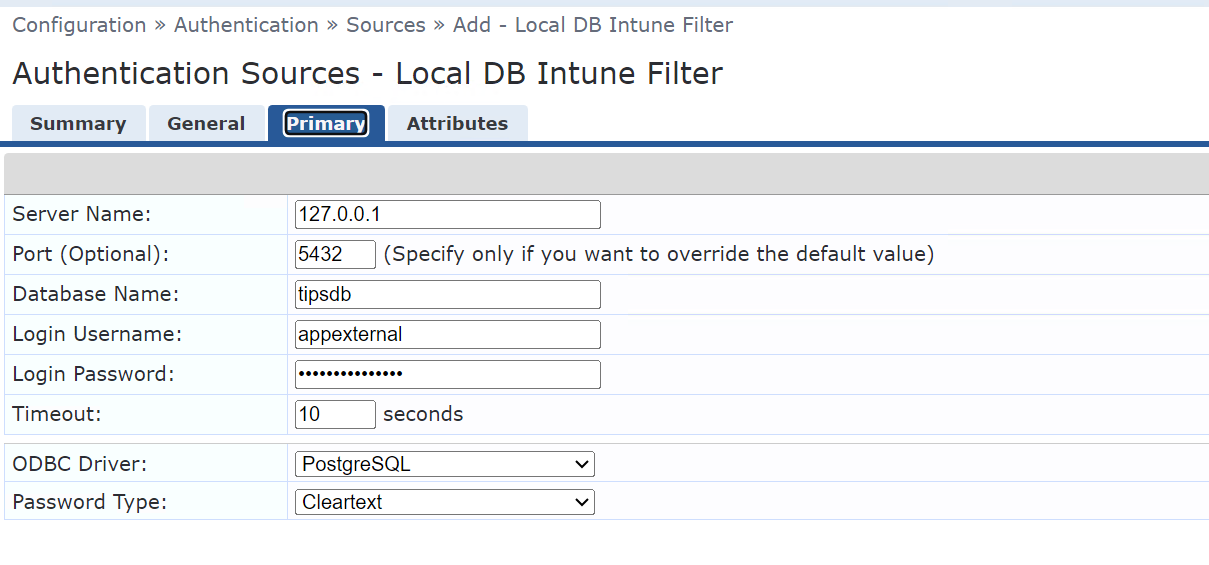
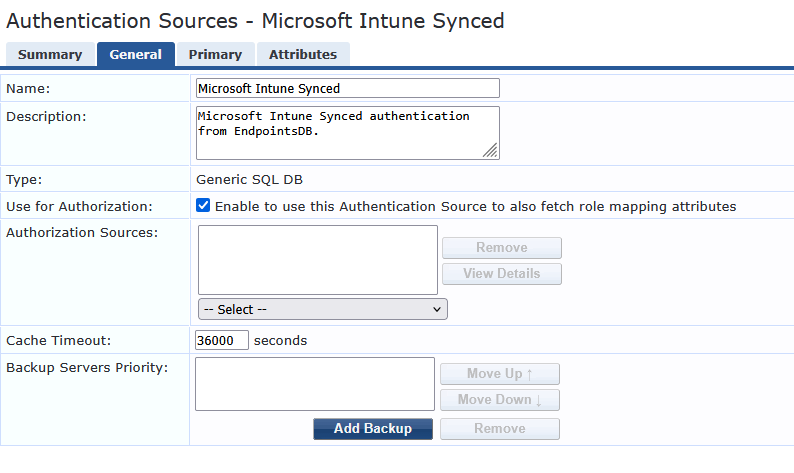
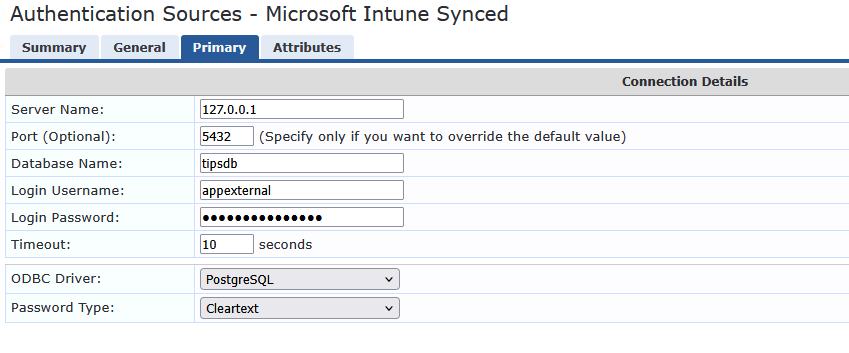
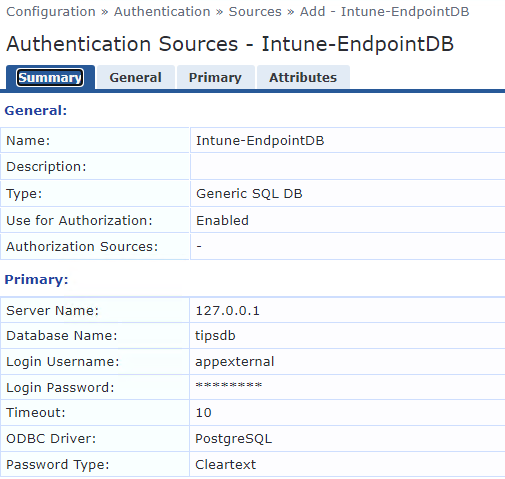
    It's a query on the Endpoint Repository, which is local and periodically synced. Here is how that Authentication Source looks like in my ClearPass:


    ------------------------------
    Herman Robers
    ------------------------
    If you have urgent issues, always contact your Aruba partner, distributor, or Aruba TAC Support. Check https://www.arubanetworks.com/support-services/contact-support/ for how to contact Aruba TAC. Any opinions expressed here are solely my own and not necessarily that of Hewlett Packard Enterprise or Aruba Networks.

    In case your problem is solved, please invest the time to post a follow-up with the information on how you solved it. Others can benefit from that.
    ------------------------------


  • 14.  RE: Clearpass + Intune

    Posted Jan 10, 2023 04:59 AM
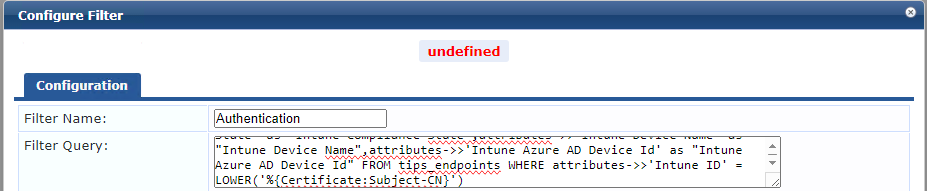
    So just to be clear Herman, you cut and paste the filter query in your post as follows :-


  • 15.  RE: Clearpass + Intune

    Posted Jan 10, 2023 12:09 PM
    That may work, but I would recommend creating a new Authentication Source with the appexternal database account. I would deprecate changing any default services, sources, roles, etc; the ones [between bracket] are defaults.

    One of the changes in ClearPass 6.11 is that the default services are locked, so you can't change them. Once you upgrade the config that you show will not work anymore.

    It may be confusing, but hopefully this helps to configure it.

    ------------------------------
    Herman Robers
    ------------------------
    If you have urgent issues, always contact your Aruba partner, distributor, or Aruba TAC Support. Check https://www.arubanetworks.com/support-services/contact-support/ for how to contact Aruba TAC. Any opinions expressed here are solely my own and not necessarily that of Hewlett Packard Enterprise or Aruba Networks.

    In case your problem is solved, please invest the time to post a follow-up with the information on how you solved it. Others can benefit from that.
    ------------------------------


  • 16.  RE: Clearpass + Intune

    Posted Mar 11, 2025 12:00 AM

    Thanks for this suggestion Herman! I had no idea this appexternal account existed or that it provided read-only access to the DB in a similar way.

    After finding I could not duplicate the default [Endpoints Repository] I assumed my only option was to add a 6th rule Peter did above


  • 17.  RE: Clearpass + Intune

    Posted Apr 30, 2024 10:50 AM

    Herman, You show using 127.0.0.1 for the IP address for the local server...is that possible in production?  We have a Clearpass cluster with no VIP, so I would like to use 127.0.0.1 so it will try to talk to the local host, but wanted to confirm this is a valid approach?


  • 18.  RE: Clearpass + Intune

    Posted May 02, 2024 07:12 AM

    Yes, database is replicated, so using 127.0.0.1 (localhost) always connects to the database running local system, which avoids any remote connectivity.


    ------------------------------
    Herman Robers
    ------------------------
    If you have urgent issues, always contact your Aruba partner, distributor, or Aruba TAC Support. Check https://www.arubanetworks.com/support-services/contact-support/ for how to contact Aruba TAC. Any opinions expressed here are solely my own and not necessarily that of Hewlett Packard Enterprise or Aruba Networks.

    In case your problem is solved, please invest the time to post a follow-up with the information on how you solved it. Others can benefit from that.
    ------------------------------


  • 19.  RE: Clearpass + Intune

    Posted Jun 30, 2025 11:53 AM

    Hi Herman,

    So if my understanding is correct,if i want to use Intune Attribute collected by the sync, i have to create a custom local database for using it as source ? I noticed that host in Endpoint repository aren't updated with Intune attributes, so during authentication testing compliance, device registred, and host Known ... doesn't work.  As I don't want to use Http real-time auth, I try to use the Intune attributes to make decision in role mapping. Is it the good way to do it ? Thks for your reply

    -------------------------------------------
    Message d'origine:
    Envoyé: Jan 03, 2023 05:59 AM
    Depuis: Herman Robers
    Sujet: Clearpass + Intune

    It's a query on the Endpoint Repository, which is local and periodically synced. Here is how that Authentication Source looks like in my ClearPass:


    ------------------------------
    Herman Robers
    ------------------------
    If you have urgent issues, always contact your Aruba partner, distributor, or Aruba TAC Support. Check https://www.arubanetworks.com/support-services/contact-support/ for how to contact Aruba TAC. Any opinions expressed here are solely my own and not necessarily that of Hewlett Packard Enterprise or Aruba Networks.

    In case your problem is solved, please invest the time to post a follow-up with the information on how you solved it. Others can benefit from that.
    ------------------------------


  • 20.  RE: Clearpass + Intune

    Posted Jun 30, 2025 12:18 PM

    No. Intune Extension will automatically sync Intune attributes into Endpoint Repository database. You just need to add Endpoint Repository as your authentication source.

    Best, Gorazd


    ------------------------------
    Gorazd Kikelj
    MVP Guru 2025
    ------------------------------


  • 21.  RE: Clearpass + Intune

    Posted Jan 17, 2023 05:25 PM
    This is a great solution. Just wondering what the query would be if the attribute to compare is the "Intune Device Name" and it is a substring of certificate subject-cn.


  • 22.  RE: Clearpass + Intune

    Posted May 09, 2024 09:42 AM

    I tried adding the custom filter as listed by Herman in Clearpass version 6.11 and get an error "The filter has been saved but has the following error: Invalid SQL Syntax - ERROR: query is syntactically wrong"... It looks okay to me, but I am obviously missing something...

    select attributes->>'Intune User Principal Name' as "Intune User Principal Name",attributes->>'Intune Model' as "Intune Model",attributes->>'Intune Jail Broken' as "Intune Jail Broken",attributes->>'Intune Operating System' as "Intune Operating System",attributes->>'Intune Managed Device Owner Type' as "Intune Managed Device Owner Type",attributes->>'Intune Management Agent' as "Intune Management Agent",attributes->>'Intune Azure AD Registered' as "Intune Azure AD Registered",attributes->>'Intune Compliance State' as "Intune Compliance State",attributes->>'Intune Device Name' as "Intune Device Name",attributes->>'Intune Azure AD Device Id' as "Intune Azure AD Device Id" FROM tips_endpoints WHERE attributes->>'Intune ID' = LOWER('%{Certificate:Subject-CN}')​


  • 23.  RE: Clearpass + Intune

    Posted May 20, 2024 10:14 AM

    This ended up being an issue with the password for the appexternal account.  I reset it and the "Invalid SQL Syntax" error went away.  Odd that is the error you get.


    ------------------------------
    Michael Conlogue
    ------------------------------


  • 24.  RE: Clearpass + Intune

    Posted Feb 18, 2025 06:17 PM

    thanks for the tip, just hit this myself!


  • 25.  RE: Clearpass + Intune

    Posted Mar 20, 2025 01:45 AM
    Edited by BF-CPm358 Mar 20, 2025 11:39 PM

    It's strange - I get the same error: "The filter has been saved but has the following error: Invalid SQL syntax - ERROR: query is syntactically wrong" but only with the new Authentication/Source. If I added it as the 6th line for instance to the existing built-in Endpoint DB it does not generate the same error.

    I have tried multiple variations on the query:


    1. Herman's original query

    select attributes->>'Intune User Principal Name' as "Intune User Principal Name",attributes->>'Intune Model' as "Intune Model",attributes->>'Intune Jail Broken' as "Intune Jail Broken",attributes->>'Intune Operating System' as "Intune Operating System",attributes->>'Intune Managed Device Owner Type' as "Intune Managed Device Owner Type",attributes->>'Intune Management Agent' as "Intune Management Agent",attributes->>'Intune Azure AD Registered' as "Intune Azure AD Registered",attributes->>'Intune Compliance State' as "Intune Compliance State",attributes->>'Intune Device Name' as "Intune Device Name",attributes->>'Intune Azure AD Device Id' as "Intune Azure AD Device Id" FROM tips_endpoints WHERE attributes->>'Intune ID' = LOWER('%{Certificate:Subject-CN}')​

    Attempting to save generates this error (ONLY SOMETIMES!)


    If I reload the page and try again it works and instead I get this:


    If I bounce the wired port and try a new access attempt the logs show this error


    2. If I try with a query ssuggested by Perplexity.ai to clean up the query it is accepted by the editor Save, but then when I try and save the Auth source instead I get the error that "Primary: Custom SQL must not contain data-modifying SQL statements"


    3. I tried with what was apparently the simplest query and still get the same result:

    = Primary: Custom SQL must not contain data-modifying SQL statements

    4. Removing semi-colon allows the query to be saved but still generates the same errors in the access logs


  • 26.  RE: Clearpass + Intune

    Posted Mar 21, 2025 04:48 AM

    Two things; if I read responses above, it appears that if there is a mismatch in appexternal SQL account (password), you will see that message about the query being syntactically wrong. So please check/reset the appexternal password.

    On the 'Custom SQL must not contain data-modifying SQL statements', that has to do with the ; at the end. In SQL the ; ends/separates commands and makes it hard to check if there are 'nasty things' happening in a query. While in SQL you normally end the query with a ; (in the CLI!), when using that programmaticallly, like in Python or C, it's not needed and ClearPass won't accept it for such a reason. So it's expected that you see that. If the appexternal password does not match, it's also expected that your query doesn't run if you leave out the ; at the end, but for a different reason.


    ------------------------------
    Herman Robers
    ------------------------
    If you have urgent issues, always contact your HPE Aruba Networking partner, distributor, or Aruba TAC Support. Check https://www.arubanetworks.com/support-services/contact-support/ for how to contact HPE Aruba Networking TAC. Any opinions expressed here are solely my own and not necessarily that of Hewlett Packard Enterprise or HPE Aruba Networking.

    In case your problem is solved, please invest the time to post a follow-up with the information on how you solved it. Others can benefit from that.
    ------------------------------


  • 27.  RE: Clearpass + Intune

    Posted Mar 23, 2025 06:44 PM
    Edited by BF-CPm358 Mar 24, 2025 01:53 AM

    Hi Herman,

    Just to be clear - when I use your filter query verbatim with just 'Intune Device Id' I get the syntax error yet it lets me save:


    select attributes->>'Intune User Principal Name' as "Intune User Principal Name",attributes->>'Intune Model' as "Intune Model",attributes->>'Intune Jail Broken' as "Intune Jail Broken",attributes->>'Intune Operating System' as "Intune Operating System",attributes->>'Intune Managed Device Owner Type' as "Intune Managed Device Owner Type",attributes->>'Intune Management Agent' as "Intune Management Agent",attributes->>'Intune Azure AD Registered' as "Intune Azure AD Registered",attributes->>'Intune Compliance State' as "Intune Compliance State",attributes->>'Intune Device Name' as "Intune Device Name",attributes->>'Intune Azure AD Device Id' as "Intune Azure AD Device Id" FROM tips_endpoints WHERE attributes->>'Intune ID' = LOWER('%{Certificate:Subject-CN}')​


    I get this error:


    The filter has been saved but has the following error:
    Invalid SQL syntax - ERROR: query is syntactically wrong

    (by the way shouldn't it be 'Intune Device Id' not 'Intune ID'? [edit] I notice in the Endpoint list via the GUI it is referrred to as "Intune ID" but in other queries it's "Intune Device Id")

    And then the authentication attempt will generate this error:

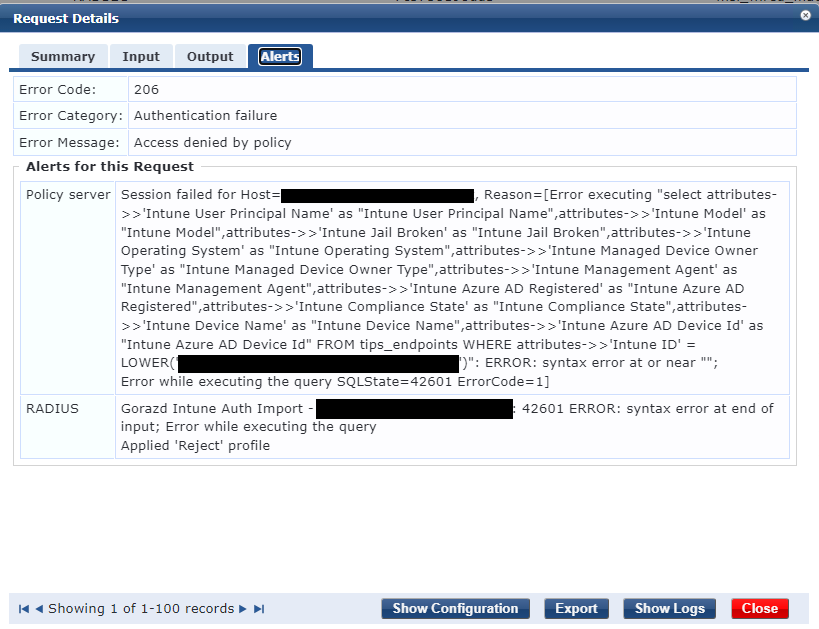
    ERROR RadiusServer.Radius - rlm_sql_unixodbc: sql state - 42601, sql error - ERROR: syntax error at end of input; Error while executing the query
    ERROR RadiusServer.Radius - rlm_sql_unixodbc: SQL down 42601 ERROR: syntax error at end of input; Error while executing the query

    I can tell it's not due to mismatching password because I can deliberately test that by changing the password and then get this error instead:


    ERROR RadiusServer.Radius - rlm_sql_unixodbc: sql state - 08001, sql error - FATAL: password authentication failed for user "appexternal" FATAL: Ident authentication failed for user "appexternal"
    ERROR RadiusServer.Radius - rlm_sql_unixodbc: SQL down 08001 FATAL: password authentication failed for user "appexternal" FATAL: Ident authentication failed for user "appexternal"
    ERROR RadiusServer.Radius - rlm_sql_unixodbc: Connection to server 127.0.0.1, database tipsdb failed
    ERROR RadiusServer.Radius - rlm_sql (authsrc_3010): Failed to connect DB handle #31
    ERROR RadiusServer.Radius - rlm_sql (authsrc_3010): There are no DB handles to use! skipped 32, tried to connect 1

    [edit]
    I have spent hours on this and multiple queries - they all result in the same syntax error.


  • 28.  RE: Clearpass + Intune

    Posted Mar 24, 2025 11:31 AM

    Brendan,

    I checked with your syntax and there seems to be an invisible character at the end that invalidates the query. When I copied your syntax, I get the exact same error, and in my text editor see the upside down ? at the end:

    If I remove that, then paste the same query without that back in, the error is gone. What is strange is that the ? is only visible for me in that text editor. This may be something unicode or so, so cleaning the code in the most basic text editor there is may fix it for you as well?


    ------------------------------
    Herman Robers
    ------------------------
    If you have urgent issues, always contact your HPE Aruba Networking partner, distributor, or Aruba TAC Support. Check https://www.arubanetworks.com/support-services/contact-support/ for how to contact HPE Aruba Networking TAC. Any opinions expressed here are solely my own and not necessarily that of Hewlett Packard Enterprise or HPE Aruba Networking.

    In case your problem is solved, please invest the time to post a follow-up with the information on how you solved it. Others can benefit from that.
    ------------------------------


  • 29.  RE: Clearpass + Intune

    Posted Mar 24, 2025 07:09 PM

    Thanks Herman for the suggestion but it is not the problem. I suspect what you are seeing is just an artifact from copy/pasting into this website.

    I manually typed the following query below from blank and still got exactly the same error. This is what I expected as well as I have tried dozens of different queries.

    Can you please let me know what version you are running? At this stage it seems like a bug.


  • 30.  RE: Clearpass + Intune

    Posted Mar 26, 2025 09:36 AM

    On this screenshot your are not using the LOWER function for the certificate field. It should be LOWER('%{Certificate:Subject-CN}')


  • 31.  RE: Clearpass + Intune

    Posted Mar 26, 2025 06:28 PM

    I've tried both - multiple times in multiple variations - some with multiple variables, some with just the Intune ID. The only queries that don't generate syntax errors are ones thast don't use JSONB elements.


  • 32.  RE: Clearpass + Intune

    Posted Mar 26, 2025 11:43 AM

    I'm on 6.12.4.


    ------------------------------
    Herman Robers
    ------------------------
    If you have urgent issues, always contact your HPE Aruba Networking partner, distributor, or Aruba TAC Support. Check https://www.arubanetworks.com/support-services/contact-support/ for how to contact HPE Aruba Networking TAC. Any opinions expressed here are solely my own and not necessarily that of Hewlett Packard Enterprise or HPE Aruba Networking.

    In case your problem is solved, please invest the time to post a follow-up with the information on how you solved it. Others can benefit from that.
    ------------------------------


  • 33.  RE: Clearpass + Intune

    Posted Mar 30, 2025 10:17 PM

    To update - I've gone through the config with TAC and still unable to resolve the syntax error issue - I'm just waiting for escalation now. Makes me wonder if there's other critical parts that I might be missing. Beyond the typical minimum lines in ArubaOS I assume there's not much else? Any way to query the database? I'm considering just rebuilding the appliance, initially with 6.11 at first to give me some troubleshooting options.


  • 34.  RE: Clearpass + Intune

    Posted Mar 24, 2025 04:46 AM
    Edited by Istvan Hegedus Mar 24, 2025 04:47 AM

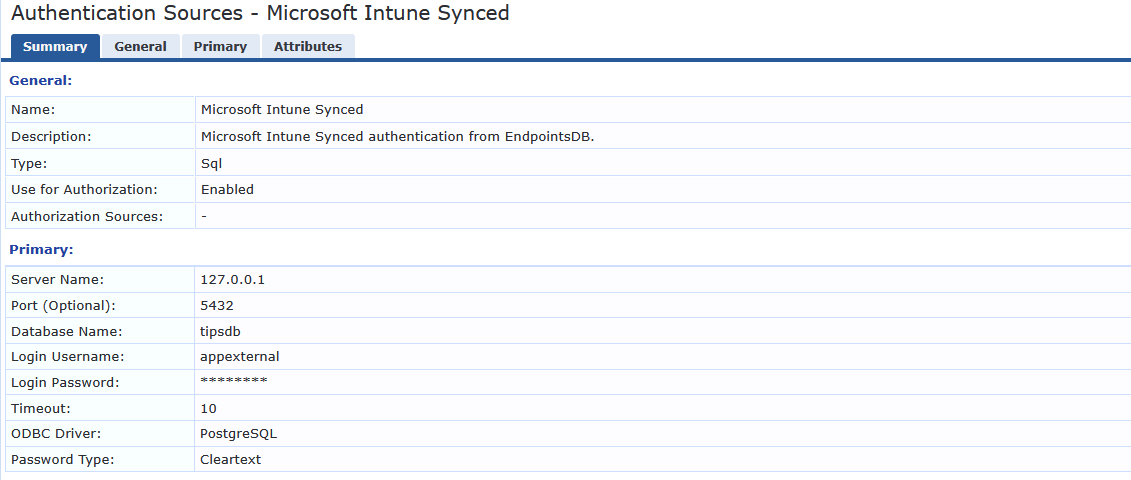
    I remember struggling with similar issues but I have solved it at the end. I have checked my config and the difference is in the authentication sources config. As you can see I use sql as type instead of Generic SQL DB. If I remember well the port 5432 was critical to get it work. I have CPPM 6.11


  • 35.  RE: Clearpass + Intune

    Posted Mar 24, 2025 07:32 AM
    Edited by BF-CPm358 Mar 24, 2025 07:36 AM

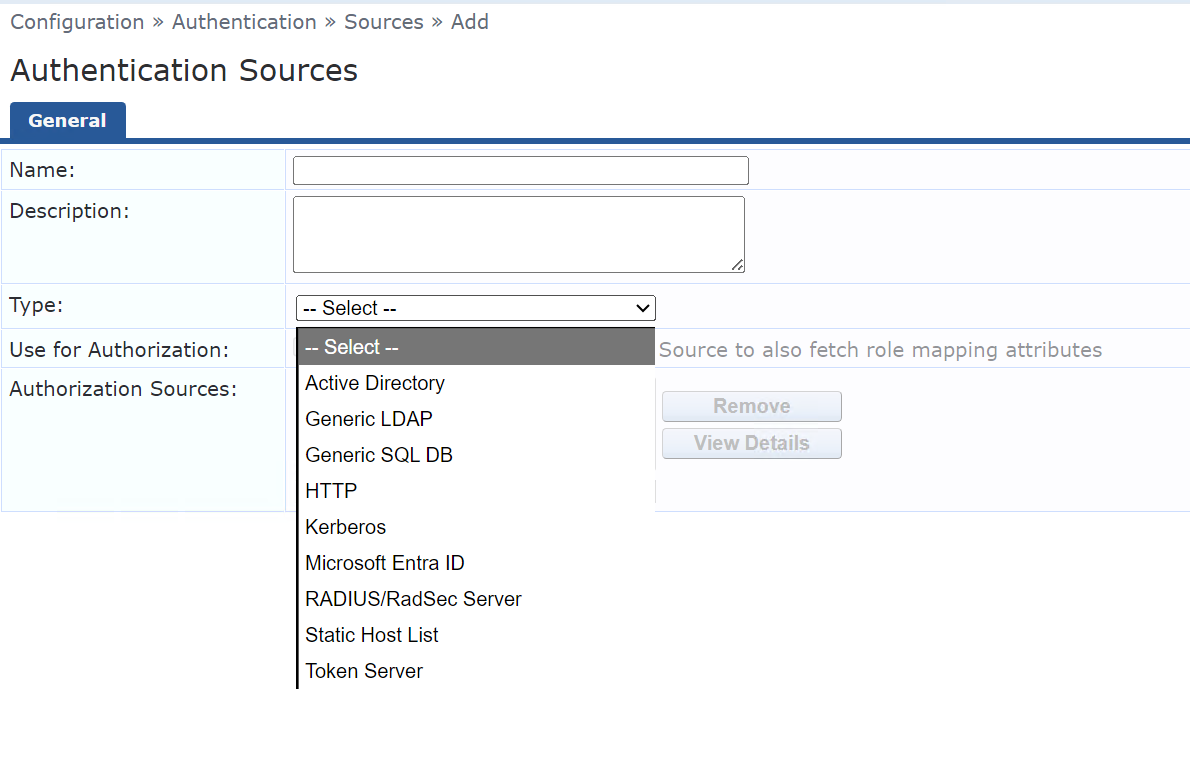
    Thanks for the reply Istvan however I only have the option of "Generic SQL" and no just "SQL". I did wonder about this after seeing Hermans screenshots also. I hope it's not a deal-breaker to be using 6.12!

    Also just to check I tried setting the port manually to 5432 but no change. I am fairly sure I had tried manually setting to 5433 earlier but that failed to connect at all, so default of blank seems to be no problem, or at least no increase in problem!


  • 36.  RE: Clearpass + Intune

    Posted Mar 25, 2025 06:35 AM

    Hi BrendanMYS,

    I have checked it again and when I create the authentication source I also just have Generic SQL DB. Choose that one.

    The key is the rest of the config.

    My query is this one:

    select attributes->>'Intune Device Name' as "Intune Device Name", attributes->>'Intune Device Registration State' as "Intune Device Registration State", attributes->>'Intune Managed Device Owner Type' as "Intune Managed Device Owner Type", attributes->>'Intune Compliance State' as "Intune Compliance State" FROM tips_endpoints WHERE attributes->>'Intune ID' = LOWER('%{Certificate:Subject-AltName-URI}')


  • 37.  RE: Clearpass + Intune

    Posted Mar 25, 2025 07:18 AM

    Thanks again Istvan but it gets the same error.

    Can you please confirm what version you are running of both ClearPass and the extension?


  • 38.  RE: Clearpass + Intune

    Posted Mar 26, 2025 09:26 AM

    Hi,

    I have created a test authentication source with your filter and I believe Herman is right, there is some strange invisible character at the end of your filter text (although I have copied it too). I got the same error but when I go to the end of your filter query (cursor blinks at the end of the last character), press the left arrow key once and press the delete key once then I can save the query without error.

    Please try it!

    Istvan


  • 39.  RE: Clearpass + Intune

    Posted Mar 26, 2025 06:31 PM
    Edited by BF-CPm358 Mar 26, 2025 06:51 PM

    I appreciate the effort but I've tested this as well - and we need to remember that this is not an exact copy of what is in my Clearpass appliance - it's been copied and pasted into this website and then the website has applied whatever formatting it does. I can use a raw text pastebin to be 100% sure but this doesn't seem to be the issue. Even then I still tested it anyway to no avail.

    By the way if you mean the query i pasted on Comment 25 - yes I see the same character, it shows up as a space - I assume this is just from this website because I formatted it in italics. Again to be clear - this is not in the original plain text query on Clearpass, it's just on the website. 


  • 40.  RE: Clearpass + Intune

    Posted Mar 27, 2025 06:47 AM

    Hi,

    Yes I understand that you said you typed it in by hand so there should not be secret character at the end. There must be something different then which causes this issue. My ClearPass is version 6.11.10 and Intune extension is 6.3.5 but the extension has nothing to do with it as you are just querying the endpoints DB.

    Maybe the browser causes it that you use? I use Firefox to manage it.


  • 41.  RE: Clearpass + Intune

    Posted Mar 31, 2025 03:12 AM
    Edited by GK-c34688 Mar 31, 2025 03:14 AM

    You can test your query in psql client directly. Verbatim it won't return anything as argument will be empty, but it will check the syntax.

    I tested your query on 6.11.10 and it's working without any problems. Postgresql version on 6.11.10 is 12.20.

    Best, Gorazd


    ------------------------------
    Gorazd Kikelj
    MVP Guru 2025
    ------------------------------


  • 42.  RE: Clearpass + Intune

    Posted Apr 02, 2025 02:55 AM

    Thanks for the info Gorazd. I got psql to connect and tried the query. As you found I also got no data returned, but crucially also no syntax error.

    I also tried a simple query:

    SELECT * 
    FROM tips_endpoints
    WHERE attributes::json->>'Intune ID' = '<sample machine Intune ID GUID';

    and this returned 2 entries successfully. I don't think there's anything wrong with the DB or the data in it. There is certainly something wrong with either my configuration or SQL connection. I can see the username is populated correctly in the Request Details as 'host/<guid>' so I don't understand why I can't get the same query that everyone else is using to work. There must be something missing. 

    Unfortunately, I still have not had any success with TAC either. 


  • 43.  RE: Clearpass + Intune

    Posted Apr 02, 2025 07:38 AM
      |   view attached

    Hi Brendan.

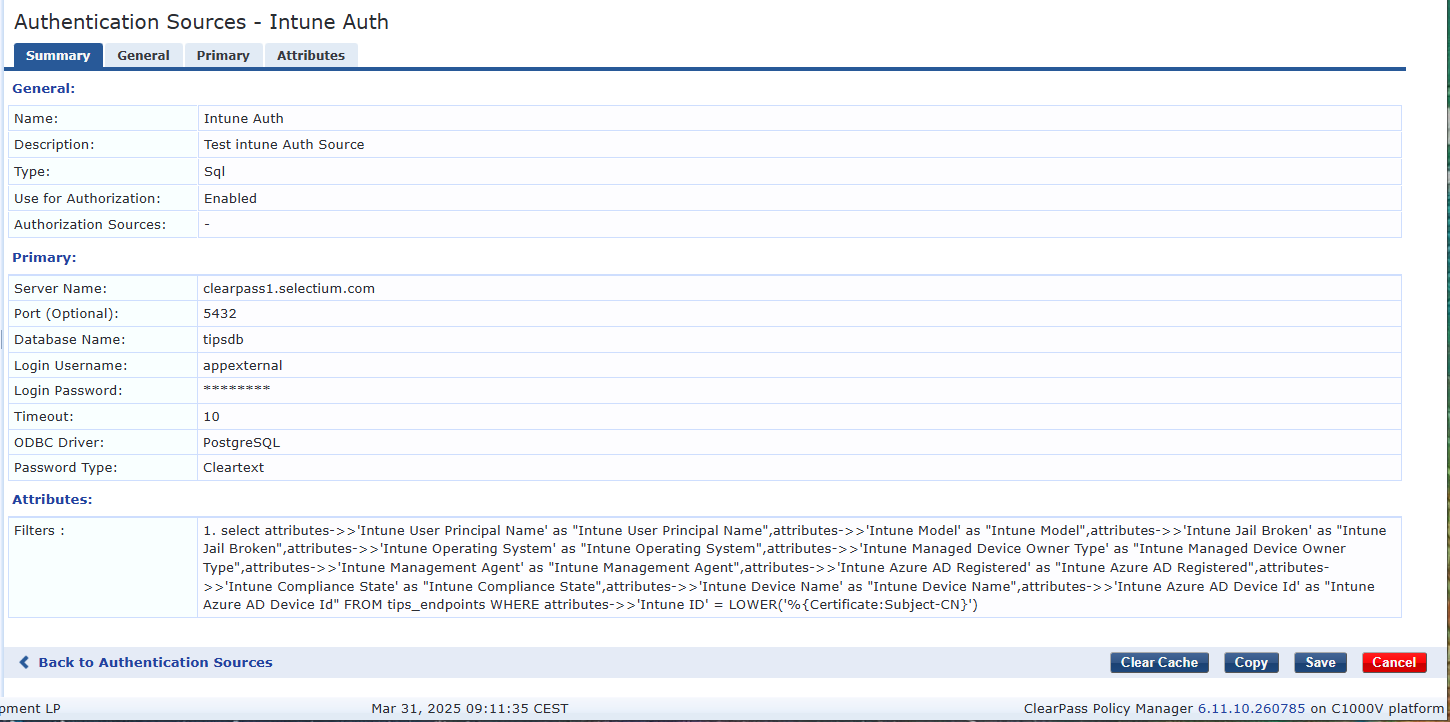
    Here is xml export from my test auth source. I also uploaded xml file as cut&paste can make funny things.

    Best, Gorazd

    <TipsContents xmlns="http://www.avendasys.com/tipsapiDefs/1.0">

    <TipsHeader exportTime="Wed Apr 02 13:31:27 CEST 2025" version="6.11"/>
    <AuthSources>
    <AuthSource description="Test intune Auth Source" name="Intune Auth" isAuthorizationSource="true" type="Sql">
    <NVPair value="36000" name="cache_timeout"/>
    <NVPair value="PostgreSQL" name="sql_driver"/>
    <NVPair value="your clearpass server here" name="server"/>
    <NVPair value="5432" name="port"/>
    <NVPair value="tipsdb" name="db_name"/>
    <NVPair value="appexternal" name="login"/>
    <NVPair value="" name="password"/>
    <NVPair value="10" name="timeout"/>
    <NVPair value="cleartext" name="password_type"/>
    <Filters>
    <Filter paramValues="" filterQuery="select attributes->>'Intune User Principal Name' as "Intune User Principal Name",attributes->>'Intune Model' as "Intune Model",attributes->>'Intune Jail Broken' as "Intune Jail Broken",attributes->>'Intune Operating System' as "Intune Operating System",attributes->>'Intune Managed Device Owner Type' as "Intune Managed Device Owner Type",attributes->>'Intune Management Agent' as "Intune Management Agent",attributes->>'Intune Azure AD Registered' as "Intune Azure AD Registered",attributes->>'Intune Compliance State' as "Intune Compliance State",attributes->>'Intune Device Name' as "Intune Device Name",attributes->>'Intune Azure AD Device Id' as "Intune Azure AD Device Id" FROM tips_endpoints WHERE attributes->>'Intune ID' = LOWER('%{Certificate:Subject-CN}')​" filterName="Intune V6">
    <Attributes>
    <Attribute isUserAttr="true" isRole="false" attrDataType="String" aliasName="Intune Azure AD Device Id" attrName="Intune Azure AD Device Id"/>
    </Attributes>
    </Filter>
    </Filters>
    </AuthSource>
    </AuthSources>

    </TipsContents>


    ------------------------------
    Gorazd Kikelj
    MVP Guru 2025
    ------------------------------

    Attachment(s)


  • 44.  RE: Clearpass + Intune

    Posted Apr 02, 2025 07:31 PM
    Edited by BF-CPm358 Apr 02, 2025 07:34 PM

    Thanks again Gorazd. Unfortunately, I got the same result, as your query is almost identical to some I've tried already - with the exception of using the full FQDN where I was told earlier that only 127.0.0.1 would work - it seems it doesn't seem to matter. (By the way I used the attached file and imported it. Interesting to notice that the <TipsHeader > is mandatory!)

    Result was again:

    rlm_sql_unixodbc: sql state - 42601, sql error - ERROR: syntax error at end of input; Error while executing the query


  • 45.  RE: Clearpass + Intune

    Posted Apr 03, 2025 02:20 AM

    Hi Brendan.

    Did you import xml or just cut&paste query? I did have similar problem but with AD query. 

    Maybe you try to install the new appliance and test it on it? Similar as you already suggested?

    Best, Gorazd


    ------------------------------
    Gorazd Kikelj
    MVP Guru 2025
    ------------------------------


  • 46.  RE: Clearpass + Intune

    Posted Apr 16, 2025 09:29 PM

    Yes Gorazd I did try direct import as well but had the same issue.

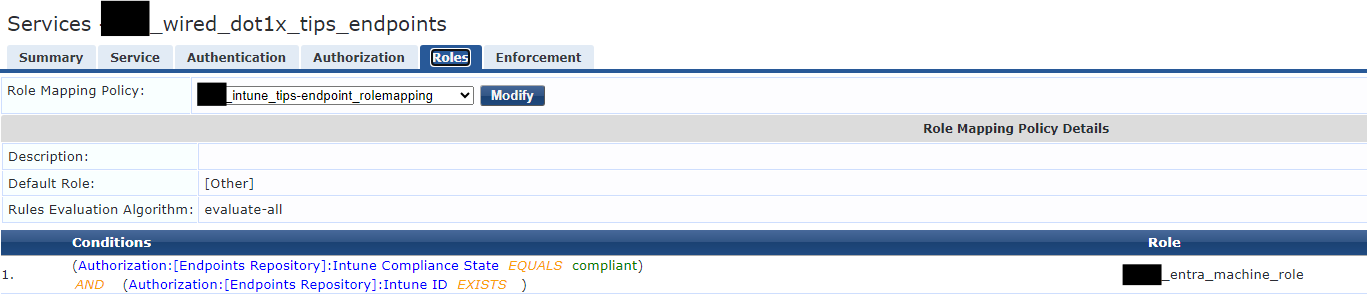
    However I eventually managed to solve the problem at least for the default Endpoint DB lookup, and for HTTP lookup for AuthZ - the issue was that my roles had to be mapped using the Auth source i.e.:

    And for the HTTP method likewise:

    Unfortunately trying the new SQL query like you and others have used still won't work for me - it returns Syntax error still. The Intune ID from the CN was substituted properly (in this test I used a SCEP template with Intune ID in the CN and the SAN) 
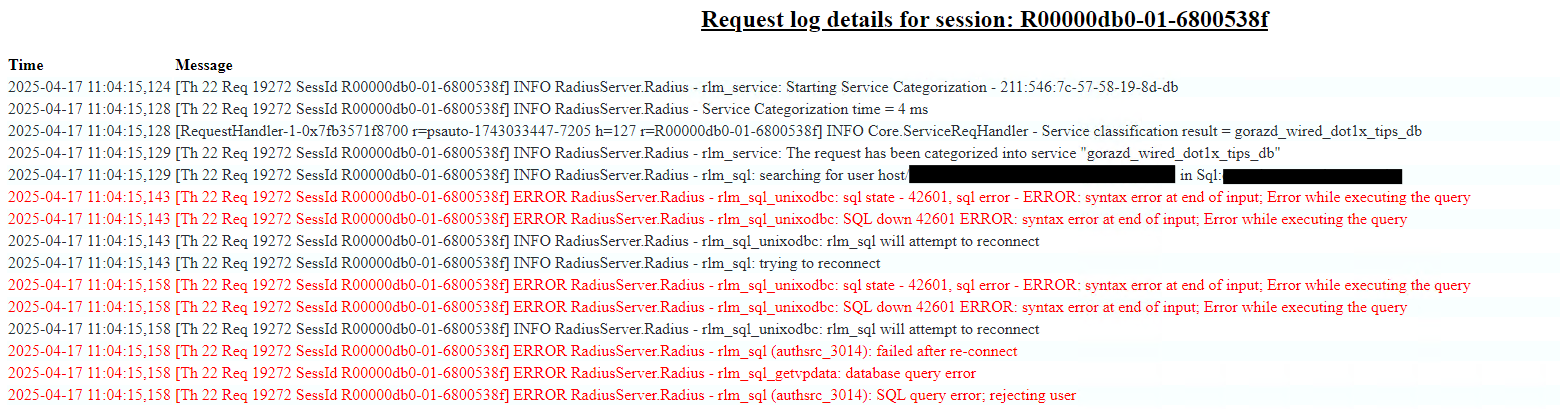
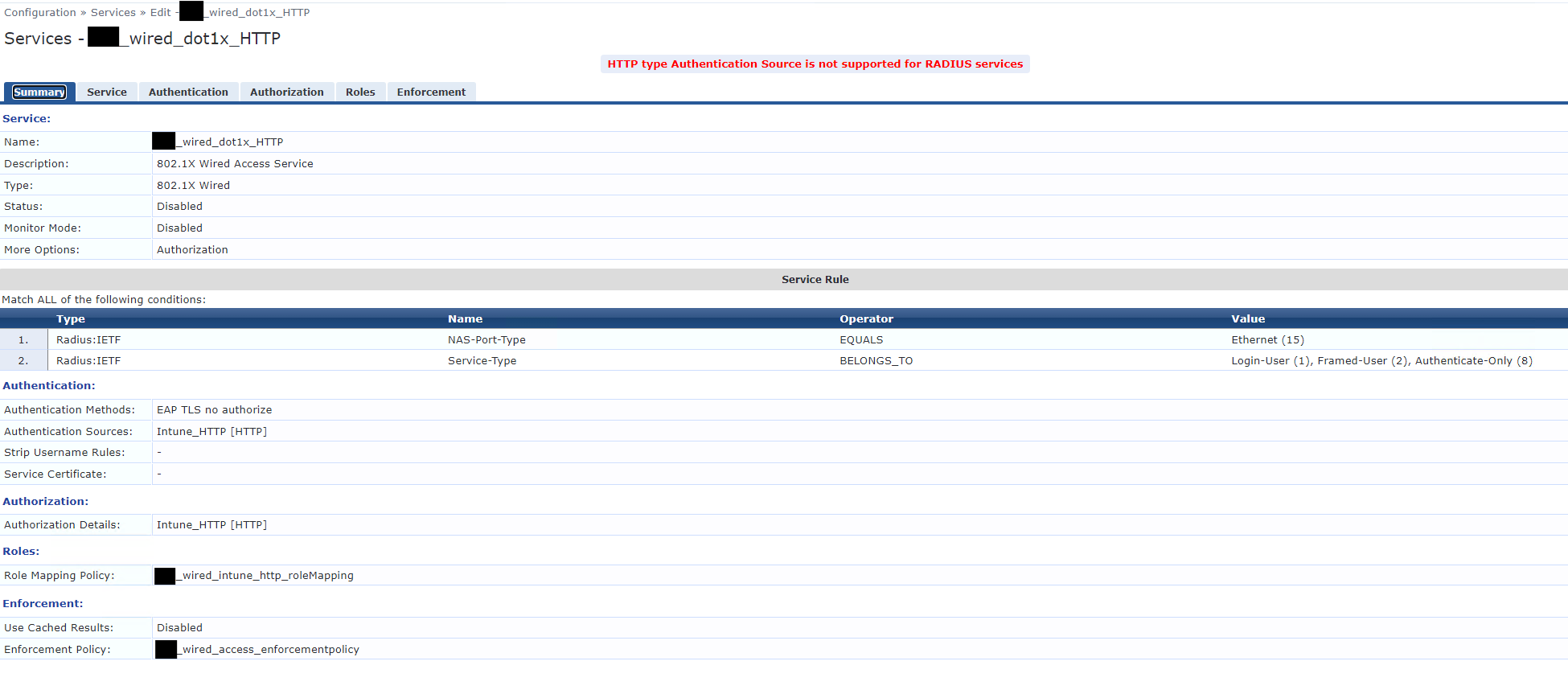
    My last issue now is that I'm not sure how to use HTTP method for Authentication - the documentation says it can be done (without needing the local Endpoint DB) but when I try and configure it I get this error:


  • 47.  RE: Clearpass + Intune

    Posted Apr 17, 2025 04:07 AM

    for authentication you cannot use the Intune HTTP auth source, you have to leave that blank. Herman's instructions have contained this criteria in a tutorial.