Security

 View Only
Expand all | Collapse all

Clearpass not getting group membership from EntraID

This thread has been viewed 134 times
  • 1.  Clearpass not getting group membership from EntraID

    Posted Jun 25, 2025 12:43 PM

    We have a customer where we are installing CPPM 6.12. Customer will use both Microsoft AD and Entra. The reason is that they are migrating from AD to Entra and this will take a while. So, we need to support both. Also, customer concluded that they want to have only device authentication and not user, for the company PCs, using certificates and EAP-TLS on CPPM side. They also have Intune where all devices are registered (company PCs and company mobile phones). We have configured the authentication and authorization sources, the role mappings, the enforcement policy and the service. We are trying to get the group membership info for the device in order to assign the required profile.

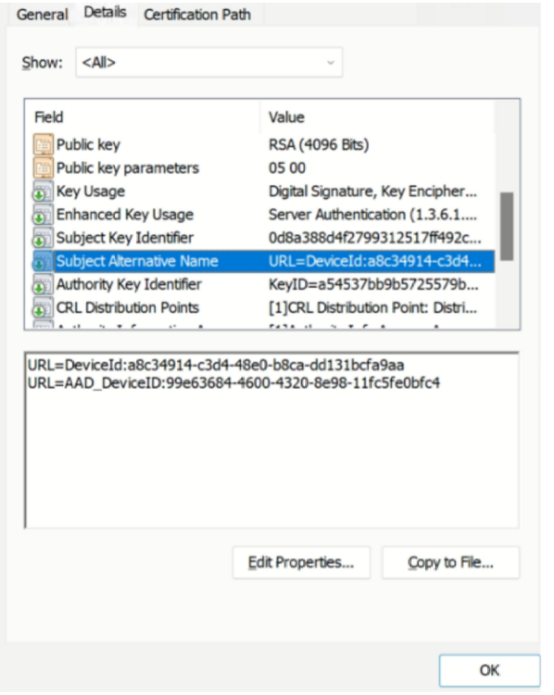
    The customer adjusted their profile in SCEP to produce the proper certificate with the necessary attributes.

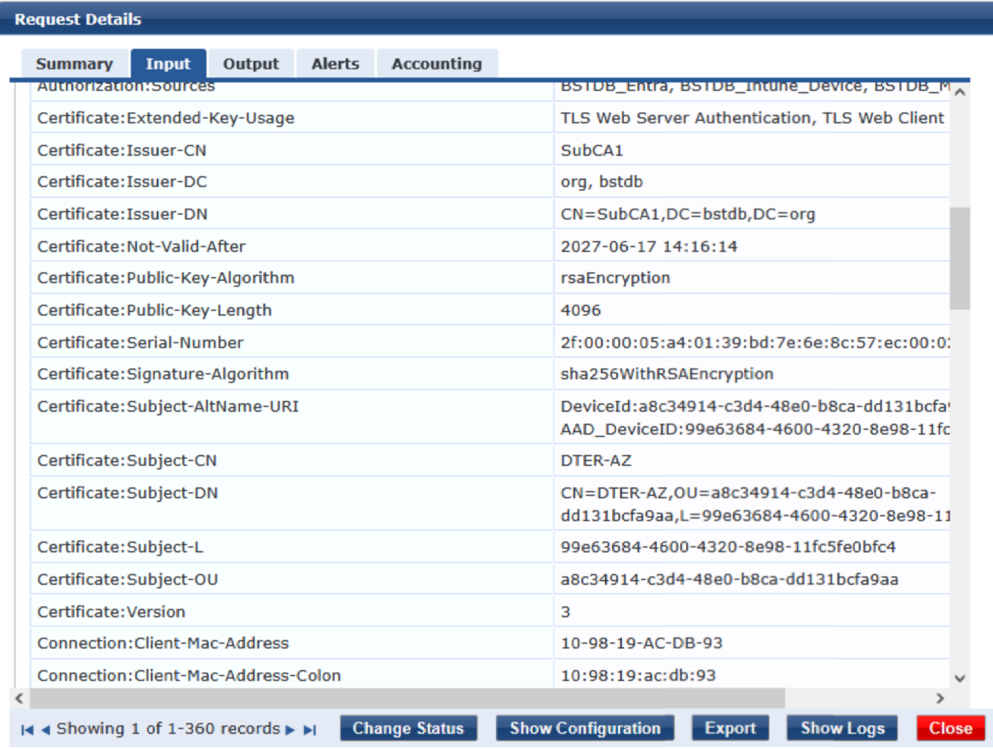
    So, now we are getting the Certificate:Subject-L attribute in the access tracker.

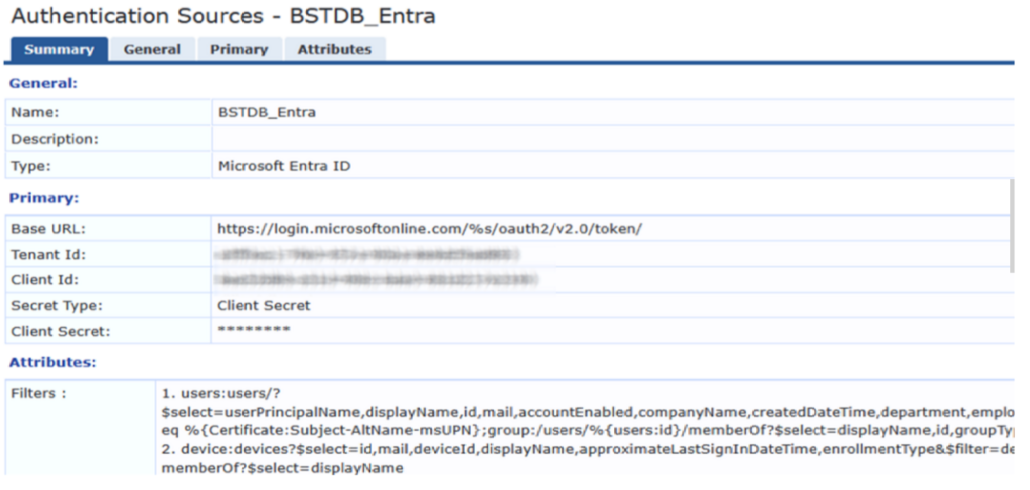
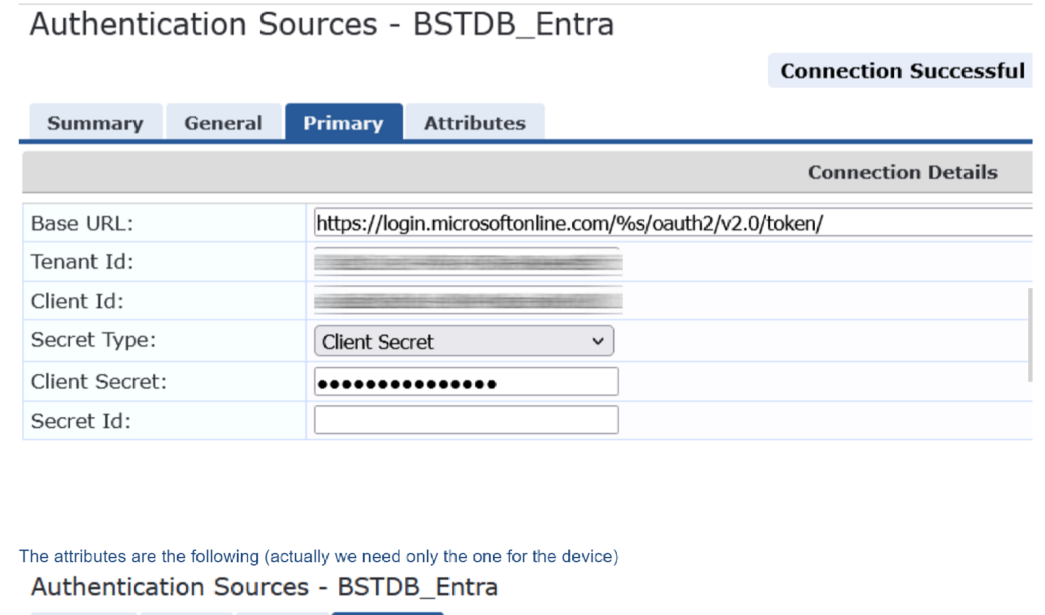
    Our Authorization source is like following and the connection test is successful:

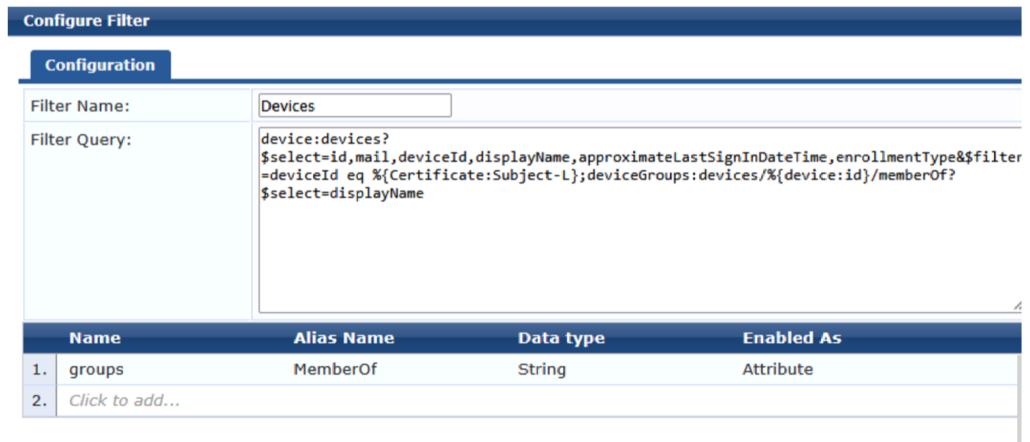
    Based on the filter used above, we would expect the information regarding the group membership of the device to be seen, possibly in the Access Tracker, under the authorization attributes. However, we can't see anything related to Entra authorization source attributes from the device. We have a test PC which belongs to the group called "CPPM-Admin-Devices".

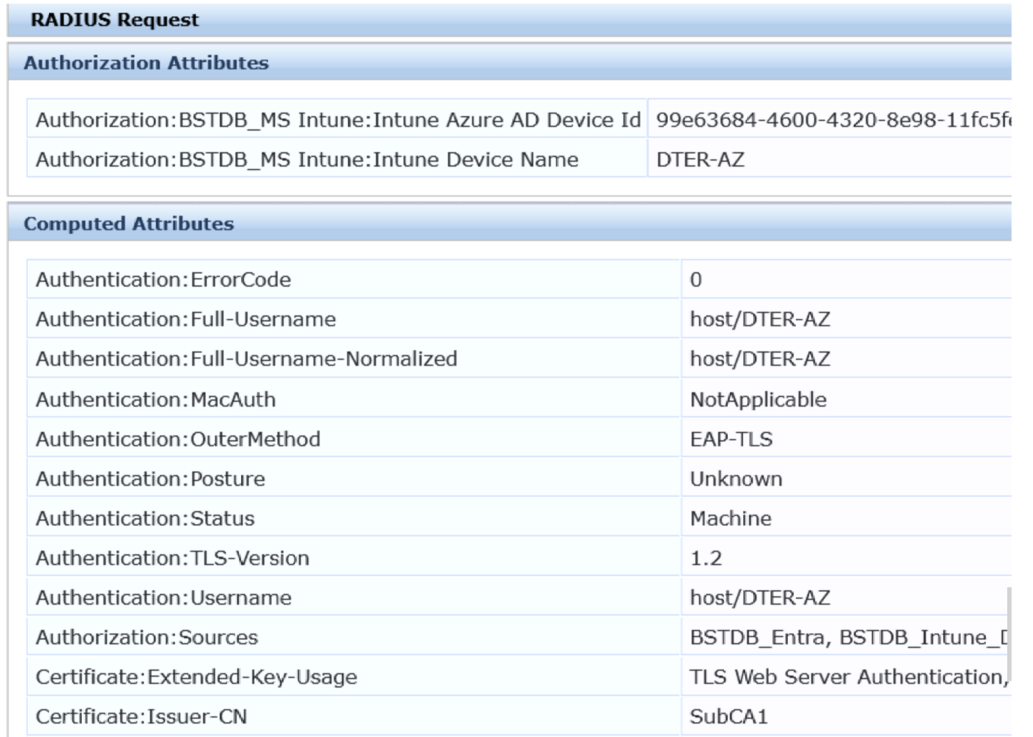
    In the Access Tracker, you can see the Authorization sources configured, which includes the Entra but on the Authorization Attributes section, there is nothing coming back from that authorization source.

    Any ideas on what we are missing? The important is to get the group membership info for each device.

    Thanks in advance


  • 2.  RE: Clearpass not getting group membership from EntraID

    Posted Jun 26, 2025 03:50 AM
    Edited by Vossi Jun 26, 2025 03:51 AM

    We have had nearly the same issue. Maybe i can help a little : In  EntraID device lookup with TEAP | Security Herman Robers Post from Jul 30 shows you the Filter Query and Attributes you could use. (Last Sign in Date was not available in my test scenario).   I had to adjust the Query because the Entra Device ID is in my test scenario not in {Certificate:Subject-L} but in {Certificate:Subject-CN} so not that huge adjustment in the Query. I think renaming the Attributes to device.<Fieldname> did the trick ? 


  • 3.  RE: Clearpass not getting group membership from EntraID

    Posted Jun 26, 2025 05:40 AM

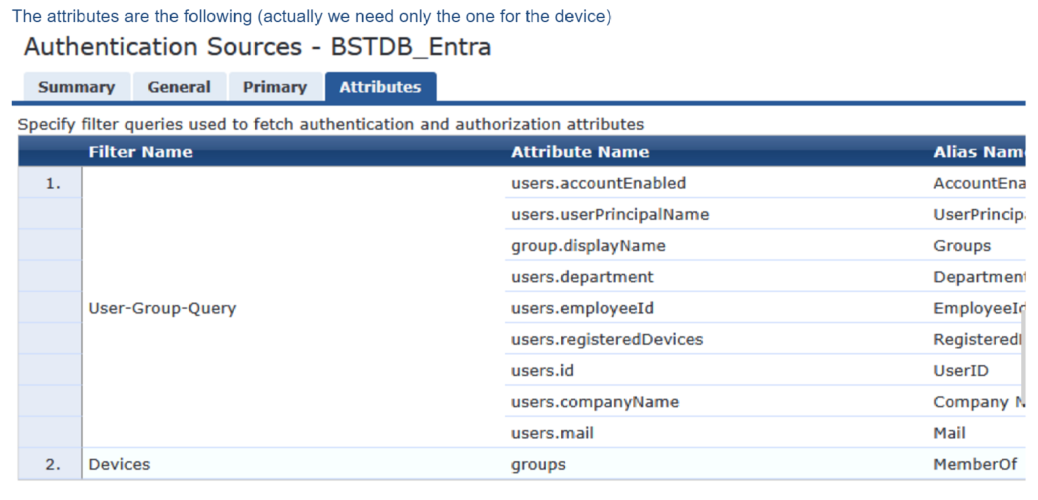
    Based on your output it looks like the Entra auth source contains an incorrect alias. The alias in your example is called groups. However this one doesn't exists. The correct ons is "deviceGroups.displayName". See the screenshot below. The query itself looks good. 

    Also make sure to add the right permissions in Entra. ClearPass should have access to the DeviceGroups. 


    ------------------------------
    Willem Bargeman
    Systems Engineer Aruba
    ACEX #125
    ------------------------------


  • 4.  RE: Clearpass not getting group membership from EntraID

    Posted Jun 26, 2025 09:16 AM

    We made the adjustment but we still don't get any input regarding the device group.

    The attributes of the Entra authorization source are like:

    The permissions on Entra looks good.

    We would expect to see the required info in Access Tracker, under the Input Tab and under the Authorization Attributes section or under the Computed Attributes starting with Authorization. Is that correct? If not, where should we expect to see this info?

    Regards

    Kostas


  • 5.  RE: Clearpass not getting group membership from EntraID

    Posted Jun 26, 2025 09:26 AM

    Yes, the attributes will be displayed under the authorization attributes.

    To double check, the EntraID source has been added to the services as an Authorization source? Keep in mind that the EntraID source has a default cache timeout of 300 seconds. Maybe for testing set it to 0 (make sure to set it back). Did you check if the Device ID is correct?


    ------------------------------
    Willem Bargeman
    Systems Engineer Aruba
    ACEX #125
    ------------------------------


  • 6.  RE: Clearpass not getting group membership from EntraID

    Posted Jun 27, 2025 05:20 AM

    Thank you for the advises and help. Unfortunately it still doesn't work.

    We've set the cache timeout to 0 for the tests.

    Entra is as Authorization source in the service along with Intune and Endpoints DB.

    We are still getting the authentication request on Access Tracker

    But no info about the groups the device belongs to:

    We get the DeviceID from the certificate the device provide to us during the authentication. So, we use this in the filter to read but nothing is returned. The question is, even if the Device ID is wrong or doesn't exist, shouldn't we receive the fields even empty or wrong? In our case, even though the Device ID is correct, we don't see those fields at all. What we are missing here?

    Best Regards,


  • 7.  RE: Clearpass not getting group membership from EntraID

    Posted Jun 27, 2025 05:27 AM

    If the device can't be found you don't see anything in the access tracker. I see I shared a incorrect screenshot. 

    In my example I did fetch the DeviceID from the EndpointDB because of my lab setup. Please change it to %{Certificate:Subject-L} because that one contains the deviceID in your setup I believe. So the query is:

    device:devices?$select=id,displayName&$filter=deviceId eq %{Certificate:Subject-L};deviceGroups:devices/%{device:id}/memberOf?$select=displayName


    ------------------------------
    Willem Bargeman
    Systems Engineer Aruba
    ACEX #125
    ------------------------------


  • 8.  RE: Clearpass not getting group membership from EntraID

    Posted Jun 27, 2025 05:39 AM

    @kmich, regarding logging.

    When you collect Policy Manager logs from the ClearPass appliance, the are more logs available in the file: PolicyManagerLogs/async-netd/identityservice.log

    Errors are listed in that log file. For example

    2025/06/27 08:47:34 server.go:64:identityservice/server.(*RequestHandler).azureAuthorizationRequest:  R00000053-02-685e3e86::request received for 8c0f80ae-e02a-4f81-a634-18bd653dd5b9: making authorization request for auth-source 3008:3024
    2025/06/27 08:47:34 server.go:64:identityservice/server.(*RequestHandler).azureAuthorizationRequest:  R00000053-02-685e3e86::request received for willembargeman@7r32sx.onmicrosoft.com: making authorization request for auth-source 3006:3011
    https://graph.microsoft.com/v1.0/devices?$select=id,displayName&$filter=deviceId eq '8c0f80ae-e02a-4f81-a634-18bd653dd5b9'
    https://graph.microsoft.com/v1.0/users/?$select=userPrincipalName,displayName,id,accountEnabled,companyName,createdDateTime,department,employeeId,lastPasswordChangeDateTime,registeredDevices&$filter=mail eq 'willembargeman@7r32sx.onmicrosoft.com'
    https://graph.microsoft.com/v1.0/devices/6715ed8c-7a65-49b4-acd5-a32b8596d870/memberOf?$select=displayName
    2025/06/27 08:47:34 WARN azure.go:293:identityservice/azure.(*AzureIdentity).processAuthorizationResponse: R00000053-02-685e3e86::no records/response found for the request 
    2025/06/27 08:47:34 WARN azure.go:333:identityservice/azure.(*AzureIdentity).RequestAuthorization: R00000053-02-685e3e86::no records found in the response
    2025/06/27 08:47:34 server.go:95:identityservice/server.(*RequestHandler).azureAuthorizationRequest: R00000053-02-685e3e86::authorization request took 349.297654ms
    2025/06/27 08:47:34 server.go:95:identityservice/server.(*RequestHandler).azureAuthorizationRequest: R00000053-02-685e3e86::authorization request took 421.759126ms


    ------------------------------
    Willem Bargeman
    Systems Engineer Aruba
    ACEX #125
    ------------------------------


  • 9.  RE: Clearpass not getting group membership from EntraID

    Posted Jun 27, 2025 08:42 AM
    Edited by Vossi Jun 27, 2025 09:02 AM

    maybe try following script to check Entra ID Permission set correctly ? 

    # Step 1: Define Variables
    $tenantId = "<Your-Tenant-ID>"
    $clientId = "<Your-Client-ID>"
    $clientSecret = "<Your-Client-Secret>"
    $graphApiUrl = "https://graph.microsoft.com/v1.0/devices"
     
    # Step 2: Get Access Token
    $body = @{
        grant_type    = "client_credentials"
        client_id     = $clientId
        client_secret = $clientSecret
        scope         = "https://graph.microsoft.com/.default"
    }
    $tokenResponse = Invoke-RestMethod -Method Post -Uri "https://login.microsoftonline.com/$tenantId/oauth2/v2.0/token" -Body $body
    $accessToken = $tokenResponse.access_token
     
    # Step 3: Query Devices
    $headers = @{
        Authorization = "Bearer $accessToken"
    }
    $response = Invoke-RestMethod -Method Get -Uri $graphApiUrl -Headers $headers
     
    # Step 4: Display Device IDs
    $response.value | ForEach-Object {
        Write-Output "Device Name: $($_.displayName), Device ID: $($_.id)"
    }

    will result in listing a few devices.

    I'm unsure if the "Microsoft Entra ID" Authentication Source uses the Graph API, but from my understanding you can check the permissions, because you use the same TennantID / ClientID (App ID) / Secret


  • 10.  RE: Clearpass not getting group membership from EntraID

    Posted Jun 27, 2025 09:20 AM
    Edited by kmich Jun 27, 2025 09:28 AM

    We get the following.


  • 11.  RE: Clearpass not getting group membership from EntraID

    Posted Jun 27, 2025 09:30 AM

    are you looking for devices or users ? 


  • 12.  RE: Clearpass not getting group membership from EntraID

    Posted Jun 27, 2025 09:52 AM

    We want to look for devices. The reply above is for a user but this was only for test to check if we get responses from Entra. Since we are not familiar with MS and especially with Graph, most probably the query was not correct to get device info. However, it looks like we are getting some response from Entra. The problem is that from Clearpass we are not getting the info we want about the device groups.


  • 13.  RE: Clearpass not getting group membership from EntraID

    Posted Jun 27, 2025 10:49 AM

    Did you take a look into the log file PolicyManagerLogs/async-netd/identityservice.log? If possible, share that file or a part of it.


    ------------------------------
    Willem Bargeman
    Systems Engineer Aruba
    ACEX #125
    ------------------------------


  • 14.  RE: Clearpass not getting group membership from EntraID

    Posted Jul 01, 2025 10:17 AM

    Finally the issue was resolved after Willem suggestions.

    There were two issues. The first one was with the secret id which was not assigned on clearpass Authorization source and the second one was in the filter query where instead of filter=deviceId we had filter=displayName.

    Thank you all for your help and especially Willem.


  • 15.  RE: Clearpass not getting group membership from EntraID

    Posted Jul 01, 2025 03:18 AM

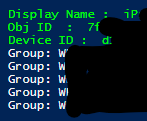
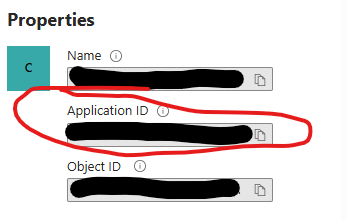
    maybe good idea to check the permissions and to clarify some things. Pls. have a look into your Entra Portal, and get the Device ID and Object ID of one Device that's member of one or more Groups i.e.then fill your data into this script. Tennant ID / Client ID (Thats the App ID from Entry ID ) Like this : the Client Secret you will get only once when creating the APP Registration, or when creating a new Client Secret.   Fill into the following Powershell Script, and run the Script.
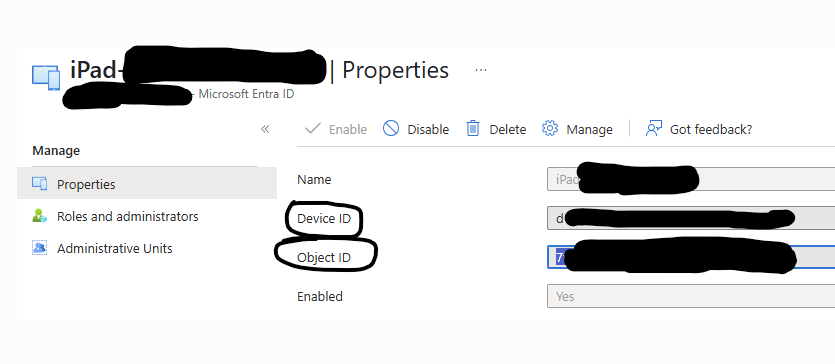
     
     # 🔍 Replace with your specific device ID (This is a "ENTRA DEVICE OBJECT ID" not a Device ID from device Properties in Entra !!!)
     $ObjectId = "XXyout data XXXXXX-XXXX-XXXX-XXXX-XXXXXXXXXXX" 
     
    # Define credentials and endpoints 
    $tenantId = "your-tenant-id" 
    $clientId = "your-client-id" 
    $clientSecret = "your-client-secret"
     
     
     $scope = "https://graph.microsoft.com/.default" 
     $tokenUrl = "https://login.microsoftonline.com/$tenantId/oauth2/v2.0/token" 
     
     # Get access token 
     $Body = @{
        client_id = $clientId
        scope = $scope
        client_secret = $clientSecret
        grant_type = "client_credentials"
     }
     $tokenResponse = Invoke-RestMethod -Method Post -Uri $tokenUrl -Body $Body 
     $accessToken = $tokenResponse.access_token 
     
     $headers = @{ 
        "Authorization" = "Bearer $accessToken" 
        "Content-Type" = "application/json" 
        } 
     
     
     # Get group memberships for the device 
     $Uri = "https://graph.microsoft.com/v1.0/devices/" +  $ObjectId 
     $EntraObj = Invoke-RestMethod -Uri $uri -Headers $headers 
     Write-host ("Display Name : ", $EntraObj.displayName) -ForegroundColor Green
     Write-host ("Obj ID  : ", $EntraObj.id )-ForegroundColor Green
     Write-host ("Display Name : ",$EntraObj.deviceId) -ForegroundColor Green
     
     $Uri = "https://graph.microsoft.com/v1.0/devices/" +  $ObjectId + "/memberOf"
     $groupMemberships = Invoke-RestMethod -Uri $uri -Headers $headers 
     
     # Display results 
     foreach ($group in $groupMemberships.value) { 
         Write-Host "Group: $($group.displayName) [$($group.id)]"
     } 
     

    If your Tenannt ID / Device ID /  App ID and Client Secret, and permissions are ok you will get a response like this: if you get this, you have to dig deeper into Clearpass, if you do not get this output you have a problem in Entra or variables. This Script ist just to check if settings / Permission in Entra are correct. Just to point into a direction to look, and to check Permissions and Variables.