Hey Miguel and good morning :)
Yeah I followed that from the beginning....
I got way too excited when I first saw Cloud Onboarding, in that I could onboard clients without needing to do anything woohoo!!!
It all seemed straightforward for setup.
Add the client MAC addresses, as per screen shot example:
Connect up Azure AD and link with SSID
(I'm selecting a AD group object (originated from AD on-prem) containing corporate devices)
The Onboarding App seems equally straightforward. I've installed, profile added, authenticated via Microsoft creds and certificate installed.
Prerequisites for Onboarding states:
On Windows devices, ensure that the Wi-Fi adapter is enabled to install the network profiles and connect to the network.
1. I don't fully understand how you'd check the adapter is enabled for network profiles.
- 2. Perhaps the Azure API graph isn't passing through properly so I'll take another look at that.
3. Or perhaps the MAC address format in the screen shot isn't correct. I recall a conversation with Aruba status that Address and Name need to be the same as shown.
------------------------------
Leo Pickford
------------------------------
Original Message:
Sent: Feb 17, 2022 02:16 PM
From: Miguel Goncalves
Subject: Cloud Authentication - RADIUS not configured?
Ah, I see... and have you followed the workflow for cloud authentication? See:
https://help.central.arubanetworks.com/2.5.4/documentation/online_help/content/nms/policy/prov-clients-wireless.htm
------------------------------
Miguel Goncalves
Original Message:
Sent: Feb 17, 2022 01:23 PM
From: Leo Pickford
Subject: Cloud Authentication - RADIUS not configured?
Interesting thank you.
I'm now testing with a new WLAN config which is using MAC Authentication, Primary server: Cloud Auth
Clients error on connecting, wont get past MAC authentication
I've asked Aruba support to confirm where the MAC addresses for said clients need to be. I think it's Global, Security, Authentication, etc
------------------------------
Leo Pickford
Original Message:
Sent: Feb 17, 2022 11:57 AM
From: Miguel Goncalves
Subject: Cloud Authentication - RADIUS not configured?
Well, I'm pretty sure you need a RADIUS authenticator somewhere, whether on cloud or on premises. If you have a hybrid Microsoft deployment - your words! - you could already have a NPS on site.
The question is: what do you have configured as authentication servers on your WLAN?
------------------------------
Miguel Goncalves
Original Message:
Sent: Feb 17, 2022 11:40 AM
From: Leo Pickford
Subject: Cloud Authentication - RADIUS not configured?
Hi Miguel,
Ok understood.
So do you think NPS is a requirement for Cloud Auth? and would explain why I keep getting Client MAC Authentication Reject?
Thank you so much,
Leo.
------------------------------
Leo Pickford
Original Message:
Sent: Feb 17, 2022 11:12 AM
From: Miguel Goncalves
Subject: Cloud Authentication - RADIUS not configured?
Hi Leo,
The NPS role doesn't necessarily run on a Domain Controller. Any member server can have it.
------------------------------
Miguel Goncalves
Original Message:
Sent: Feb 17, 2022 09:24 AM
From: Leo Pickford
Subject: Cloud Authentication - RADIUS not configured?
Hello,
Thank you for your message.
No there is not. Just checked the PDC and other DCs on-prem. Network Policy and Access Service role is not installed on our Windows Server 2021 R2 domain controllers.
Haven't got anywhere with pcap via Wireshark to fathom the problem so I've deleted the Aruba Central configuration for CloudAuth and corresponding SSIDs config.
Tested a new SSID with simple security and all clients connect so the IAP and related infrastructure appears to be fine.
When our client computers connect they show as NameNumberlocalaplbdom
I wouldn't be surprised (albeit a total guess) that there is some kind of mismatch between our domain computers, azure and the Aruba onboarding certificate. That and we actually do need some kind of RADIUS server on-prem but what do i know.
------------------------------
Leo Pickford
Original Message:
Sent: Feb 17, 2022 08:47 AM
From: Miguel Goncalves
Subject: Cloud Authentication - RADIUS not configured?
You said you have a "hybrid on-prem domain" - is there a Microsoft RADIUS Server (a domain server with the NPS role) on the same site as the APs?
------------------------------
Miguel Goncalves
Original Message:
Sent: Feb 16, 2022 07:39 AM
From: Leo Pickford
Subject: Cloud Authentication - RADIUS not configured?
Hello,
Thanks for your reply.
I had been testing with the configuration you suggest for months but with no joy.
Looked through the document reference and it's setup as I think it suggests.
I did try changing the 'Role' from Unrestricted to 'Role Based' but it's made no difference.
Errors continue to be:
Client 802.1x Radius Reject and Client EAP Failure
When trying to connect to the SSID I'm using Windows Credentials, Certificate but get the same issue.
The client computer has then enrollment certificate installed.
Tested using different hardware and same issue.
I'm at a loss. It seems to be a cred mismatch somewhere along the lines. The client computer isn't getting past the first step of authentication...
------------------------------
Leo Pickford
Original Message:
Sent: Feb 15, 2022 05:20 PM
From: Ariya Parsamanesh
Subject: Cloud Authentication - RADIUS not configured?
no you don't need a RADIUS server, you need to select "CloudAuth" as your authentication server
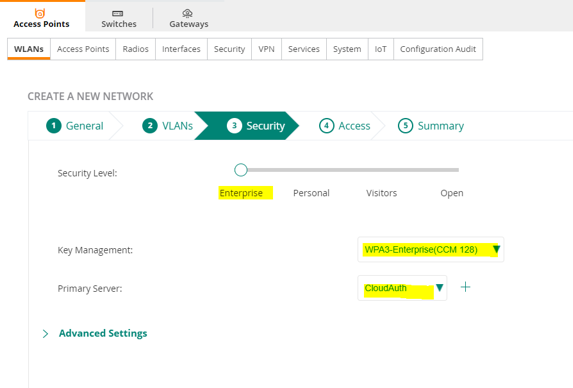
https://help.central.arubanetworks.com/2.5.4/documentation/online_help/content/nms/access-points/cfg/networks/cfg-ca-wlan.htm
------------------------------
Any opinions expressed here are solely my own and not necessarily that of Hewlett Packard Enterprise or Aruba.
Original Message:
Sent: Feb 15, 2022 08:43 AM
From: Leo Pickford
Subject: Cloud Authentication - RADIUS not configured?
Hello,
Any help with this would be greatly appreciated. I have an open ticket with Aruba support but we're not getting anywhere and it's been months so far...
I have Instant APs (AP-515) with Aruba Central.
Whatever I try I cannot get client computers to authenticate.
Setup in brief is: (Hybrid on-prem Domain, Azure AD Connect) Cloud Authentication to connect to the SSID. WPA3, Enterprise, Cloud Auth
Errors are always RADIUS related. e.g. 802.1x Radius Reject received for client ac:etc on BSSID cc:etc on channel 52E of AP hostname cc:etc. Reason: Rejected from radius server
The summary for the SSID config shows internal auth for client so I'm wondering if under System, Administration Client Configuration should be changed from Internal to RADIUS?
I do not have internal RADIUS server. I assumed that using Cloud Authentication that role would be via Aruba Central or Azure somehow.
Ignorance on my part here...
Thank you,
Leo.
------------------------------
Leo Pickford
------------------------------