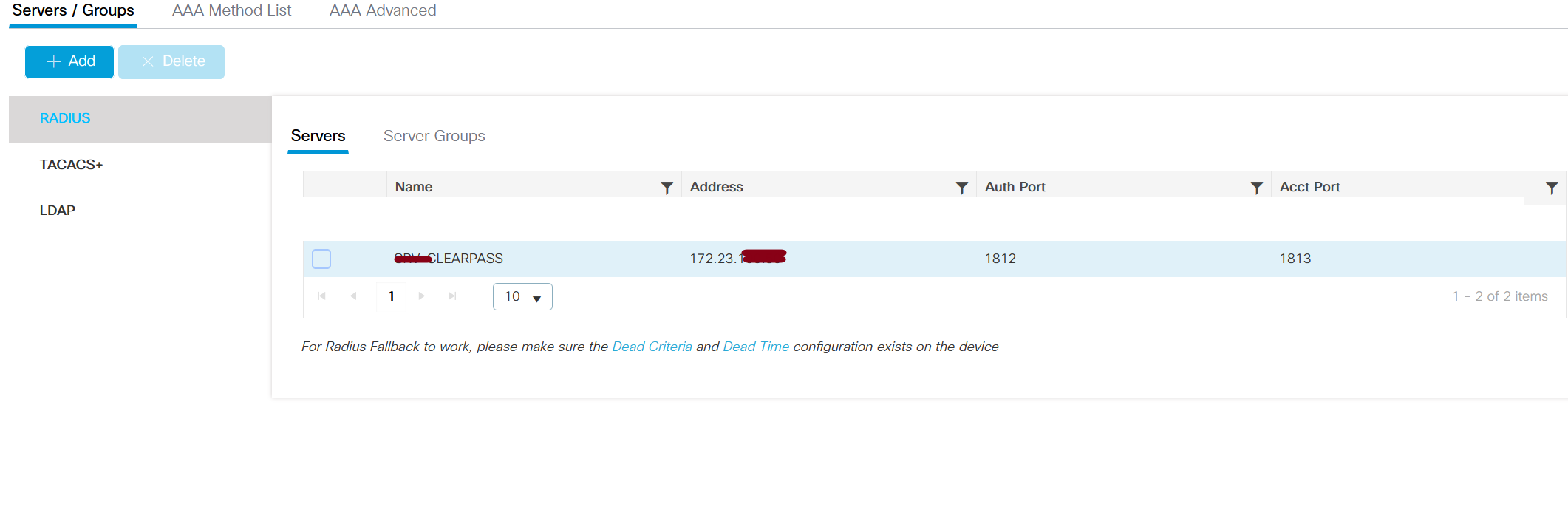
I configured the IP clear pass MGMNT IP 172.23.x.x from the Side WLC without using an IP dataport. Is it significant? Perhaps not, given the goal is to get communication againt the radius clear pass possible. Is that not so?
If you think this is a crucial issue, I can go back and add the IP dataport. I sent you a screen grab so you could clearly comprehend my point
The firewall rule was enabled as a result, which is why the ping between the clear pass dataport and the vlan guest controller is consistent.
I want to comment to you the clear pass is on virtyual machine .
In order to receive this communication between the guest on VLAN 19 and WLC on the virtual machine, on the port of the virtual machine was set up as acces vlan 19
From dataport there is no comunicaction betwwen mgmnt and guest . t
I requested to my customer some tests when when he is connecting through ssid guest
I requested to him when he is connecting ssid guest if I go to google what is see on the browser for first time
I sent to him the link to copy and paste directly into the browser to check if the portal is viewable. sent resoult changed the ip for dataportip 172.28x.x.
Original Message:
Sent: Nov 09, 2023 06:56 AM
From: ahollifield
Subject: CPPM portal guest WLC 9800
You need to make sure the Data port IP address is in the ACL on the 9800. Then you need to include the data port IP address as part of the guest redirect URL you are sending to the 9800 in the RADIUS result. Finally do your guest endpoints actually have routed access to the data port IP of the ClearPass server? Are there any firewall rules or ACLs that needs to be changed in other parts of the network to allow this communication?
Original Message:
Sent: Nov 08, 2023 05:08 PM
From: cadcam
Subject: CPPM portal guest WLC 9800
Hi ,thanks for your reply
For the moment , The plan is that the wifi guest was tested by the customer , for now , I don't care about the warning or the certificate;
all I want is for my customer to see the portal show up when connect to an SSID guest_test.
Any solution or idea for this test ?
Original Message:
Sent: Nov 08, 2023 09:28 AM
From: ahollifield
Subject: CPPM portal guest WLC 9800
Yes you need DNS. Without DNS client certificate trust of the public certificate of the guest portal will not work. All of your guests will see certificate warnings without DNS or a public certificate.
You need to create a DNS record for the data interface on whatever DNS server your guest clients are connected to. If they are pointed to public DNS, you need to create a public DNS entry.
Original Message:
Sent: 11/8/2023 9:13:00 AM
From: cadcam
Subject: RE: CPPM portal guest WLC 9800
Hi, I'm sorry, but I don't understand. I'm currently having trouble to understand how to make in this case with DNS resolution.
However, the dataport is only accessible to vlan guests . How can I make the dataport guest user reach the prtalguest now that it is in the MGMNT 172.23.x.x.x?
As of right now, DNS resolution is nonexistent.
Would you please let me know if creating a DNS resolution in the data port is required?
What are the best way for creating a DNS resolution?
I will need to created a entrance for resolve name clear pass (srv-clearpass) trought ip dtatport 172.28.50.80 and will need to create a reverse resolving the ip dataport 172.28.50.80 for srv-clearpass.
Would that be accurate?
Will I Need to Create Another DNS Resolution in the Same Way for the Management Port?
The final step would be to add a rule to the guest user firewall to reach the ip domain server . or to further improve security, make this DNS was recheable for public so that guest users can access it without needing to activate a rule on the firewall to reach dns server
Original Message:
Sent: Nov 08, 2023 06:36 AM
From: ahollifield
Subject: CPPM portal guest WLC 9800
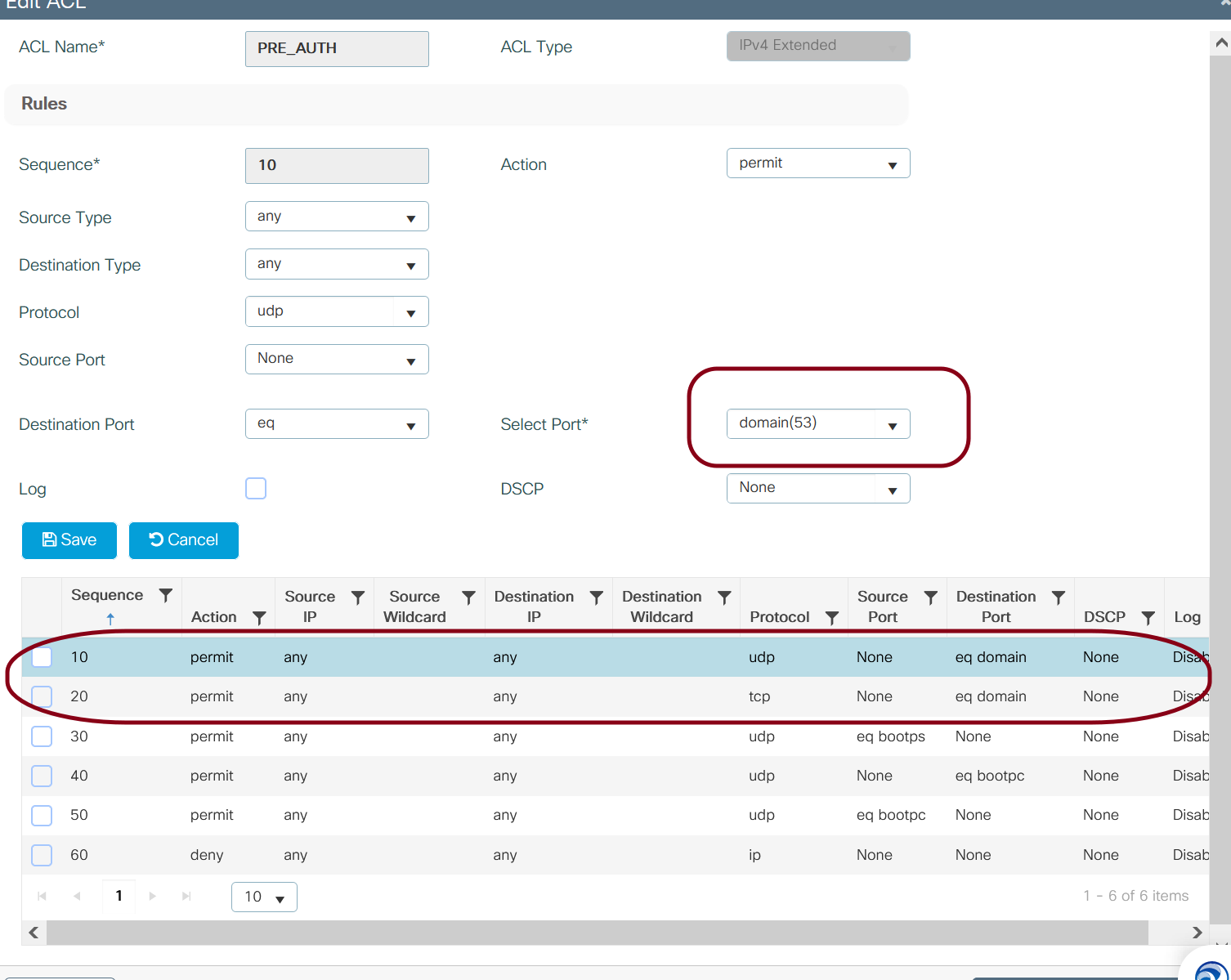
The first ACL is correct. The second ACL is wrong. You must use DNS for this. The DNS should resolve to the data port IP. If you don't use DNS you will have certificate warnings. You will also need a public certificate for this as well
Original Message:
Sent: 11/8/2023 3:51:00 AM
From: cadcam
Subject: RE: CPPM portal guest WLC 9800
Sure, I have two ACL that I'll show you.
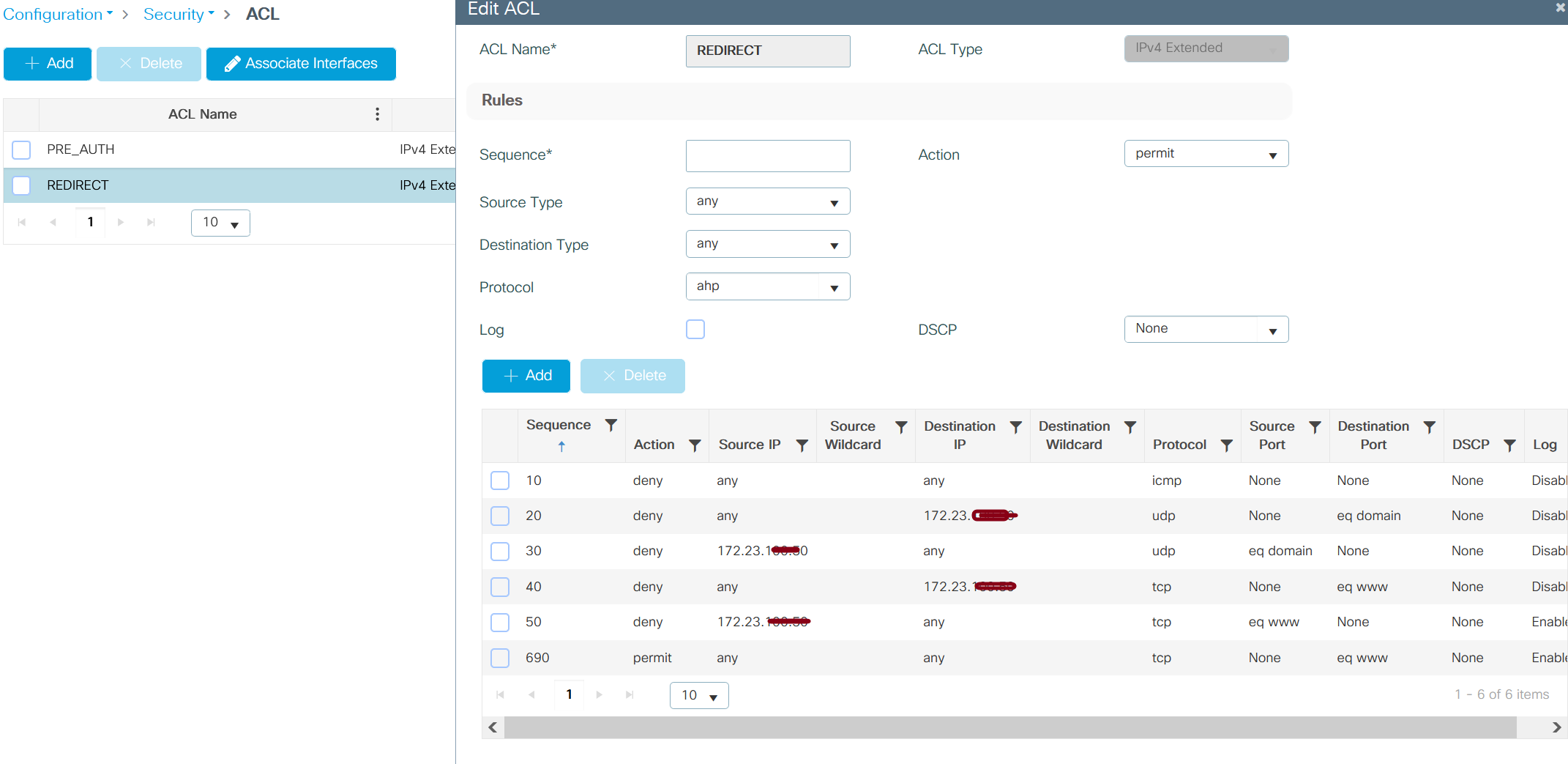
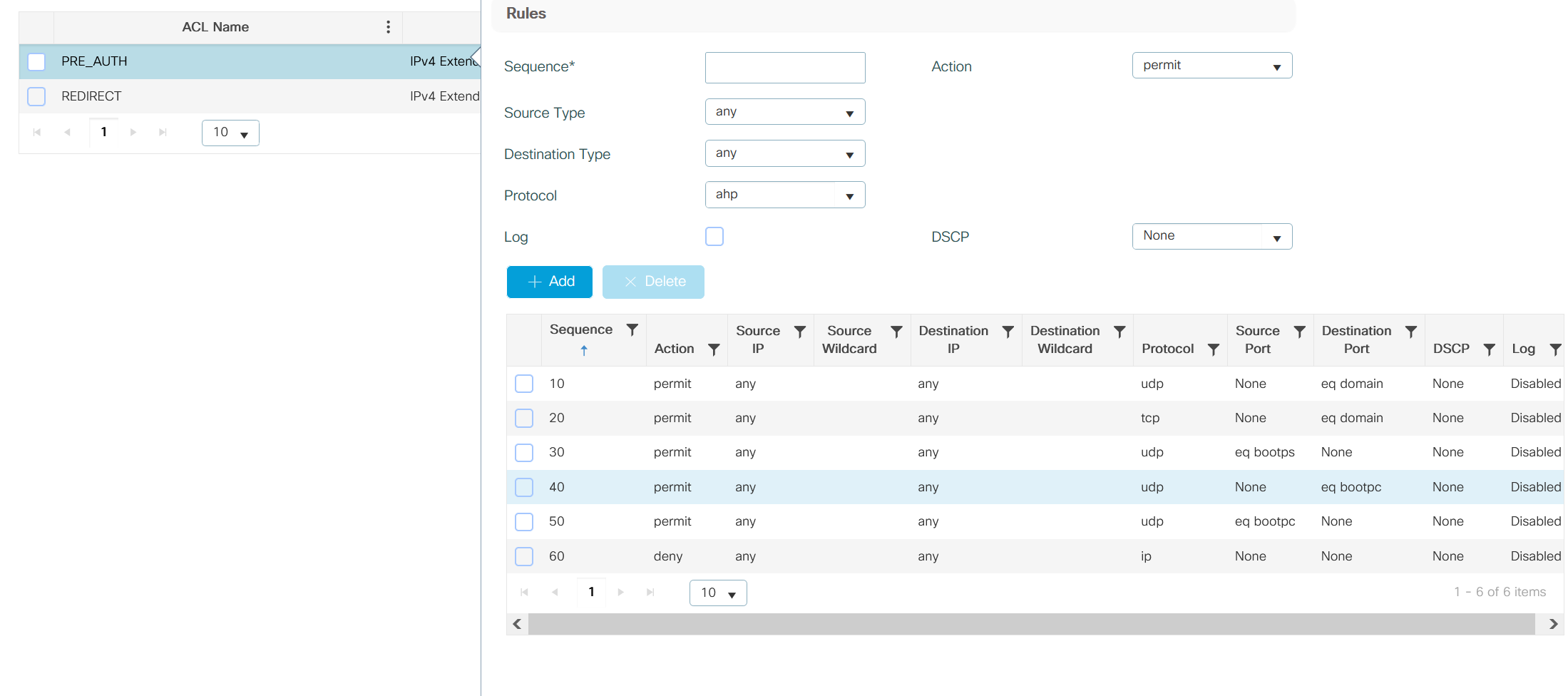
I would like to get my questions about this theme answered.
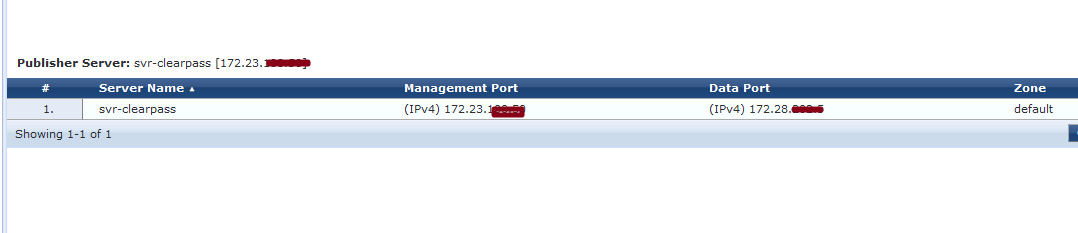
The plan was to configure two ports on clear pass MGMNT only for MGMNT. (network172.23.x.x)
DATAPORT only, guests user
(Network 172.28.x.x)
The MGMN firewall rule is exclusively for network management; it is not reachable for data port .
DATAPORT is recheable from clear pass to WLC vlan_guest .
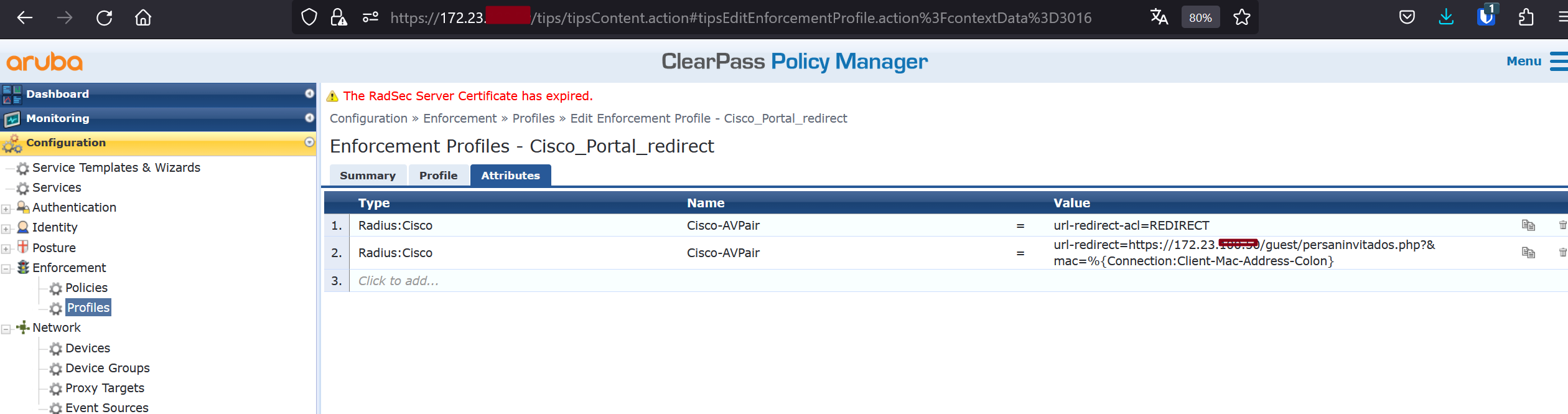
When I created a portal guest, by default, the IP address was https://172.23.x.x/guest/xxxxx.php? This is for management IP belongs to MGMNT, in case a guest user tries to access this network segment.
The firewall rule cannot communication between management and the data port.
I updated the enforcement profiles to IP address to url-redirect=https://172.28.0.0/guest/xxxx.php?&mac=%{Connection:Client-Mac-Address-Colon} in order to conduct a test.
However, the dataport IP cannot be obtained using https for a clear pass. I f i put on the browser the dataport ip https://172.28.50.80 I dont have access to clear pass console
How can I set up the dataport network on the Clear Pass guest portal? and to do this dataport ip was reachable?
Maybe is trought DNS resolve ?
If I put nslookup 172.23.50.50 clear pass management, nothing is resolved it because my customer does not have DNS setup. The same outcome would occur if I tried to use nsllokup data port 172.28.50.80, same resoult no dns resolve
Original Message:
Sent: Nov 07, 2023 10:30 AM
From: ahollifield
Subject: CPPM portal guest WLC 9800
Does the ACL REDIRECT actually exist on the 9800? Is it correct?