Security

 View Only
  • 1.  Customize guest receipt page

    Posted Mar 26, 2022 08:55 AM
    How can I customize the guest receipt page sent to the user?.
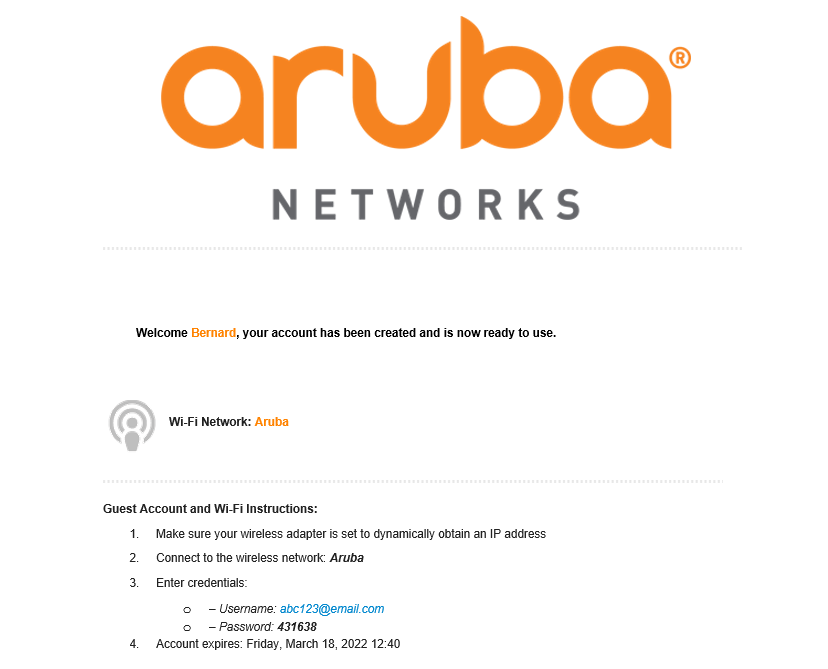

    I want to replace the "aruba NETWORKS" logo with my company logo and also the Wi-Fi Network name. From where can I change it?.

    Thanks,

    ------------------------------
    Ajin Skariah
    ------------------------------


  • 2.  RE: Customize guest receipt page
    Best Answer

    Posted Mar 28, 2022 02:08 PM
    Edited by AjinS Mar 30, 2022 04:03 AM
    I believe it's under administration > Plugin Manager > Skin Plugins > select your skin > look for logo and e-mail logo

    Images can be uploaded under Configuration > Content Manager
    ------------------------------
    Marcel Koedijk | MVP Expert 2022 | ACEP | ACMP | ACCP | ACDP | Ekahau ECSE | Not an HPE Employee | Opinions are my own
    ------------------------------


  • 3.  RE: Customize guest receipt page

    Posted Mar 30, 2022 02:00 AM
    Thank you Marcel. Where can I change the name of WiFi network in the email receipt? It is showing default "Aruba".

    Thanks,

    ------------------------------
    Ajin Skariah
    ------------------------------


  • 4.  RE: Customize guest receipt page

    Posted Mar 30, 2022 03:54 AM
    That is under Configuration > Guest Manager > Site SSID

    See also this link if you need different SSID's with there  one guest receipt: 
    https://community.arubanetworks.com/browse/articles/blogviewer?blogkey=46f40ae3-a826-4190-9626-7669b0cd4c05

    ------------------------------
    Marcel Koedijk | MVP Expert 2022 | ACEP | ACMP | ACCP | ACDP | Ekahau ECSE | Not an HPE Employee | Opinions are my own
    ------------------------------