Thanks Parnassus. I really appreciate all the help and insight. I'm currently digging into the Hyper-V environment and virtual switch\adapter settings. I will keep you updated when things progress.
Original Message:
Sent: Feb 06, 2025 06:14 AM
From: parnassus
Subject: DHCP Issue - Intervlan Routing with Dark Fiber
Hello Chad, I'm slowly running out of ideas (clearly the full picture is bigger than the one shown)...in any case, if I were you, I would check and analyze the current network topology highlighting all switches, the ones with IP Routing enabled acting as Layer 3 for their directly connected networks and the ones that are just acting as simple Layer 2 (seen as VLAN extensions from the Cores), the physical interconnections between them (also the connections to relevant infrastructure Hosts) and, finally, their full VLAN membership (so to understand for each peer port what VLANs are allowed and what is the reason for their transport). Basically you need to know what VLANs are defined, where their SVIs are declared (and routed) and where they are transported up to reaching the ports of access switches (where clients/servers/devices are mostly connected).
Original Message:
Sent: Feb 05, 2025 02:56 PM
From: CRO
Subject: DHCP Issue - Intervlan Routing with Dark Fiber
Yes, it does work.
Original Message:
Sent: Feb 05, 2025 02:47 PM
From: parnassus
Subject: DHCP Issue - Intervlan Routing with Dark Fiber
Guessing: the Guest OS Firewall blocking incoming IGMP? I mean it could not be necessarily a routing issue only...Core A (and any routed host behind it) should be able to ping any (freely responding) routed host behind Core B, this given the set of static routes defined on both switches (IIRC try to ping from Core A VLAN 100 SVI to a Core B VLAN 255 responding host: ping 10.18.100.x source 10.17.100.1 <- it must work).
Original Message:
Sent: 2/5/2025 1:38:00 PM
From: CRO
Subject: RE: DHCP Issue - Intervlan Routing with Dark Fiber
Yes, I believe everything you have stated is accurate.
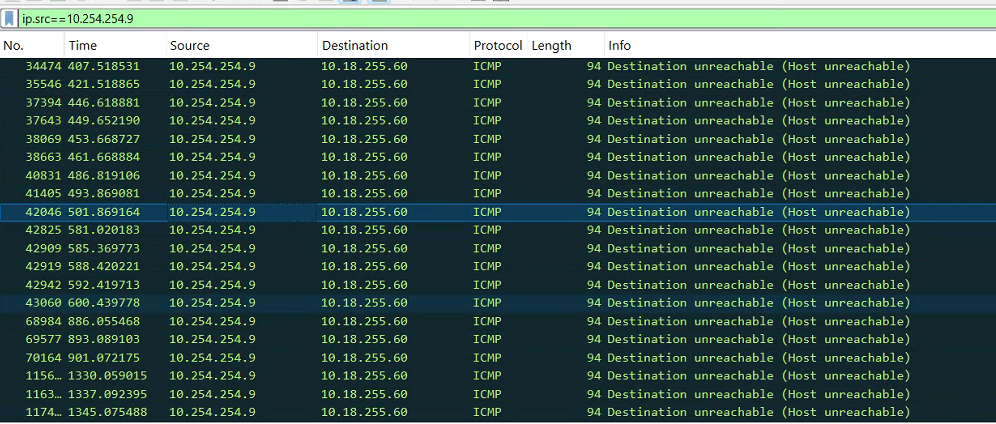
I have a laptop that I have set a static IP on, and added an adapter to test DHCP. I noticed this message when trying to do an ipconfig /renew. (Not sure why I havent seen this previously) but it appears there is not route back from Core A based on this...
Original Message:
Sent: Feb 05, 2025 12:35 PM
From: parnassus
Subject: DHCP Issue - Intervlan Routing with Dark Fiber
OK, DHCP Server appears to be essentially correctly configured, as far as I can see.
Let me answer your latter question first:
"I see the core A also has a default gateway set...but that isn't used if ip routes are used is it, or are we routing right out of the switch somehow?"
Your first assumption is the correct one, the DG is used by the Switch to reach non local networks but, when IP Routing is enabled, the Default Route (if present) wins in routing traffic destined to non directly connected networks.
About the Microsoft HyperV part...my assumption are (correct me if your scenario is different):
- The HyperV host has a Management Network with dedicated uplinks (directly from the Core A or through an intermediate switch in Data Room <- not unusual).
- The above uses a specific routed VLAN = Network Segment (VLAN SVI on Core A and the transported up to the above intermediate Switch, from this one up to the relevant HyperV host's NIC Port in scope.
- The HyperV host, via other NIC port(s), provide network connectivity between its hosted VMs and the physical network (as above, via intermediate Switch dedicated uplinks to host).
Given the above scenario...I expect that latter uplink(s) will carry (allow) all required VLANs (all required by hosted VMs and their network segments). The management uplink should carry only the management VLAN.
If the above is true then I expect that, somewhere, VLAN 100 is transported between the Core A and the intermediate Switch (Data Room) and between this latter one and the HyperV Host and the VM frontend NIC port. Does it sound reasonable?
If not...how is it possible for any HyperV's VM belonging to 10.17.100.0 /24 (VLAN 100) to reach any reachable destination on your physical network up to the Core A and beyond?
I'm unable to read all you pasted now, I'll do later for sure...so pardon me if these answers seem incomplete.
Original Message:
Sent: 2/5/2025 10:55:00 AM
From: CRO
Subject: RE: DHCP Issue - Intervlan Routing with Dark Fiber
(a) DHCP Server with - say - IP 10.17.100.7 Subnet mask 255.255.255.0 (/24)
This is correct.
(b) DHCP Server with Default Gateway set to 10.17.100.1 (SVI of VLAN 100 on Core A)
This is correct:
Gateway of the DHCP server is the IP of this SVI.
vlan 100
name "Servers"
tagged Trk2,Trk7,Trk17
untagged Trk9-Trk11
ip helper-address 10.17.100.7
ip helper-address 10.17.100.8
ip address 10.17.100.1 255.255.255.0
ipv6 enable
ipv6 address autoconfig
jumbo
exit
(c) DHCP Server with the right DHCP scope to serve the DHCP Clients belonging to VLAN 255 network segment on Core B
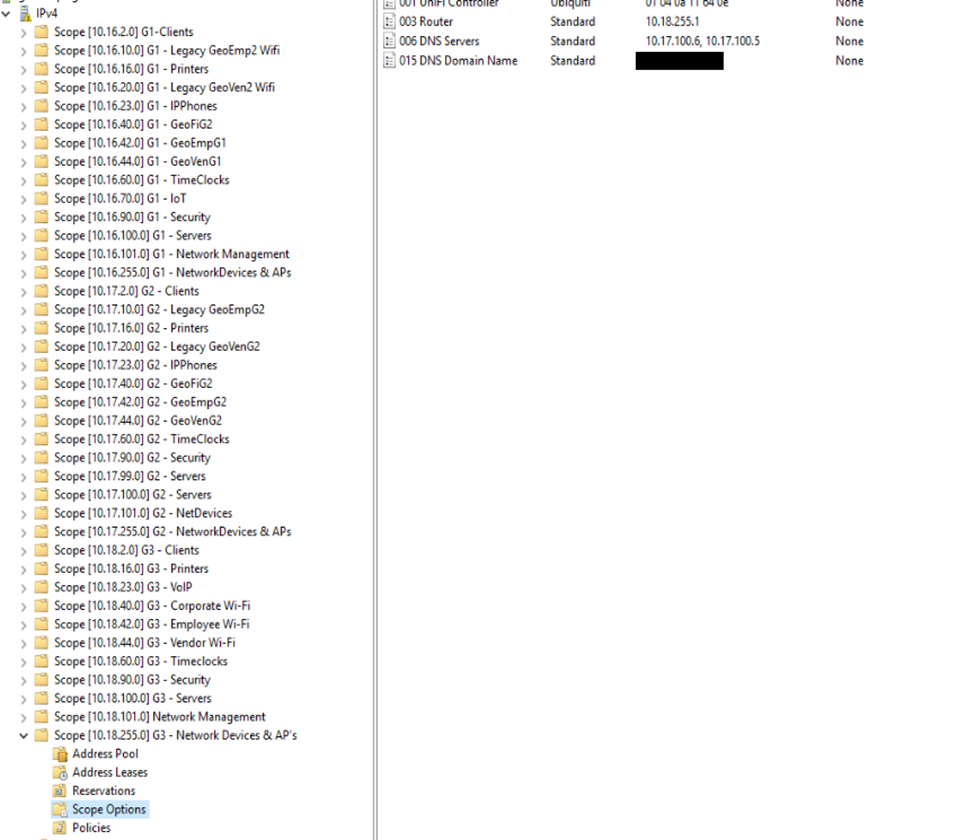
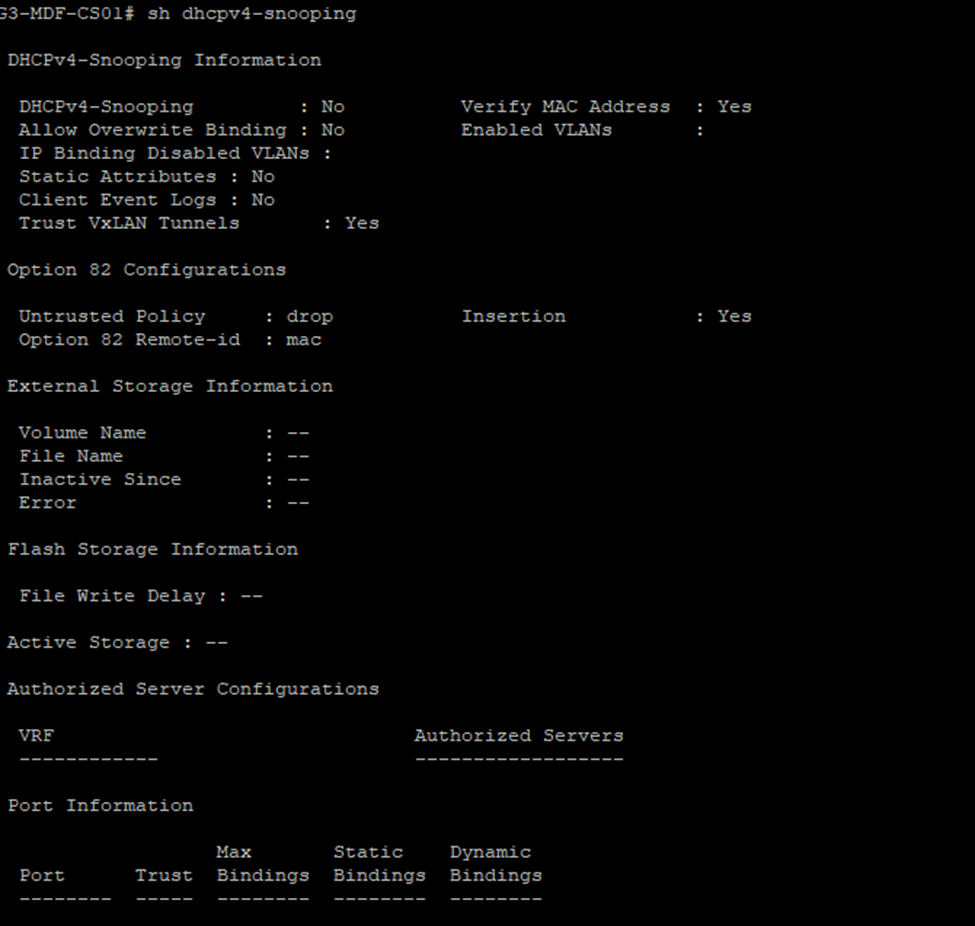
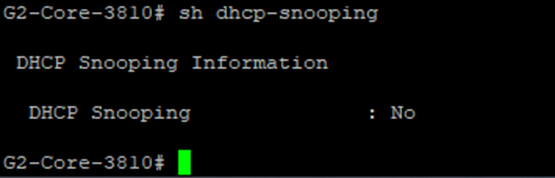
(d) no DHCP Snooping along the path (especially if the DHCP Server can be reached through another one switch from the Core A <- note that VLAN 100 is transported to a third switch).
No, here are the two cores. I spot checked some access switches as well, no snooping enabled.
The part that I don't really understand is the Hyper-V hosts have management IP's 10.17.99.x but the servers have an IP of 10.17.100.x. I tracked down where the ethernet cables of the servers go to, and they are connected to an access switch here:
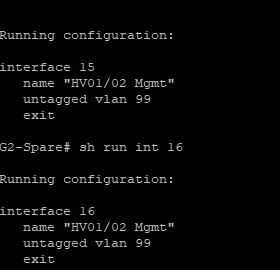
And to a switch labeled "out of band management"
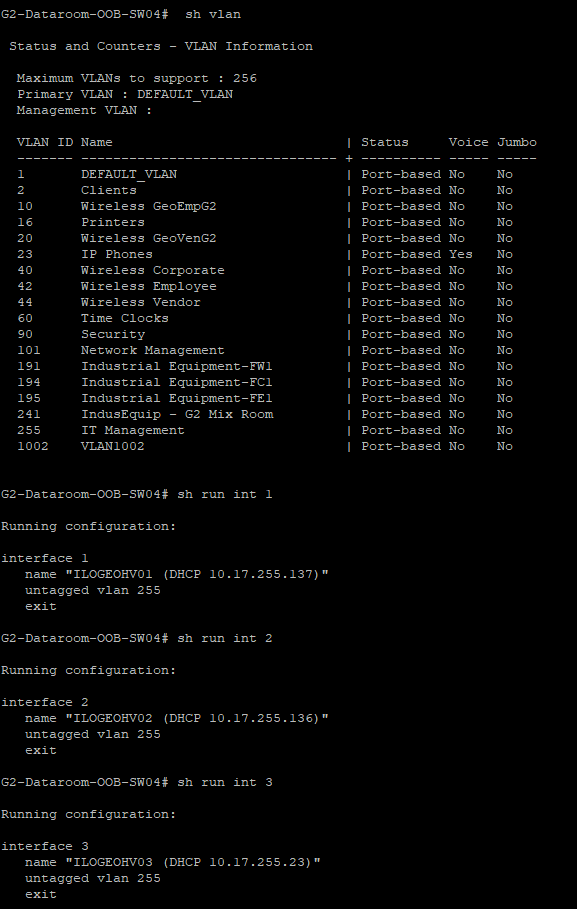
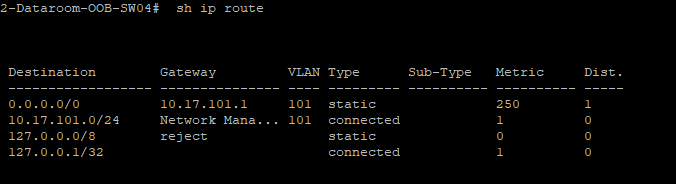
The core should already have its route to the DHCP server since the other two sites are working, but maybe a VLAN is missing somewhere?
I see the core A also has a default gateway set...but that isn't used if ip routes are used is it, or are we routing right out of the switch somehow?
Original Message:
Sent: Feb 05, 2025 10:21 AM
From: parnassus
Subject: DHCP Issue - Intervlan Routing with Dark Fiber
It would be nice to pinpoint how the DHCP Server is actually configured.
Especially given the quite strange zero DHCP dropped/responses to non zero egressing requests.
I write down my initial assumptions:
(a) DHCP Server with - say - IP 10.17.100.7 Subnet mask 255.255.255.0 (/24)
(b) DHCP Server with Default Gateway set to 10.17.100.1 (SVI of VLAN 100 on Core A)
(c) DHCP Server with the right DHCP scope to serve the DHCP Clients belonging to VLAN 255 network segment on Core B
(d) no DHCP Snooping along the path (especially if the DHCP Server can be reached through another one switch from the Core A <- note that VLAN 100 is transported to a third switch).
Can you confirm?
Original Message:
Sent: 2/5/2025 8:39:00 AM
From: CRO
Subject: RE: DHCP Issue - Intervlan Routing with Dark Fiber
Good morning, here you go. Keep in mind we're using the local DHCP server right now, I am testing with VLAN 255 which is why they have the helpers set that we actually want to use.
G3-MDF-CS01# sh dhcp-relay
DHCP Relay Agent : enabled
DHCP Smart Relay : disabled
DHCP Request Hop Count Increment : enabled
L2VPN Clients : enabled
Option 82 : disabled
Source-Interface : disabled
Response Validation : disabled
Option 82 Handle Policy : replace
Remote ID : mac
DHCP Reply Overwrite Source IP : disabled
DHCP Relay Statistics:
Valid Requests Dropped Requests Valid Responses Dropped Responses
-------------- ---------------- --------------- -----------------
3226 0 0 0
DHCP Relay Option 82 Statistics:
Valid Requests Dropped Requests Valid Responses Dropped Responses
-------------- ---------------- --------------- -----------------
0 0 0 0
G3-MDF-CS01# sh ip helper-address
IP Helper Addresses
Interface: vlan2
IP Helper Address VRF
----------------- -----------------
10.18.100.10 default
Interface: vlan16
IP Helper Address VRF
----------------- -----------------
10.18.100.10 default
Interface: vlan23
IP Helper Address VRF
----------------- -----------------
10.18.100.10 default
Interface: vlan40
IP Helper Address VRF
----------------- -----------------
10.18.100.10 default
Interface: vlan42
IP Helper Address VRF
----------------- -----------------
10.18.100.10 default
Interface: vlan44
IP Helper Address VRF
----------------- -----------------
10.18.100.10 default
Interface: vlan60
IP Helper Address VRF
----------------- -----------------
10.18.100.10 default
Interface: vlan90
IP Helper Address VRF
----------------- -----------------
10.18.100.10 default
Interface: vlan100
IP Helper Address VRF
----------------- -----------------
10.18.100.10 default
Interface: vlan101
IP Helper Address VRF
----------------- -----------------
10.18.100.10 default
Interface: vlan255
IP Helper Address VRF
----------------- -----------------
10.17.100.7 default
10.17.100.8 default
Original Message:
Sent: Feb 05, 2025 06:42 AM
From: parnassus
Subject: DHCP Issue - Intervlan Routing with Dark Fiber
Hi! Can you paste the whole outputs of the show dhcp-relay and the show ip helper-address commands executed on Core B?
Original Message:
Sent: Feb 04, 2025 11:46 AM
From: CRO
Subject: DHCP Issue - Intervlan Routing with Dark Fiber
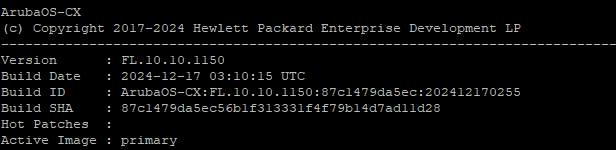
Hello, I have updated the firmware on the 6300. No change to the DHCP issue though unfortunately.
Original Message:
Sent: Feb 04, 2025 10:32 AM
From: parnassus
Subject: DHCP Issue - Intervlan Routing with Dark Fiber
Perfect, my approach is try to keep the involved running configurations as clean as possible to reduce their "surfaces" and avoid unwanted potential issues.
In any case try to keep both routing tables clean with the bare minimum both cores need.
So the routing is working. That's good.
If the routing works then the DHCP handshakes between a DHCP Client and the DHCP Server (flowing through both cores) should for the same reason.
Try to upgrade the Aruba CX 6300 to 10.10.1150 first and report back!
Original Message:
Sent: Feb 04, 2025 10:18 AM
From: CRO
Subject: DHCP Issue - Intervlan Routing with Dark Fiber
I am not concerned with the 25 VLAN right now, it works for other locations but hasn't been implemented or tested at the other location. The route was probably just added as it existed on the other switches. My only concern right now is why devices connected to Core B can't get DHCP addresses.
Side question: why the default route (0/0 via NHG) has a non default value assigned to the metric? It was just set up to mimic to other core switches and given that DHCP isn't working I was open for trying anything.
Given there are static routes set on both ends (as we already checked), I expect that:
- VM WiFi Controller hosted into Core A's VLAN 100 is able to ping/traceroute to any static Host belonging to a Core B's Client VLAN, as example (let me limit this statement to Hosts with static IP assigned).
- Any static Host belonging to a Core B's Client VLAN is able to ping/traceroute to the VM WiFi Controller hosted on Core A's VLAN 100.
Correct, all of this works without issue.
Original Message:
Sent: Feb 04, 2025 10:06 AM
From: parnassus
Subject: DHCP Issue - Intervlan Routing with Dark Fiber
OK, so it's always an issue hitting your Core A and your Core B relationship.
Given there are static routes set on both ends (as we already checked), I expect that:
- VM WiFi Controller hosted into Core A's VLAN 100 is able to ping/traceroute to any static Host belonging to a Core B's Client VLAN, as example (let me limit this statement to Hosts with static IP assigned).
- Any static Host belonging to a Core B's Client VLAN is able to ping/traceroute to the VM WiFi Controller hosted on Core A's VLAN 100.
If the two above actions complete without errors the routing is working as we expect (Core A knows where to route - and route back - the WiFi Controller's packets with DST the Host on Core B and vice-versa, the Core B knows where to route - and route back - the Host's packets with DST the WiFi Controller on Core A). You and me know that is pretty simple.
Both involved hosts need to have their respective Default Gateways correctly assigned (SVI of VLAN 100 on Core A and SVI of Client's VLAN on Core B, respectively)...and you must be sure that no disturbing static routes are set at level of their OSes (plus allow IGMP responses in case OSes' Firewalls are enabled).
This is just to prove that A speaks with B and vice-versa (A1 -> Core A -> Core B -> B1 and B1 -> Core B -> Core A -> A1). If it works, it will work for any directly connected VLANs covered by the static routes on both cores.
Side question: why the default route (0/0 via NHG) has a non default value assigned to the metric?
Core A:
ip route 0.0.0.0 0.0.0.0 10.254.254.5 metric 250 name "default" <------ metric 250 for any other non local network?
ip route 10.16.0.0 255.255.0.0 10.254.254.5 name "G1 Routing"
ip route 10.18.0.0 255.255.0.0 10.254.254.10 <------------------------- to Core B via VLAN 1002's tagged interface
ip route 10.168.0.0 255.255.0.0 10.254.254.5 name "Legacy"
ip route 172.16.25.0 255.255.255.0 172.16.25.1 <----------------------- Wrong (what is the meaning of this static route?)
Core B:
ip route 0.0.0.0/0 10.254.254.9 distance 250 <------------------------- metric 250 for any other non local network?
ip route 10.16.0.0/16 10.254.254.9 <----------------------------------- to Core A via VLAN 1002's tagged interface
ip route 10.17.0.0/16 10.254.254.9 <----------------------------------- to Core A via VLAN 1002's tagged interface
ip route 172.16.25.0/24 172.16.25.1 <---------------------------------- Wrong (NHG is the 10.254.254.9 of the Core A)
...and now that I'm looking at static routes a little bit better...the Core B should reach the 172.16.25.0 /24 segment (of Core A) through 10.254.254.9 (SVI of VLAN 1002 on Core A) and not via 172.16.25.1. It will never work if left as-is.
Then on the Core A: the static route "ip route 172.16.25.0 255.255.255.0 172.16.25.1" is non sense. Why?
Because the Core A's VLAN 25 is a directly connected /24 network segment (so it is routed by the Core A automatically):
vlan 25
name "Guest Wireless"
untagged 8
tagged 16,Trk1-Trk7,Trk17-Trk20
ip address 172.16.25.252 255.255.255.0
ip helper-address 172.16.25.1 <--------- reason for this? none, probably
ipv6 enable <--------------------------- remove (everywhere if IPv6 is not used)
ipv6 address autoconfig <--------------- remove (everywhere if IPv6 is not used)
exit
Original Message:
Sent: Feb 04, 2025 08:42 AM
From: CRO
Subject: DHCP Issue - Intervlan Routing with Dark Fiber
The wireless controller runs on a Hyper V VM which is in the server vlan (100) and the APs are not able to see that server either from building B. So it appears there is an issue with access all of VLAN 100 from that location (or the route back to it) was my only intent with that statement.
Original Message:
Sent: Feb 04, 2025 03:58 AM
From: parnassus
Subject: DHCP Issue - Intervlan Routing with Dark Fiber
Hi, can you better explain this statement: "we have a UniFi wireless controller that is hosted on the 100 Server VLAN, and even if I set a static IP address on the AP, it cannot find the controller"?
It's not clear if you are speaking about a WiFi AP laying into the same VLAN 100 along with its WiFi Controller or not...
Original Message:
Sent: Feb 03, 2025 12:46 PM
From: CRO
Subject: DHCP Issue - Intervlan Routing with Dark Fiber
Something else that may be helpful in troubleshooting...we have a UniFi wireless controller that is hosted on the 100 Server VLAN, and even if I set a static IP address on the AP, it cannot find the controller. So...so maybe it is some sort of routing issue but I'm out of ideas on where that issue lies.
Original Message:
Sent: Feb 03, 2025 11:40 AM
From: CRO
Subject: DHCP Issue - Intervlan Routing with Dark Fiber
Hi,
Physically yes, it's a direct fiber connection from Core C to Core A, however those two switches are the same models. They are 3810m switches. We don't really even use DHCP for VLAN 100, they are all statically set. I must have just added that third helper for some testing and will remove it.
Ok, these are all switches and configs I inherited. I come from a cisco world, and the trunking there is quite a bit different. What would be the recommended way to create a proper trunk on these switches?
Original Message:
Sent: Feb 03, 2025 11:10 AM
From: parnassus
Subject: DHCP Issue - Intervlan Routing with Dark Fiber
Then, to be honest, all those Port Trunks definitions done on Core A [*], each one with just one member interface...well, they are simply wrong (a wrong approach to Port Trunking usage on AOS-Switch <- I suspect that they were created thinking that "trunk" means "transport more VLANs" over the interface).
Despite the DHCP Relay issue, luckily the Core B is not involved being connected to Core A using a single link uplink and not an "half leg" static LAG :-).
[*] I mean:
trunk 1 trk1 trunk
trunk 2 trk2 trunk
trunk 3 trk3 trunk
trunk 4 trk4 trunk
trunk 5 trk5 trunk
trunk 6 trk6 trunk
trunk 7 trk7 trunk
trunk 9 trk9 trunk
trunk 10 trk10 trunk
trunk 11 trk11 trunk
trunk A1 trk17 trunk
trunk A2 trk18 trunk
trunk A3 trk19 trunk
trunk A4 trk20 trunk
Configuring downlinks to peering switches (Access/Distribution) that way could potentially cause you issues (especially if your real network topology is not going to require real LAGs between peers).
Original Message:
Sent: Feb 03, 2025 10:48 AM
From: parnassus
Subject: DHCP Issue - Intervlan Routing with Dark Fiber
Hi! is your Building C connected to Core A in the same way (physically and logically) and using the same AOS-CX based switch (Aruba CX 6300) as compared to your Building B to Core A? I mean if we start a comparison we need to compare apples for apples...
Also (just to keep things clean) on the Core A:
vlan 100 name "Servers"
untagged Trk9-Trk11
tagged Trk2,Trk7,Trk17
ip address 10.17.100.1 255.255.255.0
ip helper-address 10.17.100.7 <- DHCP Clients within the VLAN 100 reach any VLAN 100 hosted DHCP Server without help
ip helper-address 10.17.100.8 <- DHCP Clients within the VLAN 100 reach any VLAN 100 hosted DHCP Server without help
ip helper-address 10.18.100.10 <- ?
ipv6 enable
ipv6 address autoconfig
jumbo exit
it shouldn't be necessary to provide IP helper addresses of servers hosted in a VLAN to their specific VLAN...the VLAN 100 is a Broadcast Domain for its hosted systems...so any DHCP Client within the VLAN 100 will reach those three servers without necessity of any help(er). Isn't it? if I were you I would remove those three lines (especially the third one...it doesn't make sense).
Original Message:
Sent: Feb 03, 2025 10:20 AM
From: CRO
Subject: DHCP Issue - Intervlan Routing with Dark Fiber
Hi, I am able to reach the 10.254.254.10 IP address from the DHCP server, as well as all of the SVI's of each VLAN.
I can try that, I'd need to schedule it so I don't know when it will happen as we have shifts 24x7. It's also working fine from building C connecting to Core A so I have my doubts.
Original Message:
Sent: Feb 03, 2025 10:07 AM
From: parnassus
Subject: DHCP Issue - Intervlan Routing with Dark Fiber
OK, but does the DHCP Server know how to reach back the source VLAN (on Core B) from where client's DHCP requests were broadcasted (the VLAN 255 on Core B, if I'm not mistaken).
You should check that DHCP Server(s) (10.17.100.7 and 10.17.100.8) are able to reach the IP address 10.254.254.10 (SVI of VLAN 1002 on Core B) and 10.18.255.254 (SVI of VLAN 255 on Core B <- where Clients are supposed to receive back the DHCP offers)...and, if so, those two servers should also be capable of reaching a Client (say one you've set the IP statically and manually just for completing this reachability test).
I don't believe that VLAN 1 is important because your two IP routers (Core A and Core B) are communicating each-other via the same VLAN 1002 (tagged peers' ports) using static routing on both ends.
Could you also try to update the AOS-CX 10.10.1070 to latest AOS-CX 10.10 build (AOS-CX 10.10.1150 released 08-01-2025)? In my opinion the AOS-CX 10.10.1070 build is really too old (June 2023?) to be sure that it is not carring DHCP related issues (and I know there were some...).
Original Message:
Sent: Feb 03, 2025 08:34 AM
From: CRO
Subject: DHCP Issue - Intervlan Routing with Dark Fiber
Hi, yes, I am able to see the DHCP server from core B, as well as any device that has a static IP at that location. I can do a traceroute, RDP, ping, nslookup, pretty much anything except for get a DHCP address.
Original Message:
Sent: Feb 03, 2025 03:13 AM
From: parnassus
Subject: DHCP Issue - Intervlan Routing with Dark Fiber
Hi, unable to see DHCP OFFER...so the question: is the DHCP Server (10.17.100.7 and 10.17.100.8) - connected to Core A - able to reach, example, the IP address 10.254.254.10 (SVI of VLAN 1002 on Core B)? I mean, is the routing between the DHCP Server(s) and the Core B working as expected?
Can you post the output os show dhcp-relay command executed on Core B?
Original Message:
Sent: Feb 01, 2025 06:34 AM
From: CRO
Subject: DHCP Issue - Intervlan Routing with Dark Fiber
Hi,
I tried that but still unable to get to DHCP. Here is the dhcp debug log, curious about the "unable to find active gateway" error.
2025-02-01:05:24:27.228379|hpe-relay|LOG_INFO|CDTR|1|DHCPRELAY|DHCPRELAY|Unable to find Active GW IP for Intf IP [10.254.254.10] and Mask [255.255.255.252] in port :vlan1002
2025-02-01:05:24:27.228399|hpe-relay|LOG_DEBUG|CDTR|1|DHCPRELAY|DHCPRELAY|updated for Intf Node:vlan1002 selected GW intf_ip:[10.254.254.10], previous value of GW :[10.254.254.10]
2025-02-01:05:24:27.228421|hpe-relay|LOG_INFO|CDTR|1|DHCPRELAY|DHCPRELAY|Matching server found, incremented ref count. server : 10.17.100.7 (refcount :2) source_vrf:default
2025-02-01:05:24:27.228441|hpe-relay|LOG_INFO|CDTR|1|DHCPRELAY|DHCPRELAY|Server entry(10.17.100.7), vrf:default, successfully updated for interface : vlan1002, current address_count : 1
2025-02-01:05:24:30.842797|hpe-relay|LOG_INFO|CDTR|1|DHCPRELAY|DHCPRELAY|Unable to find Active GW IP for Intf IP [10.254.254.10] and Mask [255.255.255.252] in port :vlan1002
2025-02-01:05:24:30.842825|hpe-relay|LOG_DEBUG|CDTR|1|DHCPRELAY|DHCPRELAY|updated for Intf Node:vlan1002 selected GW intf_ip:[10.254.254.10], previous value of GW :[10.254.254.10]
2025-02-01:05:24:30.842852|hpe-relay|LOG_INFO|CDTR|1|DHCPRELAY|DHCPRELAY|Matching server found, incremented ref count. server : 10.17.100.8 (refcount :2) source_vrf:default
2025-02-01:05:24:30.842876|hpe-relay|LOG_INFO|CDTR|1|DHCPRELAY|DHCPRELAY|Server entry(10.17.100.8), vrf:default, successfully updated for interface : vlan1002, current address_count : 2
2025-02-01:05:25:24.661721|hpe-relay|LOG_DEBUG|CDTR|1|DHCPRELAY|DHCPRELAY|DHCP REQUEST Packet received on interface vlan255 from client MAC 38ca84-bb41cc.
2025-02-01:05:25:24.661871|hpe-relay|LOG_INFO|CDTR|1|DHCPRELAY|DHCPRELAY|DHCP REQUEST Packet sent to Server(10.17.100.8) successfully via src VRF [default] for Client MAC is 38ca84-bb41cc, present on interface vlan255. Flag: 0
2025-02-01:05:25:24.661947|hpe-relay|LOG_INFO|CDTR|1|DHCPRELAY|DHCPRELAY|DHCP REQUEST Packet sent to Server(10.17.100.7) successfully via src VRF [default] for Client MAC is 38ca84-bb41cc, present on interface vlan255. Flag: 0
2025-02-01:05:25:44.497203|hpe-relay|LOG_DEBUG|CDTR|1|DHCPRELAY|DHCPRELAY|DHCP REQUEST Packet received on interface vlan255 from client MAC 38ca84-bb41cc.
2025-02-01:05:25:44.497351|hpe-relay|LOG_INFO|CDTR|1|DHCPRELAY|DHCPRELAY|DHCP REQUEST Packet sent to Server(10.17.100.8) successfully via src VRF [default] for Client MAC is 38ca84-bb41cc, present on interface vlan255. Flag: 0
2025-02-01:05:25:44.497426|hpe-relay|LOG_INFO|CDTR|1|DHCPRELAY|DHCPRELAY|DHCP REQUEST Packet sent to Server(10.17.100.7) successfully via src VRF [default] for Client MAC is 38ca84-bb41cc, present on interface vlan255. Flag: 0
G3-MDF-CS01(config)# ^C
Original Message:
Sent: Jan 31, 2025 06:19 PM
From: parnassus
Subject: DHCP Issue - Intervlan Routing with Dark Fiber
Out of curiosity, what's about adding - as a test - the ip helper address to the interface vlan 1002 context on Core B (I admit it shouldn't be necessary because the VLAN 1002 is simply clientless with regard to DHCP)? it seems thay the DHCP broadcast is not leaving the Core B to travel to Core A and reach the DHCP Server (even if this one is reachable via IP/IGMP from the client VLAN you're using).
Original Message:
Sent: 1/31/2025 4:32:00 PM
From: CRO
Subject: RE: DHCP Issue - Intervlan Routing with Dark Fiber
Ok, I got it cleaned up and everything is still talking, but no DHCP still. I included the new configs as well as one of the access switch configs I'm testing a client trying to get a DHCP address from. (ports 29 and 31 were my test ports on the access switch)
I ran a debug dhcprelay on core B where I am trying to get an IP from, and it looks like it's leaving on the correct VLAN.

But the client gets this and I don't see anything attempting to hit the DHCP server so I don't know where it's getting dropped.

If I set a static IP address, I can tracert to the DHCP server no problem.
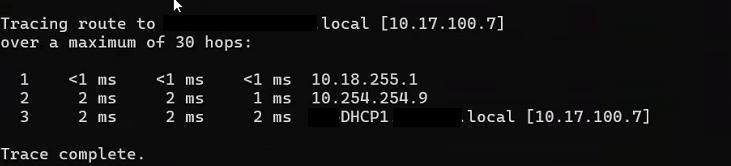
Original Message:
Sent: Jan 31, 2025 10:59 AM
From: parnassus
Subject: DHCP Issue - Intervlan Routing with Dark Fiber
Hi!
"I don't believe VLAN 1 is needed, it was just set up the same way as the other site. I can try with and without it."
The only valid reason to use the 15 <-> 1/1/16 interconnection that way (with a Transport VLAN for routing the VLAN 1002 and use it to route A to B and B to A AND concurrently to allow other VLANs other than the 1002 to pass between A and B) would be - and I would add "unusually" - to share that interconnection link to carry, on one side, a routed VLAN and, on the other side, other VLANs where their routing is on one peer only (or, seeing it from another side, by extending them from a routing switch to another switch). That's not your case...but it is a potential scenario.
Say Core A is the routing switch with VLAN 1000, 1100, 1200, 1300, 2300 and 4000 directly connected (let me suppose then that (a) each of those VLANs own a SVI and (b) the IP Routing is enabled so all the connected VLANs are routed together by their Core A) and Core B is the routing switch with VLAN 2000, 2100, 2200, 2300 and 4000 (let me suppose in this case that (a) ONLY the VLANs 2000, 2100, 2200 and 4000 own a SVI and (b) the IP Routing is enabled so only those VLANs are routed together by their Core B).
The VLAN 4000 (on both) is used as the Transport VLAN (or Transit VLAN)...but - note - the Core B VLAN 2300 has no SVI on its switch (because Core A has it only)...now a Network Administrator could share an existing interconnection in order to (1) let the Transport VLAN to route Core B's VLANs with SVIs to Core A and vice-versa (provided that proper Static Routes are applied on both ends) and (2) let the VLAN 2300 between Core B and Core A to pass (so he needs to allow it on peering interfaces along with the special use VLAN 4000) and he does that because he needs to extend the VLAN 2300 born on Core A up to Core B...in this case the Core B acts just a Layer 2 switch "passing" the VLAN 2300 since its routing really happens on Core A only (Core A is a pure router for all of its VLANs, Core B is a router for all of its VLAN minus one). This is a workaround used to reuse an existing interconnection (born for the P2P) for another purpose (VLAN extension), just a dual use. Not exactluy elegant but possible.
I believe it's not your case because, at least for VLAN 101, you have a SVI (10.18.101.1 /24) on Core B and also a SVI (10.17.101.1 /24) on Core A (allowing the VLAN 101 on the peer interfaces will defeat the VLAN 1002 main purpose on those interfaces)...but, maybe, it could be a valid reason for VLAN 1 (it owns a SVI on Core A, but no SVI on Core B). Difficult to say without knowing the exact evolution of the network...strange in any case...in the end, as said, it could be simply an error.
Original Message:
Sent: Jan 31, 2025 09:52 AM
From: CRO
Subject: DHCP Issue - Intervlan Routing with Dark Fiber
I don't believe VLAN 1 is needed, it was just set up the same way as the other site. I can try with and without it.
In the HP world, "Untagged VLAN 101" would be the same as "vlan trunk native 101" or is that not correct?
Original Message:
Sent: Jan 31, 2025 09:49 AM
From: parnassus
Subject: DHCP Issue - Intervlan Routing with Dark Fiber
Then, considering the Core A interface 15 VLAN membership, the Core B 1/1/16 should be:
interface 1/1/16 description Accedian to G2 no shutdown no routing vlan trunk native 1 vlan trunk allowed 1,101,1002
But the real question is: Why you need to transport VLAN 1 and VLAN 101 over a link (15 <-> 1/1/16) born to be the physical medium through which the Point-to-Point connectivity is done via a dedicated Transport VLAN (the 1002)?
That is the reason I wrote the above (I missed that 15 was tagged 101 and untagged 1...but, anyway, the question is still valid considering the nature of VLAN 1002 and its SVIs /30 addresses <- typical of P2P Layer 3 transports).
Original Message:
Sent: Jan 31, 2025 09:03 AM
From: CRO
Subject: DHCP Issue - Intervlan Routing with Dark Fiber
One quick question, if I set this on Core B, how should Core A be set?
interface 1/1/16 description Accedian to G2 no shutdown no routing vlan trunk native 1002 tag vlan trunk allowed 1002
Currently it's set to:
Int 15
tagged vlan 101, 1002
untagged vlan 1
If I set the native vlan trunk to 1002 on site B, then I assume leaving untagged vlan 1 on this side will not work or will that be ok?
I need to leave vlan 101 because that's our management vlan, if I don't tag it I will lose access to the remote site.
Original Message:
Sent: Jan 31, 2025 08:01 AM
From: parnassus
Subject: DHCP Issue - Intervlan Routing with Dark Fiber
Hello Chad, you wrote "...and we are using intervlan routing to connect back to the main datacenter.".
Looking at both running configurations, we then expect that the VLAN 1002 is used effectively as a Transport VLAN (SVI assigned to Core A VLAN 1002 is 10.254.254.9 /30 and SVI assigned to Core B VLAN 1002 is 10.254.254.10, both SVIs belong to a two hosts 10.254.254.8 /30 network), so a typical VLAN used to create a Point-to-Point connectivity between Cores, each one operating at Layer 3...and, as a proof of that approach, we also expect that if the interface 15 on Core A is a tagged member of VLAN 1002 (with no other VLAN membership assigned) the corresponding peer interface on Core B - probably the 1/1/16 - should be configured the same way.
Core B interface 1/1/16 (which, as suggested, is probably the one peering to Core A) has this configuration instead:
interface 1/1/16 description Accedian to G2 no shutdown no routing vlan trunk native 1 vlan trunk allowed 1-2,16,23,25,40,42,44,60,90,100-101,255,1002
which means that the VLAN membership assginments are not exactly matching what is used on Core A interface 15 (VLAN 1002 tagged only), in other words we expect to find something like:
interface 1/1/16 description Accedian to G2 no shutdown no routing vlan trunk native 1002 tag vlan trunk allowed 1002
in order to let the peering interfaces (both VLAN 1002 tagged) to exchange only tagged packets (Point-to-Point) with VLAN id 1002 tag.
Given the existing combined setups the end result of your configuration could be similar.
That is...given the Core A interface 15 is VLAN 1002 tagged only...then, looking at Core B interface 1/1/16, all packets flowing into interface 1/1/16 to Core A tagged with any VLAN id not equal to 1002 or untagged will be blocked anyway (only 1002 tagged packets will pass)...to say that that configuration is not exactly elegant, for sure it should be corrected.
If the role of VLAN 1002 is to act as "Transport VLAN" then it should be used only on that peering interface and not elsewhere on Core B (so it is to be removed from 1/1/1 - 1/1/5 and 1/1/6 because, on that one, all VLANs are allowed to traverse - ingressing/egressing - the interface).
With that said, Core A (G2) static route to reach the 10.18.0.0 /16 network segment behind the Core B (G3) is:
ip route 10.18.0.0 255.255.0.0 10.254.254.10
and Core B (G3) static routes to reach (any net, 10.16.0.0 /16 and 10.17.0.0 /16) network segments behind the Core A (G2) are:
ip route 0.0.0.0/0 10.254.254.9 distance 250
ip route 10.16.0.0/16 10.254.254.9ip route 10.17.0.0/16 10.254.254.9
The above combined static routes suggest that routing should be OK (A to B and B to A with A acting as the Next Hop Gateway to any other non directly connected network for Core B...so A lets B to reach, example, external networks like Internet through A NHG).
With all the above preface, try to add on the Core B the IP Helper Addresses on VLANs requiring it:
ip helper-address 10.17.100.x
ip helper-address 10.17.100.y
ip helper-address 10.17.100.z
because your requirement - if we are not mistaken - is to have Core B's DHCP Clients being able to be served specifically by reacheable (routable) Core A's DHCP Servers (and not by a temporary local Core B's DHCP Server). Isn't it?
Sound reasonable?
Original Message:
Sent: Jan 30, 2025 09:07 PM
From: CRO
Subject: DHCP Issue - Intervlan Routing with Dark Fiber
Hi, we recent added an additional building and it's connected via dark fiber and we are using intervlan routing to connect back to the main datacenter. Everything seems to be working fine except for DHCP and I can't figure out why. It appears the requests go out fine, but they don't receive anything back.
We'll call the original building A, and the new building, Building B.
Everything works fine if I set a static IP address, I can access everything on the network, internet, etc, but I cannot get a DHCP address from the network where our existing DHCP servers reside. The scopes are all set up and active. We do have a 3rd building set up the exact same way that doesn't have any issues so I'm not sure where the issue lies here.
I've attached the configs for both core switches. (disregard the 10.18.100.10 ip helper in building B. We set up a temp server on prem for now, but would like to use the existing DHCP servers)
Let me know what other configs would be helpful for you here. I'm pretty new to HP switches fwiw.