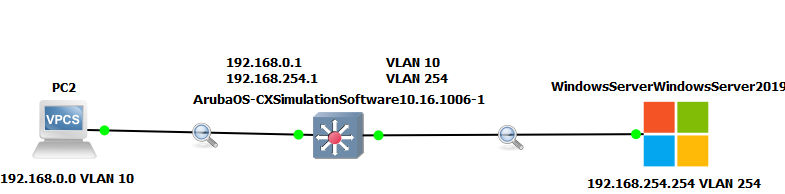
Hello everyone, I'm running a DHCP-Snooping lab on GNS3 using the AOSCX 10.16 image. However, I'm encountering the following problem:
My DHCP IP address assignment configuration completes successfully when DHCP-Snooping is disabled. However, when I enable it, the client remains in a discover state.
I have DHCP-Snooping enabled on all the VLANs I'm using and have configured DHCP-Snooping Trust on the interface that communicates with the DHCP server.
I also disabled option 82 and enabled DHCP-Snooping globally.
Does anyone know if this is an OVA-related issue, or can you help me by pointing out what I might be doing wrong?
This is my switch configuration, and I've attached the topology.
switch#
switch# show running-config
Current configuration:
!
!Version AOS-CX Virtual.10.16.1006
!export-password: default
user admin group administrators password ciphertext AQBapZKmUPHMDZp1N5f93PMbUvjWgARgwayhcnIdk+zr7wp6YgAAANNq8HV4AyUaDZ+rviiLDMu3PxORe/M046Uy53X7lximDFRMIbvwobyic34t2WGmXmHRSvVdop7RfuEipjiLyfqX
ntp server pool.ntp.org minpoll 4 maxpoll 4 iburst
ntp enable
!
!
!
!
!
!
ssh server vrf mgmt
dhcpv4-snooping
no dhcp-snooping option 82
dhcpv4-snooping authorized-server 192.168.254.254
dhcpv4-snooping event-log client
vlan 1
dhcpv4-snooping
vlan 10
dhcpv4-snooping
vlan 254
dhcpv4-snooping
interface mgmt
no shutdown
ip dhcp
interface 1/1/1
no shutdown
no routing
vlan access 10
interface 1/1/6
no shutdown
no routing
vlan access 1
interface 1/1/7
no shutdown
no routing
vlan access 254
dhcpv4-snooping trust
interface vlan 10
ip address 192.168.0.1/24
ip helper-address 192.168.254.254
interface vlan 254
ip address 192.168.254.1/24
!
!
!
!
!
https-server vrf mgmt
switch#
-------------------------------------------