Uplink trust is required. Authorised server is optional. From security point of view it has benefits but it is optional.
---------------------------------
Original Message:
Sent: Aug 08, 2025
From: Calvin Rempel
Subject: RE: DHCP Snooping drops the correct Server?
If I am not mistaken, you need BOTH trusted ports AND authorized server (rather than it being the case of preferring one over another). Trusted ports tell the system which ports DHCP responses are allowed to come into the switch from, and authorized server tells the switch which IP addresses are allowed to give those DHCP responses. I reckon that the two together make it much harder for someone to deliberately spoof your DHCP server than just one or the other would.
-------------------------------------------
Original Message:
Sent: Aug 08, 2025 09:53 AM
From: willembargeman
Subject: DHCP Snooping drops the correct Server?
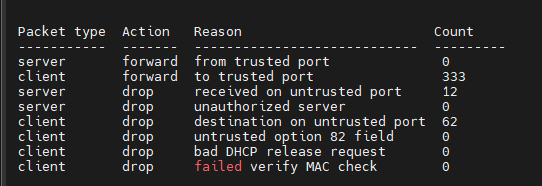
You MUST configure the trusted port. Like you can see the DHCP packets are dropped because an untrusted port.
------------------------------
Willem Bargeman
Systems Engineer Aruba
ACEX #125
Original Message:
Sent: Aug 08, 2025 09:46 AM
From: Notknown
Subject: DHCP Snooping drops the correct Server?
so i should prefer trusted port settings over authorized server Settings?
Original Message:
Sent: Aug 08, 2025 09:40 AM
From: willembargeman
Subject: DHCP Snooping drops the correct Server?
You need to configure the uplinks as DHCP-snooping trust.
Some the authorized server config give issues. I've seen that in the past with Comware. That authorized server config is optional.
Please use the command "show dhcp-snooping stats" to figure out if DHCP snooping is dropping packets.
------------------------------
Willem Bargeman
Systems Engineer Aruba
ACEX #125
Original Message:
Sent: Aug 08, 2025 09:14 AM
From: Notknown
Subject: DHCP Snooping drops the correct Server?
Hello,
since we recently had a problem with one of the colleguaes bringing their own fritzbox for "i needed better wifi", we wanted to roll out DHCP Snooping across our Switches.
we have a few older switches that dont support DHCP Snooping, but most of them do and down below are the lines i configured for all of them:

10.105.0.1 is that location's Domain Controller, DHCP, NTP Server and a few other things, our gateway is done by the firewall and sits on the 10.105.0.254, connected to the same Switch.
the VLANs on the location range from 80-110, but 105-109 are the only ones with an active DHCP and 106-109 the only ones important for clients. 105 is the Management VLAN that the Server and all our Switches are in, has a DHCP set up for the IPs of the Access points, Switches are static. we do not use Option 82 anywhere.
Our core is a flexfabric and thus was a bit differently configutred, not via authoriszed DHCP server IP, but with "trusted" Ports. since the Server isnt on the FF directly but one of the nearby switches, I set those switch uplinks as "trusted" ports.
from what i read, this should've been a simple config change that simply blocks out everything that ISNT the 10.105.0.1, but a few hour later, our first-level Support colleagues get multiple calls of their internet not working anymore, and all of those we checked getting an APIPA Address.
any idea where i went wrong with three lines of config?
-------------------------------------------