Hello Levi,
Sorry to come back to this old post, but having resolved the Ring doorbell issue (this turned out to be an AOS bug) I notice that still, when I run 'show firewall' directly on one of our clusters' cluster members I see:
DPI Classification Disabled (*Requires controller reload to take effect*) [Cfg: enabled, PEF license: installed]
We have definitely reloaded the controllers in this cluster recently (we upgraded about 3 weeks ago) so it is odd that this is showing as Disabled. On our other live cluster it shows as enabled.
Is there a CLI command I can run that would definitively tell me if it is active on this cluster? I'm happy enough to wait for the next opportunity to reload those controllers but what is the effect of not having it enabled?
Thanks,
Guy
-------------------------------------------
Original Message:
Sent: May 30, 2025 07:30 AM
From: levi_m
Subject: DPI classification enabled?
Hi,
No, unfortunately I have no in-depth experience with troubleshooting RTP.
Do you know exactly which protocols must be used to communicate with which target systems?
The target networks of the questionable rule are defined in an alias? I would perhaps start by splitting this rule into individual deny rules for the respective IP subnets as a test. This way you can deactivate the rules one by one and find out which subnet the doorbell has to communicate with. This could narrow down your problem.
However, if the CLI of your controller shows that DPI is deactivated, you should first double-check these settings. Are you sure the settings were inherited correctly?
If not, check the settings directly at controller level. It is possible that something has not been inherited correctly.
If the settings are set correctly on all controllers, I think you should restart the controllers once and check again.
Best
------------------------------
Levi Mahncke
- ACX-NS
------------------------------
Original Message:
Sent: May 28, 2025 10:31 AM
From: cauliflower
Subject: DPI classification enabled?
Thanks Levi,
We have the first two of those enabled according to the GUI, but not enable web content classification.
The firewall visibility and DPI settings will have been enabled for a long time so I can't believe there hasn't been a reload since we configured this. So I'm going to assume this is working.
The reason this came up is that someone is trying to use a Ring doorbell on our IoT network and it looks like alg-rtp traffic is being dropped when a particular ACL rule is in place - but as soon as we remove the ACL it works fine. Do you know much about RTP? The rule in question blocks access to pretty much all of the university subnets (which includes the IPs the controllers are on), I'm wondering if RTP does something that means denying traffic to the controllers is breaking things?
Guy
Original Message:
Sent: May 28, 2025 09:23 AM
From: levi_m
Subject: DPI classification enabled?
Hi,
please check the following settings:
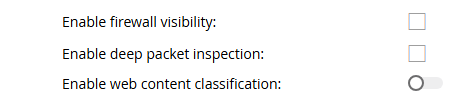
You can find the settings under "Configuration - Services - Firewall - Global Settings" on the bottom.
You also need the corresponding licenses for activation and a reboot of the controller is required. PEF licenses for DPI and WebCC for content classification.
Best
------------------------------
Levi Mahncke
- ACX-NS