Hello,
In my home network I am currently using a Meraki MX64 Security Appliance which does all the routing, with the Aruba 2930F switch used only as a Layer 2 switch. I want to change the network as in the diagram below.
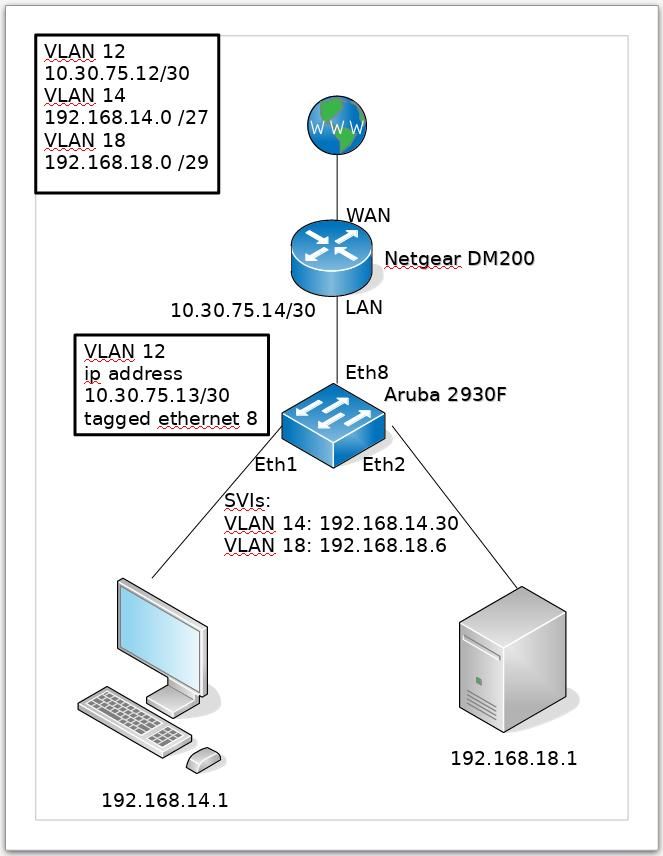
Netgear DM200 is a VDSL Modem / Router with only one LAN port. At the moment this is used only as a VDSL modem passing through the VLAN 101 from my ISP to the MX64 appliance; this will change, the DM200 will be used as a modem / router combined, and the MX64 appliance will be removed from this network. As far as I am aware, there is no option to define VLANs in the Netgear DM200 device and I want to use the Layer 3 capabilities of the Aruba 2930F switch.
The VLAN configuration:
Aruba 2930F# show running-config vlan 12,14

Running configuration:

vlan 12
   untagged 8
   ip address 10.30.75.13 255.255.255.252
   exit
vlan 14
   untagged 1
   ip address 192.168.14.30 255.255.255.224
   exit
The routing table:
Aruba 2930F# show ip route

                                IP Route Entries

  Destination        Gateway         VLAN Type      Sub-Type   Metric     Dist.
  ------------------ --------------- ---- --------- ---------- ---------- -----
  0.0.0.0/0          10.30.75.14     12   static               1          1
  10.30.75.12/30     UPLINK          12   connected            1          0
  127.0.0.0/8        reject               static               0          0
  127.0.0.1/32       lo0                  connected            1          0
  192.168.14.0/27    DATA            14   connected            1          0
And a running-configuration snippet:
Aruba 2930F# show running-config structured
[...]
ip route 0.0.0.0 0.0.0.0 10.30.75.14
ip routing
[...]
interface 1
   name "PC"
   untagged vlan 14
   exit
[...]
interface 8
   untagged vlan 12
   exit
[...]
vlan 1
   name "DEFAULT_VLAN"
   no untagged 1,8
   untagged 2-7,9-10
   no ip address
   exit
vlan 12
   name "UPLINK"
   untagged 8
   ip address 10.30.75.13 255.255.255.252
   exit
vlan 14
   name "DATA"
   untagged 1
   ip address 192.168.14.30 255.255.255.224
   exit
[...]
The PC in the diagram is configured with a static IP address:
IP address: 192.168.14.1
Mask: 255.255.255.224
Gateway: 192.168.14.30
The problem is that I cannot get internet connectivity from the PC:
Aruba 2930F# ping 1.1.1.1
1.1.1.1 is alive, time = 7 ms

Aruba 2930F# ping 10.30.75.14
10.30.75.14 is alive, time = 1 ms

Aruba 2930F# ping 192.168.14.1
192.168.14.1 is alive, time = 1 ms

[root@arch-pc]# ping 192.168.14.30
PING 192.168.14.30 (192.168.14.30) 56(84) bytes of data.
64 bytes from 192.168.14.30: icmp_seq=1 ttl=255 time=0.481 ms
64 bytes from 192.168.14.30: icmp_seq=2 ttl=255 time=0.466 ms
^C
--- 192.168.14.30 ping statistics ---
2 packets transmitted, 2 received, 0% packet loss, time 8ms
rtt min/avg/max/mdev = 0.466/0.473/0.481/0.023 ms

[root@arch-pc]# ping 10.30.75.13
PING 10.30.75.13 (10.30.75.13) 56(84) bytes of data.
64 bytes from 10.30.75.13: icmp_seq=1 ttl=255 time=0.496 ms
64 bytes from 10.30.75.13: icmp_seq=2 ttl=255 time=0.497 ms
^C
--- 10.30.75.13 ping statistics ---
2 packets transmitted, 2 received, 0% packet loss, time 22ms
rtt min/avg/max/mdev = 0.496/0.496/0.497/0.022 ms

[root@arch-pc]# ping 10.30.75.14
PING 10.30.75.14 (10.30.75.14) 56(84) bytes of data.
^C
--- 10.30.75.14 ping statistics ---
5 packets transmitted, 0 received, 100% packet loss, time 60ms

[root@arch-pc]# ping 1.1.1.1
PING 1.1.1.1 (1.1.1.1) 56(84) bytes of data.
^C
--- 1.1.1.1 ping statistics ---
3 packets transmitted, 0 received, 100% packet loss, time 37ms
There is a route back in the DM200 router, similar to:
ip route 192.168.0.0/16 10.30.75.13
Any idea why the PC cannot access the internet?