Wireless Access

 View Only
  • 1.  Editing ClearPass Role_ID form

    Posted Jun 04, 2026 05:08 PM
    I am trying to edit the role_id form for users registering a MAC address in ClearPass version 6.11.12.
    I currently have it set to hide this field and auto-assign a specific role for wireless users.  I want to change it to a dropdown list  which is easy to complete.  I want the drop downlist to be restricted and only list 2 of the roles from full list of available roles.  I also need to change the display of the roles to a user friendly option  = Wired and Wireless as the role names are not clear for an end user to select.  

    Thanks

    Chris Hart

    Network Operations Engineer Lead

    Tel: 847-467-7747

    Email: chart@northwestern.edu

    2020 Ridge Ave, Evanston, IL


  • 2.  RE: Editing ClearPass Role_ID form

    Posted Jun 06, 2026 03:58 PM

    Guest roles are defined in the [Guest Roles] role mappings.
    First, create the appropriate TIPS roles, then assign the role IDs to the role names.
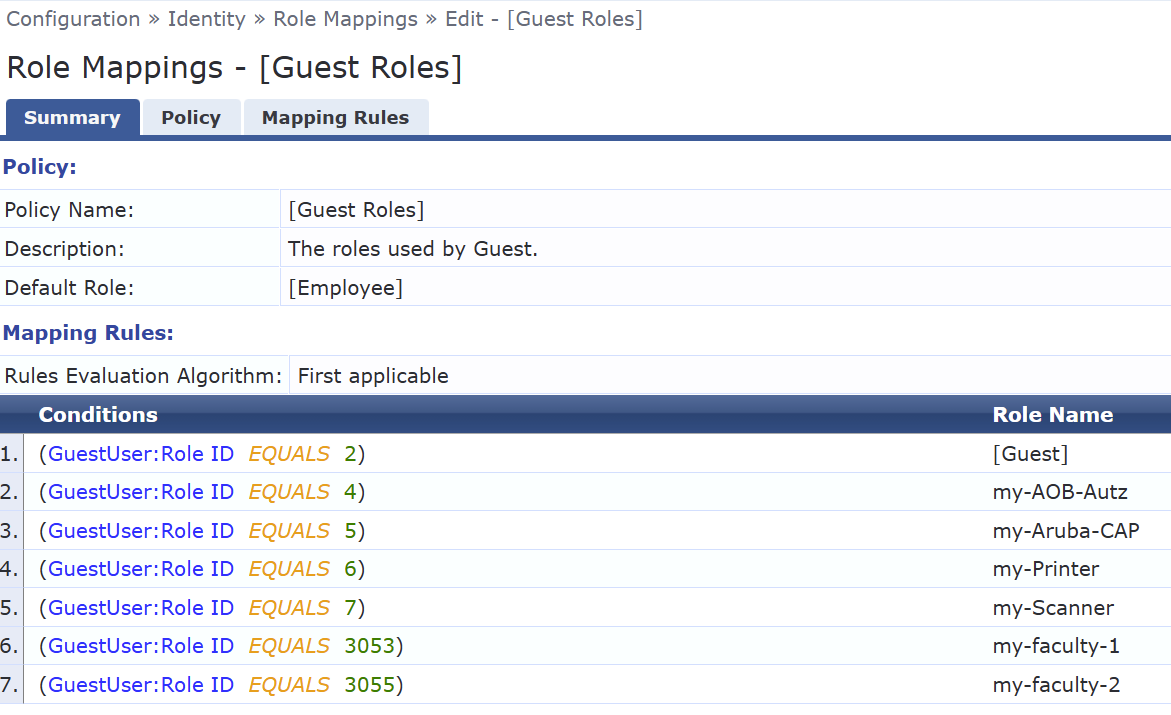
    Only the role ID is stored on the guest device; if you assign a different TIPS role to an ID in the [Guest Roles] role mappings, this new role will be displayed on the guest device.

    This allows you to quickly change the guest role in existing devices. Create a TIPS role named Wired. Then assign this new role to the existing ID in [Guest Roles] Role Mappings.


    Alternatively, you can assign a new ID to the TIPS role "Wired" in the role mapping.
    Then export the relevant devices, replace the old role IDs with the new ones in the CSV file, and import the file.


    ------------------------------
    Regards,

    Waldemar
    ACCX # 1377, ACEP, ACX - Network Security
    If you find my answer useful, consider giving kudos and/or mark as solution
    ------------------------------