interesting. The definition for this as per the user guide is
If my post was useful accept solution and/or give kudos.
Any opinions expressed here are solely my own and not necessarily that of HPE or Aruba.
Original Message:
Sent: Jun 23, 2025 06:14 AM
From: Mikeyeah
Subject: Guest Captive Portal on IOS
After much troubleshooting, i have found out why the captive was not displaying on IOS.
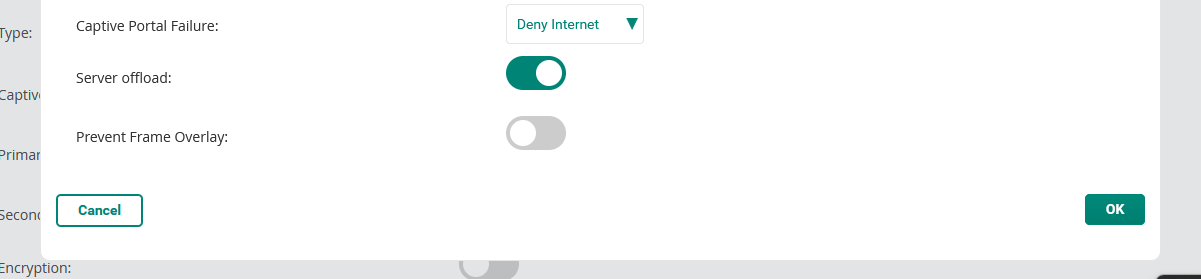
If you have AOS10 APs, within Aruba Central and under the Guest SSID you need to edit Captive Portal Profile and then switch 'Server Offload' on.
Original Message:
Sent: Jun 18, 2025 12:55 PM
From: Herman Robers
Subject: Guest Captive Portal on IOS
I got corrected on that point; with AOS10 apparently the certificate only needs to be on the AP. And you are right that if it works for non IOS devices, it can't really be the certificate being on the wrong device.
What IOS is expected to do is check https://captive.apple.com/hotspot-detect.html and if it's redirected, it should pop up the captive portal, if it shows just the text 'Success', it assumes it's on a functional network. You could check that URL manually, if there is indeed a redirect happening. Otherwise, try switching off cellular data (or enable flight mode); see if that improves things. This may be something to work on with TAC.
------------------------------
Herman Robers
------------------------
If you have urgent issues, always contact your HPE Aruba Networking partner, distributor, or Aruba TAC Support. Check https://www.arubanetworks.com/support-services/contact-support/ for how to contact HPE Aruba Networking TAC. Any opinions expressed here are solely my own and not necessarily that of Hewlett Packard Enterprise or HPE Aruba Networking.
In case your problem is solved, please invest the time to post a follow-up with the information on how you solved it. Others can benefit from that.
Original Message:
Sent: Jun 18, 2025 05:06 AM
From: Mikeyeah
Subject: Guest Captive Portal on IOS
Hi Herman,
Thanks for your response, apologies for the delay in responding.
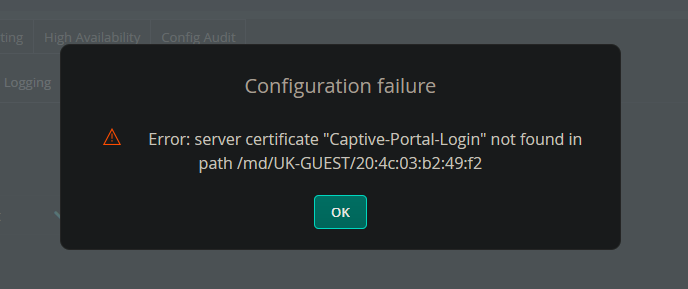
You mentioned that the captive portal cert should be on the gateway, i have been stuggling to upload the the cert via central as i get an error when trying to add it and via the gateways GUI i get a message that i cannot add due to the gateway being controller by ASP. but wouldn't not having the cert on the gateway stop the laptops/andriod devices from working? As currently they all work fine, without the cert on the gateway.
I have opened Safari and used 1.1.1.1 and the captive portal appears and there is no cert issues displayed all works as expected i just don't get the inital portal 'pop up' when i first connect to the Guest SSID. I have also checked the CNA bypass it is unticked on both the gateway and Clearpass.
Any other ideas?
this is the error it get on Central when i try to added the cert to the gateway.
Original Message:
Sent: Jun 11, 2025 04:47 AM
From: Herman Robers
Subject: Guest Captive Portal on IOS
The captive portal certificate should (also) be on the gateway, and it needs to be 'chained', so all intermediate certificates should be included.
Another thing is that for Apple there is an option 'CNA bypass' to prevent the automatic popup, maybe that's enabled on the gateway or ClearPass.
What you may try is to open Safari or another browser, when connected, then manually go to something like: http://1.2.3.4/ and see if that's redirected... (note http, not https); and maybe you see certificate warnings or other indication what's wrong. I think there is a (reduced) list of trusted root CAs for captive portal on IOS; check if your CA is supported.
------------------------------
Herman Robers
------------------------
If you have urgent issues, always contact your HPE Aruba Networking partner, distributor, or Aruba TAC Support. Check https://www.arubanetworks.com/support-services/contact-support/ for how to contact HPE Aruba Networking TAC. Any opinions expressed here are solely my own and not necessarily that of Hewlett Packard Enterprise or HPE Aruba Networking.
In case your problem is solved, please invest the time to post a follow-up with the information on how you solved it. Others can benefit from that.