Security

 View Only
  • 1.  Guest network / vlan confusion

    Posted Feb 28, 2019 10:14 AM

    I am still trying to setup a clean guest WLAN which is directly routed via external firewall into the www.


    So I set up as follows:

    at aruba 7005:


    Interface                   IP Address / IP Netmask        Admin   Protocol   VRRP-IP

    vlan 1                   192.168.0.254 / 255.255.254.0     up      up                        

    vlan 100                    172.16.0.2 / 255.255.255.0     up      up                


    C    192.168.0.0/23 is directly connected, VLAN1

    C    172.16.0.0/24 is directly connected, VLAN100


    VLAN  Description  Ports               AAA Profile  Option-82

    ----  -----------  -----               -----------  ---------

    1     Default      GE0/0/0-0/2 Pc0-7   N/A          Disabled 

    100   VLAN0100     GE0/0/3             N/A          Disabled 


    DHCP-Helper ist set to 172.16.0.1 = DHCP on external firewall for VLAN100 ONLY.


    created a guest WLAN and bound it to VLAN 100.


    At external firewall:

    created an virtual eth ("eth3:1") with 172.16.0.1

    created a guest network 172.16.0.0/24

    created a DHCP-Pool in this range

    created a static route for 172.16.0.0/24 => 172.16.0.2=aruba


    When I do now plugin the cable between eth3 on aruba and the DMZ-switch (where the external firewall resides) happens the following:


    Guest-WLAN is working as expected, but:

    Internal WLAN is broken immediately. 


    So I configured VLAN at the DMZ switch (HP 2900al)


    added VLAN 100

    Port 1 (=aruba eth3) set to:

    default vlan (=1): Forbid

    VLAN 100: Tagged


    Port 24 (=firewall)

    default vlan (=1): Untagged

    VLAN 100: Tagged


    When I now do plugin that named cable internal WLAN stays fine - but Guest-WLAN stops working.


    For not always trying to connect to Guest-WLAN and obtaining an IP by DHCP I am debugging with static client IP setting and trying to ping aruba vs. firewall by wire - but so far with no luck.


    Where is my fault in this?


    Any help would be appreciated- I even worked as a painter for better understandig.
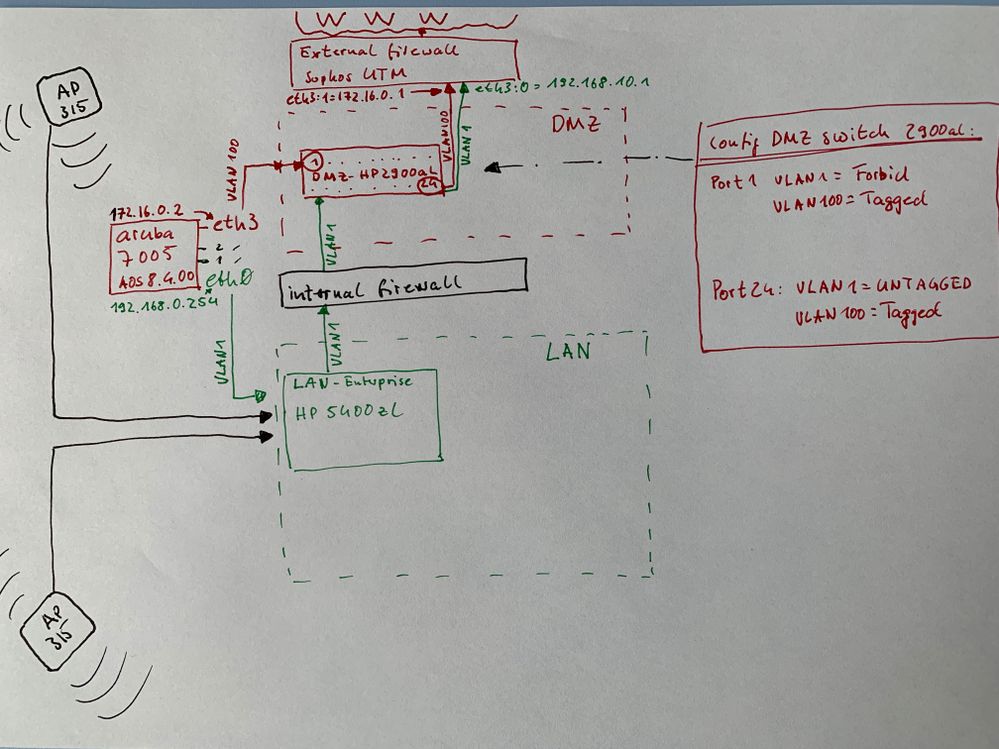
     

    IMG_8791.jpeg


    Thank you in advance- F.One


  • 2.  RE: Guest network / vlan confusion

    Posted Feb 28, 2019 11:01 AM
    How are the ports configured on the controller?

    Is inter VLAN routing disabled?

    Why are you using VLAN 1?


  • 3.  RE: Guest network / vlan confusion

    Posted Feb 28, 2019 12:19 PM

    port config:


    Slot-Port  PortType  AdminState  OperState  PoE  Trusted  SpanningTree  PortMode  Speed   Duplex  PortError

    ---------  --------  ----------  ---------  ---  -------  ------------  --------  -----   ------  ---------

    0/0/0      GE        Enabled     Up         N/A  Yes      Forwarding    Access    1 Gbps  Full    -

    0/0/1      GE        Enabled     Down       N/A  Yes      Disabled      Access    Auto    Auto    -

    0/0/2      GE        Enabled     Down       N/A  Yes      Disabled      Access    Auto    Auto    -

    0/0/3      GE        Enabled     Up         N/A  Yes      Forwarding    Access    1 Gbps  Full    -


    Port Untrusted Vlan Table

    -------------------------

    Name: GE0/0/3

    Vlan(s): 1-99,101-4094


    Port Statistics

    ---------------

    Port      PacketsIn   PacketsOut  BytesIn        BytesOut       InputErrorBytes  OutputErrorBytes  CRCErrors

    ----      ---------   ----------  -------        --------       ---------------  ----------------  ---------

    GE 0/0/0  5687969414  5737163907  3063935211430  3136070784607  0                0                 0

    GE 0/0/1  0           0           0              0              0                0                 0

    GE 0/0/2  0           0           0              0              0                0                 0

    GE 0/0/3  955         10460       231097         746778         0                0                 0


    If this is not you were interested in please let me know.


    VLAN routing is disabled


    Using VLAN 1 because it is default VLAN ID on all our HP environment and until now we never had the a request to use VLANs at all.


  • 4.  RE: Guest network / vlan confusion
    Best Answer

    Posted Mar 08, 2019 04:51 AM

    Update & near to a solution:


    2 things have had to be changed to get it up and running:


    @DMZ-Switch:

    - Port 1 VLAN100: UNtagged


    @aruba

    - disable inter VLAN Routing ONLY for VLAN 100 but ENable it for VLAN 1


    Since theses changes it is quite working.

    Don´t know why guest WLAN members can ping internal servers but hey, they cannot establish any real connection to these servers (ssh, https...).  

    99% of corporate WLAN clients are fine, too.

    But strange: 1 Mac OS X Mojave Client in the internal WLAN can ping any server but cannot establish ssh & smb connection.

    Still searching for reasons while he is connected via cable...