Security

 View Only
  • 1.  How to change Default MSPK on ClearPass manually

    Posted Aug 04, 2023 02:35 AM

    Hello community, 

    We are looking for a way to change default MSPK key through ClearPass GUI. At this moment we can only regenerate it with random value, we want it to be a specific defined. 

    unknown.png

    I found that  it can be changed statically through RestAPI, but it's not so convenient.  Is there a other way?


  • 2.  RE: How to change Default MSPK on ClearPass manually

    Posted Aug 04, 2023 02:54 AM

    Hi

    If you export your enforcement profile to an XML file, with password, you can edit the password written in clear text in the XML file and import the XML again.
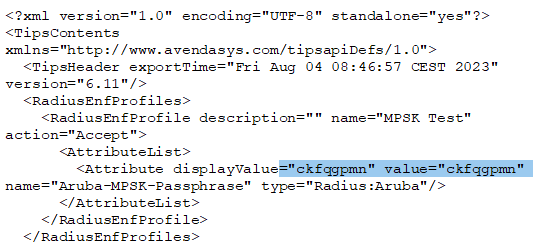


    ------------------------------
    Best Regards
    Jonas Hammarbäck
    MVP 2023, ACCX #1335, ACX-Network Security, Aruba SME, ACMP, ACDP , ACEP, ACSA
    Aranya AB
    If you find my answer useful, consider giving kudos and/or mark as solution
    ------------------------------


  • 3.  RE: How to change Default MSPK on ClearPass manually

    Posted Aug 04, 2023 02:59 AM

    Re-run the Service Wizard and change the Default MPSK there:


    ------------------------------
    Herman Robers
    ------------------------
    If you have urgent issues, always contact your Aruba partner, distributor, or Aruba TAC Support. Check https://www.arubanetworks.com/support-services/contact-support/ for how to contact Aruba TAC. Any opinions expressed here are solely my own and not necessarily that of Hewlett Packard Enterprise or Aruba Networks.

    In case your problem is solved, please invest the time to post a follow-up with the information on how you solved it. Others can benefit from that.
    ------------------------------


  • 4.  RE: How to change Default MSPK on ClearPass manually

    Posted Aug 16, 2023 02:53 AM

    Thank you Herman and Jonas for response. Eventually I did this with RestAPI.

    Pasted Graphic.png
