I have a VC (8.13.1.2) managed by Classic Central. In the VC config is the list of "allowed APs" listed by mac-address. For example:
allowed-ap xx:xx:xx:xx:xx:x1
allowed-ap xx:xx:xx:xx:xx:x2
allowed-ap xx:xx:xx:xx:xx:x3
allowed-ap xx:xx:xx:xx:xx:x4
allowed-ap xx:xx:xx:xx:xx:x5
Some of the APs are old relics that are no longer online. However, this inflates the "APs Down" statistic when you log into the VC web gui:
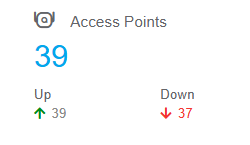
Since the VC is Central-managed, I cannot ssh into the VC and modify the config manually.

And I cannot find anywhere in Central where I can remove the mac-addresses of the old APs from the allowed-ap list.
How can I get the old mac-addresses removed from the VC config?
(trying to avoid having to pull the VC out of Central and back to local or Airwave management, make the edits, then add it back to Central)