thank you a lot for your great answers.
<<<Please note this will lead to a data lose of the perf_db.
Do you mean my perf_db will be empty, an so my statistics will start from a clean DB?
Original Message:
Sent: Sep 06, 2024 01:35 AM
From: vasilyotov
Subject: HPE iMC migration to new VM
Hi Luka,
the SQL Server version on the IMC server in the lab with local DB is also 2017. MS SQL Server 2022 is also supported, so it is up to you.
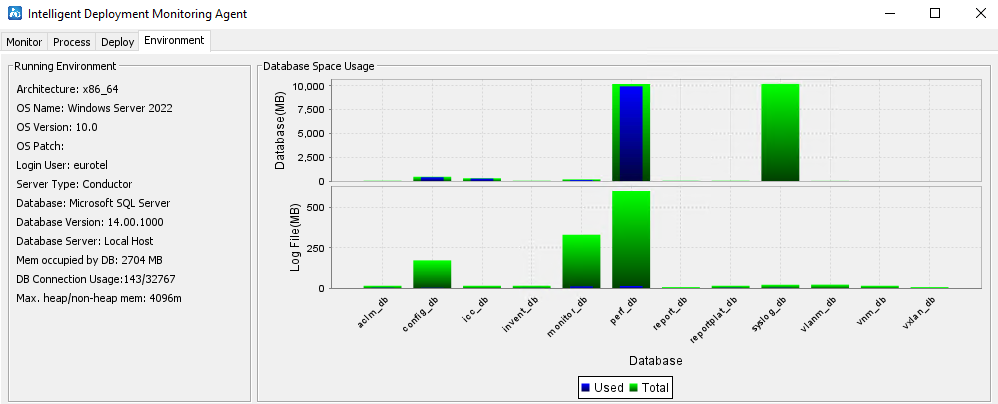
Regarding the perf_db - from the screenshot I see it has reached the 10GB MS SQL Server DB limit. I`m afraid it is 100% full and it is already not responsible, which means the only way to clean it up is to redeploy the performance management component from the deploy tab in DMA. Here screenshot:
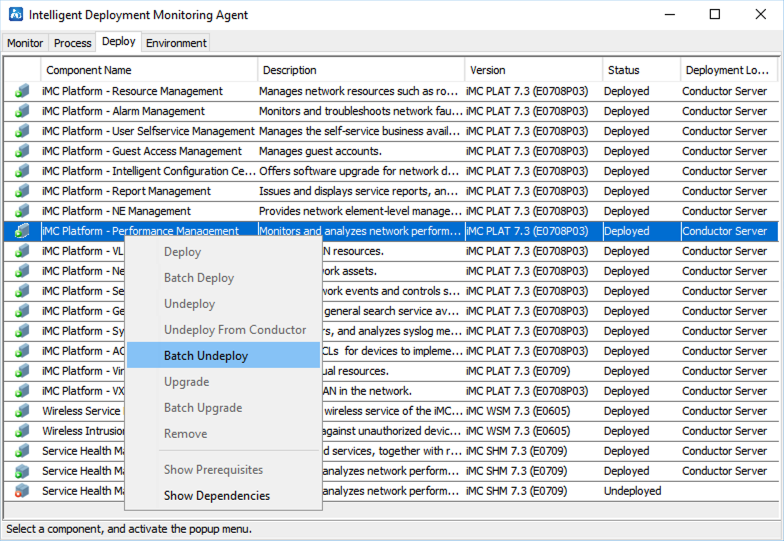
Once you undeploy, you need to deploy it again from the same menu. Please note this will lead to a data lose of the perf_db.
Once you are done with it you can set data export settings from system -> system configuration -> log configuration. Theoretically this could prevent filling again the DBs to 100%
Regards,
Vasil
Original Message:
Sent: Sep 04, 2024 09:58 AM
From: lbrune
Subject: HPE iMC migration to new VM
Hi Vasil,
thank you a lot !!
Yes I followed similar steps:
- I installed E0706 on Win Server 2022,
- Imported the original DB
- followed the upgrade step by step E706 -> E708 -> E710 -> E710P04
I also followed the doc you shared. I find it useful.
Thank you a lot.
What about the SQL version ? What is your version?
I have MS SQL 2017, installed by the iMC installation. My idea is to manually upgrade to 2022. What do you think.
Is it also possibile to delete part of perf_DB? I have 10 GB of perf_DB
Thank you in advance
Luca
Original Message:
Sent: Sep 04, 2024 08:24 AM
From: vasilyotov
Subject: HPE iMC migration to new VM
Hello Luca,
the only official supported method for config/DB migration is using the IMC DBman backup/restore.
Unfortunately DBman backup/restore is only possible when the both IMC versions(old IMC and new IMC)/installed modules are 1:1
In your case you have E0706(old) and E0710P04(new) - this means you must upgrade your old IMC server to E0710P04. Once this is done you could go ahead with the migration of the DB.
I found only one Migration guide on our servers, which is not the latest one, but the steps are the same. Here link for it:
https://support.hpe.com/hpesc/public/docDisplay?docId=a00038008en_us&docLocale=en_US
Regards,
Vasil