Hello,
That makes sense then... you can enable TLS 1.2 support via the following steps from the release notes:
In order to configure the IMC environment to use TLS 1.2, perform the following steps after applying patch 7.3 E0705P02:
1) Ensure your MS SQL version supports TLS 1.2 and it's patched, following https://support.microsoft.com/ensg/help/3135244/tls-1-2-support-for-microsoft-sql-server .
2) On all IMC and database servers, install the OLE DB patch available from https://www.microsoft.com/enus/download/details.aspx?id=56730 .
3) Disable both TLS 1.0 and TLS 1.1 in the registry, following https://support.microsoft.com/enus/help/187498/how-to-disable-pct-1-0-ssl-2-0-ssl-3-0-or-tls-1-0-in-internet-informat .
4) Add usetls=true at the top of server/conf/qvdm.conf file.
Restart iMC after you make the change and it should work with TLS 1.2.
------------------------------
Justin Guse
------------------------------
Original Message:
Sent: Aug 21, 2025 03:31 AM
From: airhead-ocm-cbr
Subject: HPE IMC Multiple services cannot start anymore
Hello jguse,
thank you for your reply. We have a local DB. You were right with your indication that connecting to the database fails. I checked the imcsysdm.txt under iMC/server/conf/log with these errors:
2025-08-21 08:13:44.697 [ERROR (0)] [THREAD(7708)] [CQvDBConnADP::CQvDBConnADP]Database has not connect!
2025-08-21 08:13:44.697 [ERROR (0)] [THREAD(7708)] [CQvDBConnADP::status] Isconnected failed, errorMsg:[DBNETLIB][ConnectionOpen (SECDoClientHandshake()).]SSL Sicherheitsfehler.
Our Security Team did disable 3 days ago TLS1.0 and TLS1.1 on the server where IMC is installed.
Is there anyway that i can update the config for IMC to support the connection with TLS1.2 ?
Thanks.
Original Message:
Sent: Aug 20, 2025 09:24 AM
From: jguse
Subject: HPE IMC Multiple services cannot start anymore
Hello,
These services not starting indicates a general issue connecting to the database. Do you use a local DB or a remote one? If it's local then thankfully it will also be restored with the VM Snapshot - if it's remote, it could be an issue since you now have a mismatch where the DB is on H08, unless you can also revert a snapshot of the DB.
Either way, check if your DB is running. For example with Windows MSSQL go to Services and check if the MSSQLSERVER process is started. The Environment tab of DMA may also show you some error message indicating why IMC can't reach the DB.
------------------------------
Justin Guse
Original Message:
Sent: Aug 20, 2025 07:30 AM
From: airhead-ocm-cbr
Subject: HPE IMC Multiple services cannot start anymore
Hello HPE Aruba Community,
we tried upgrading our IMC to PLAT 7.3 (E0710H08) but after some services did not start we did decide to revert back via WM snapshot to the older version iMC_PLAT_7.3_E0710P06.
Now we have the same problem after the snapshot that only a few services are starting correctly. See attached screenshot.
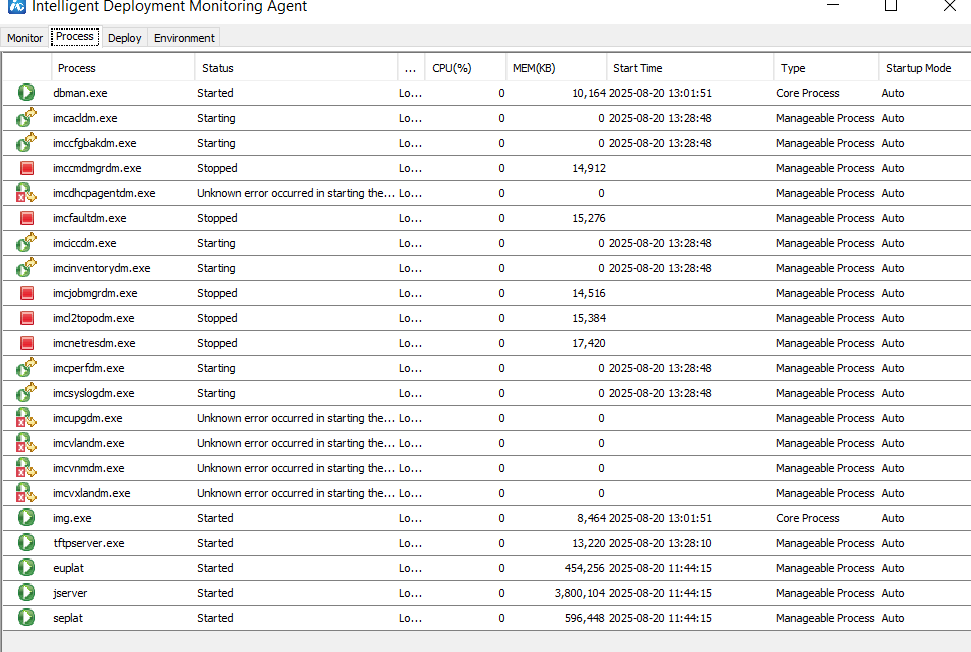
Does anybody know how i can get IMC to work again or where i can find the cause?
Thanks.
-------------------------------------------