It worked as expected! Thanks again Herman. Indeed at first I tried the intermediate cert which wasn't working, I really needed the root cert.
Original Message:
Sent: Feb 27, 2025 11:16 AM
From: Herman Robers
Subject: IFMAP two issues
Through Central, you can upload the CA certificate through Organization -> Network Structure -> Certificates; use CA Certificate there.
It may be that the certificate is not pushed to your gateway, which you can check with CLI:
(c2c-gw9004-33) #show crypto pki TrustedCACertificates of All Nodes-------------------------Name Expired-------------- -------ArubalabNL-CA No
So it it's not pushed, in the gateway config go in System -> Certificates -> Certificates for VPN Clients, there Add a new one, and the one you uploaded should be available.
Then verify again with the show crypto pki TrustedCA. Not sure if this is the official way, but it works for me.
------------------------------
Herman Robers
------------------------
If you have urgent issues, always contact your HPE Aruba Networking partner, distributor, or Aruba TAC Support. Check https://www.arubanetworks.com/support-services/contact-support/ for how to contact HPE Aruba Networking TAC. Any opinions expressed here are solely my own and not necessarily that of Hewlett Packard Enterprise or HPE Aruba Networking.
In case your problem is solved, please invest the time to post a follow-up with the information on how you solved it. Others can benefit from that.
Original Message:
Sent: Feb 25, 2025 12:33 PM
From: mvanoverbeek
Subject: IFMAP two issues
Hi Herman,
Thanks for the detailed response, I suspected something with certificates but this was a very detailed response. If the gateway is managed through Aruba central, how do I get that certificate on the box? Would that be through the web-gui of the gateway itself of through Aruba central? In central I had troubles finding how to do this.
| Martijn van Overbeek |
| Architect |
|
|
|
|
|
Original Message:
Sent: 2/25/2025 6:07:00 AM
From: Herman Robers
Subject: RE: IFMAP two issues
Following what you shared, the Mobility Conductor (MCR) can't reach the cppm with 'unable to get local issuer certificate'. This is expected if you didn't import the Root CA that issued the ClearPass HTTPS certificate, as unlike your computer/browser, there is no list of trusted root CAs in a controller/gateway/MCR.
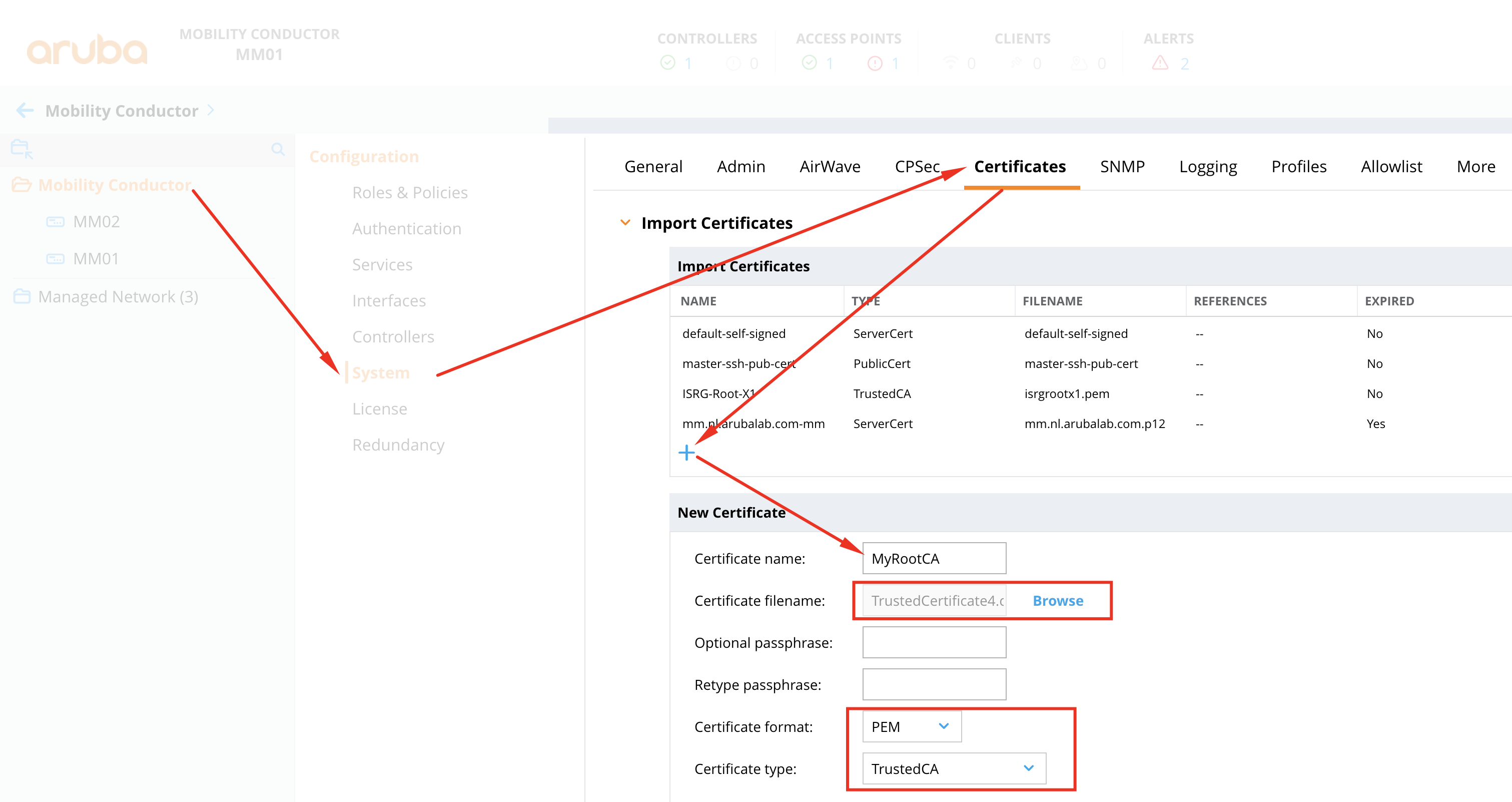
What you should do is export the root CA that signed the ClearPass HTTPS certificate, and imported that as a TrustedCA in your MCR.
Check in your ClearPass that there is only one HTTPS certificate enabled (ECC or RSA), then check there what is the RootCA for that certificate. In the Trust List, that RootCA should be available, and there you can export it as a .crt file. Make sure there are no parentheses in the filename, which happens if you downloaded a certificate from the trust list earlier (just rename it to myrootca.crt or so..).
Then import in your MCR, use format PEM and type TrustedCA:
------------------------------
Herman Robers
------------------------
If you have urgent issues, always contact your HPE Aruba Networking partner, distributor, or Aruba TAC Support. Check https://www.arubanetworks.com/support-services/contact-support/ for how to contact HPE Aruba Networking TAC. Any opinions expressed here are solely my own and not necessarily that of Hewlett Packard Enterprise or HPE Aruba Networking.
In case your problem is solved, please invest the time to post a follow-up with the information on how you solved it. Others can benefit from that.
Original Message:
Sent: Feb 18, 2025 02:07 PM
From: mvanoverbeek
Subject: IFMAP two issues
I am having a hard time trying to figure out how to succesfully set up IFMAP
Although it is relatively straightforward finding the instructions on how to configure IFMAP on the conductor/gateway, I think I am missing instructions on how to trust the publicly signed certificate on the conductor/gateway.
Both AOS8 and AOS10 provide the output below.
(DR-Mode) *[mm] #show ifmap state cppm
CPPM IF-MAP Connection State [Interface: Enabled]
-------------------------------------------------
Server State
------ -----
cppm.xxxxx.net:443 DOWN[02/18/25 13:56:24]SSL certificate problem: unable to get local issuer certificate
I suspect I need to import a root or intermediate CA certificates on the conductor (AOS8) or through Aruba Central AOS10 but am just not that experienced with Certificates to figure out what the missing piece is or how to do that. Through a normal web browser on a client when using the FQDN the browsers trusts the Clearpass server so I assume it has to be something on the conductor and gateway.
Help appreciated :)
Hope someone can help.
I am kind of at a loss here on how to get this operational. Is there a helpful instruction somewhere
------------------------------
Martijn van Overbeek
Architect, Netcraftsmen a BlueAlly Company
------------------------------