Thank you very much! Yes this helped!
Ive gone through the training videos on this site, and read through some of the documentation. I feel I am grasping the concepts, now to Test in PROD!!!
From what I understand, the Airwave Server is not necessarily required. Our airwave server is currently set to monitor only, so it's not pushing any configs, just monitoring, which is why I say not necessarily required.
Instead of being concerned with Airwave, I will first focus on the IAP Cluster.
Our district contains 5 subnets-
10.10.0.0
10.20.0.0
10.30.0.0
10.40.0.0
10.50.0.0
I have the 10.50.x.x AP's on the correct subnet. The master receives a dhcp address in the correct subnet. I am unable to access the VC using the 10.50 subnet address. I can however access an AP on the 10.50 network, which reroutes me to the master AP. The master AP shows as, what seems to me, to be a duplicate name and address of another site/subnet.
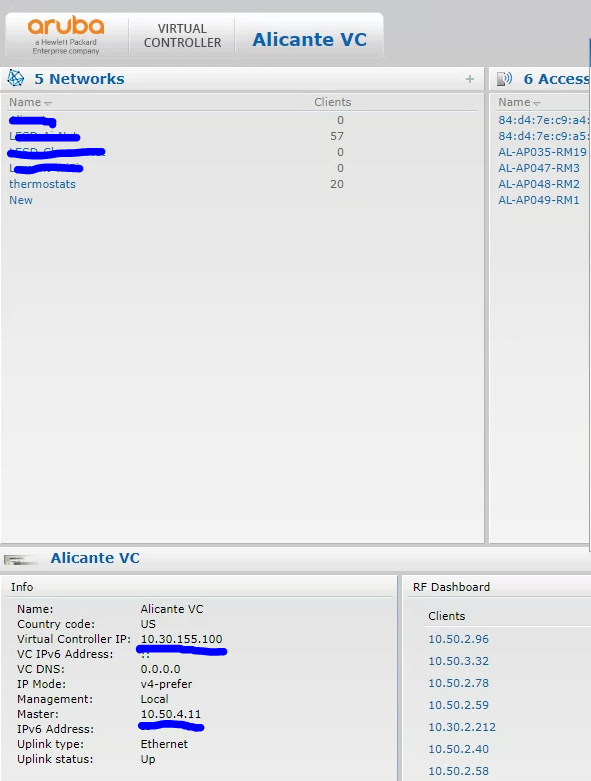
Here is the VC Gui on the 10.30 Subnet. This looks to be configured correctly.
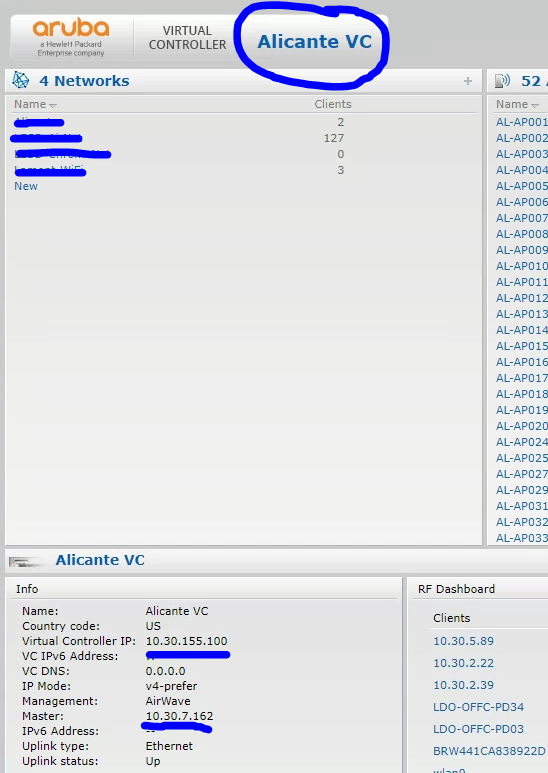
We usually have issues trying to access the web gui of our 10.30.x.x Virtual Controller. I'm assuming the reason is because the IAP's have created a cluster on the 10.50.x.x subnet, but has a duplicate address for another subnet's VC IP address.
What I would think to do is get into the master AP on the 10.50 subnet, change to the correct site name, and change the Virtual Conroller IP to the 10.50 subnet.
Once these settings are corrected. I should now be able to reliably access our 10.30 VC, and have a new VC on the 10.50 subnet. Would this be correct? Thank you for the help!!!
------------------------------
Rick Reyes
------------------------------
Original Message:
Sent: Apr 01, 2022 09:16 PM
From: Colin Joseph
Subject: Inherited Wireless Infrastructure - Please Help
Some general answers to your questions:
APs will show "good" if they received the last configuration, even though they are down.
For the "new" devices, you can add it to a folder designated for that site, or create a folder for that site and then go back and add them to that folder. Make sure you have the "monitor only" option checked, otherwise Airwave will push a configuration to those devices.
There is a procedure to add a cluster to airwave. The Airwave/Instant configuration guide is here: https://support.hpe.com/hpesc/public/docDisplay?docId=a00099169en_us. Look at the section under "Setting up Instant Manually".
If you are only monitoring APs, that means Airwave is not pushing configuration to those instant APs, and the configuration will always be "mismatched". You can ignore that for now. It is only important when you are managing the configuration from airwave.
When you navigate to the ip address of any AP in a cluster., it will redirect to the cluster ip address, which is what you need to monitor and manage a cluster.
Good luck and I hope any of this helps.
------------------------------
Any opinions expressed here are solely my own and not necessarily that of Hewlett Packard Enterprise or Aruba Networks.
------------------------------