Cloud Managed Networks

 View Only
Expand all | Collapse all

Insight on Coverage Hole Optimizer

This thread has been viewed 17 times
  • 1.  Insight on Coverage Hole Optimizer

    Posted Apr 10, 2026 12:08 PM

    New Central is giving me an Insight on a Coverage Hole.  I'm trying to understand what it see's that makes it say that.  So, it says the AP named GF-Pool-NE has Low Uplink SNR:

    If I click on that for more detail:

    Is that saying that it had a low SNR that it heard 50 clients with a low SNR.  Below is a snippit of the map of that portion of the building.  Being that GF-Pool-NE is on the outside wall of the building, could it be that these 50 clients with low SNR were outside the building on the sidewalk or parking lot?.  If they are I wouldn't expect them to have a strong signal, we haven't made any effort to provide outdoor wireless around this building.

    Does this mean the advice of this Insight is meaningless any time it identifies a coverage hole with an AP on the outside edge of a building?  Probably also if it identified a hole for any outdoor AP?


    -------------------------------------------


  • 2.  RE: Insight on Coverage Hole Optimizer

    Posted May 03, 2026 04:39 AM

    Downlink SNR: Measures signal quality from the AP to the client.

    Uplink SNR: Measures signal quality from the client to the AP

    So, in your case if the insight is showing an AP at the edge of your network, then yes it could include clients outside of your campus. 

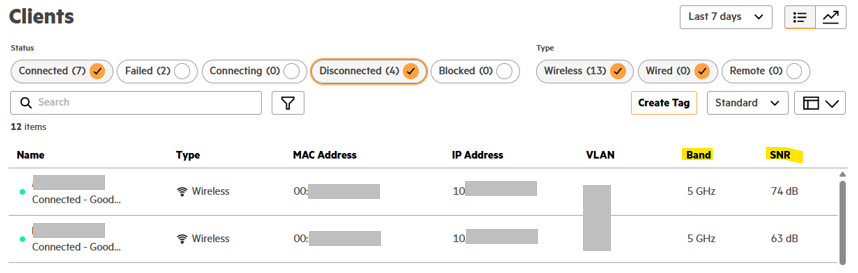
    You could use this insight for other areas. Also you can check the clients for the AP in question by clicking on the AP and then check the client planet and add  columns "SNR" and "Band" to see which client devices have low SNR (<20)


    ------------------------------
    If my post was useful accept solution and/or give kudos.
    Any opinions expressed here are solely my own and not necessarily that of HPE or Aruba.
    ------------------------------