Wireless Access

 View Only
  • 1.  Installing firmware msm460

    Posted Jun 27, 2020 04:24 PM

    How to install firmware on the access point msm460 without access to the equipment settings? after clicking on the option "switch to autonomous mode" it resets and locks access. Thank you


  • 2.  RE: Installing firmware msm460

    Posted Jun 29, 2020 09:57 AM

    Hello

    After switching the AP to autonomous mode you should have access to the webUI where you have a menu for updating the firmware. What exactly means that the AP locks access? 

    You are not getting the webUI and you cannot enter the credentials? Did you test if you can ping the AP in this state? If ping is working, did you test with different browsers? Did you test if you can access the AP via SSH and login with admin/admin?

    Or you are getting the webUI login prompt but your credentials are not accepted? Are you using the default credentials admin/admin or some credentials you configured?

    Do you know what the current firmware version of the AP is? The version should be displayed in the webUI on the same screen where you have the buttin "Switch to autonomous mode"

    It may be also important how was the AP used by now? Did you use with an HPE MSM controller? With an HPE Unified controller? Or it was autonomous?


  • 3.  RE: Installing firmware msm460

    Posted Jun 29, 2020 05:52 PM

    Hello

    The procedure below was performed


    1. Isolate the computer and the unit so they are not connected on a network with any other
    devices.
    Attach the crossover LAN cable from the PC to the LAN port of the unit. Do not attach any cables
    to the Internet port of the unit.
    NOTE: If you do not isolate the PC and unit and there is a DHCP server on the network, the unit
    will obtain an IP address from the DHCP server. In that case, substitute that IP address in the
    rest of the instructions where, 192.168.1.1 is mentioned.
    2. Statically assign an IP address to the PC on subnet 192.168.1.x, in the range of .2 - .254
    3. Use the end of a paper clip to press and hold the reset button until the front status LEDs
    flash together at a rate of approximately twice/second (the LEDs will flash together slowly
    first, and then start flashing faster). Then release the reset button. The unit will now start up
    in TFTP boot mode.
    (NOTE for MSM720: Follow the instructions above for factory reset but hold the clear button until
    the LEDs flash together at a rate of approximately twice/second. NOTE for MSM466-R: A paperclip
    is not necessary.)
    4. On the PC, open a command window, change directories so that you are in the directory where
    you’ve saved the startup.cim file, and type the following commands:
    arp -d 192.168.1.1
    ping 192.168.1.1

    Command used when pushing an image via TFTP (If the ping command does not work, see
    Troubleshooting below).
    tftp -i 192.168.1.1 put xxx.cim.startup image
    The transfer should take fewer than 10 seconds to complete during which time the LAN LED will
    indicate activity. You can confirm that the firmware is being flashed on the AP/Controller by
    seeing two distinct sets of flashing LEDs, the second one being much longer duration than the
    first. Give the AP/Controller ample time to reboot (5 minutes to be sure).
    5. Perform a factory reset of the AP/Controller by following the instructions detailed above.
    6. On the PC, ping the AP/Controller using the command: ping 192.168.1.1 The AP/Controller
    should now be in the same state as when it is s
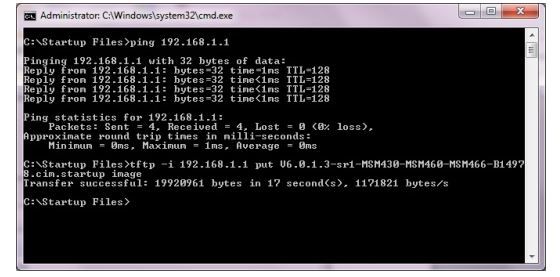
    comandos.JPG


    After executing the procedure sent by HP together with the image V6.6.9.1-MSM430-MSM460_Bootware_wNewDay-B23594.cim.startup when initializing presents the screen below:
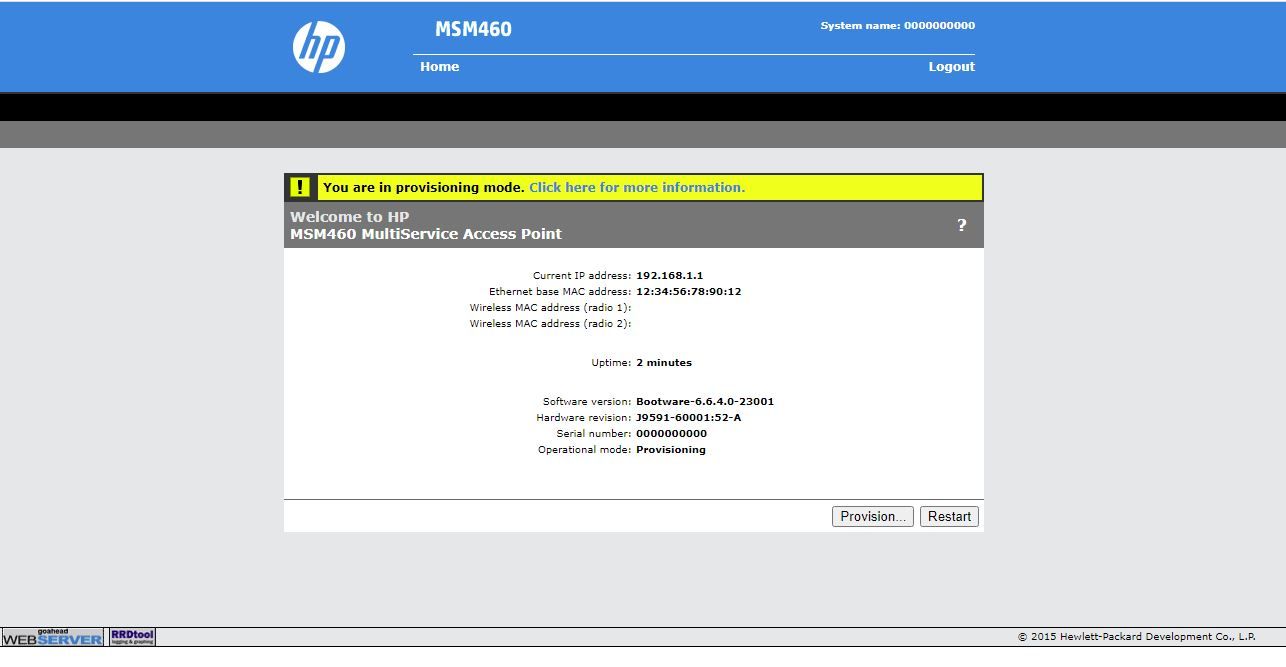
     

    msm460.JPGbutton switch operacional mode does not appear.


  • 4.  RE: Installing firmware msm460

    Posted Jun 29, 2020 06:13 PM

    erro cli.JPG


    follows the error complement, note that it has an error Validate image personality ... invalid: 1 when executing the switch operational mode command


  • 5.  RE: Installing firmware msm460

    Posted Jun 30, 2020 01:51 AM

    Hello, 

    If I am not wrong you have also an open support case at the moment. Maybe it is better for you to get the instructions from one point of contact. I will contact the colleague and we will coordinate the next steps.


  • 6.  RE: Installing firmware msm460

    Posted Dec 21, 2020 11:22 PM

    I also need "460.cim.startup", can you help me,thank you so much!

    personal info erased


  • 7.  RE: Installing firmware msm460

    Posted May 11, 2021 05:34 AM

    Dear Everybody,

    Unfortunately, my MSM460 also became a brick. I need to fix it. Where can I download the startup firmware for it?

    I can not find it anywhere.

    Thank you for your help.

    Hi: Thomas