Thank you Gorazd,
I will have it moved and factory reset and then reallocate it.
Much appreciated.
 | | Geraint Williams | |
| Systems Engineer | |
| +64 (4) 462 4824 | |
| Manawatu |
| |
|
|
|
| Managed Services | | Contact Centre | | Digital Workplace | | Networking | | Security | | Digital Innovation | | Procurement |
|
|
This email, including any attachments, is intended solely for the use of the individual or entity to whom it is addressed and may contain confidential and/or privileged information. If you are not the intended recipient, please notify the sender immediately by reply email and destroy all copies of the original message. Any unauthorized review, use, disclosure, or distribution is strictly prohibited. The views expressed in this email are those of the individual sender and do not necessarily reflect the views of the Company. Before opening or using any attachments, please scan them for viruses and other defects. Please be advised that this communication is not intended to designate an information system for the purposes of the Electronic Transactions Act 2002.
|
|
|
Original Message:
Sent: 8/16/2023 2:48:00 AM
From: GorazdKikelj
Subject: RE: Moving APs between groups
You can't have members of the same instant cluster in different configuration groups. Remember, groups are configuration entities.
If you want to move a specific AP that is a part of existing cluster, to a different group, you need to remove it from the cluster, meaning you need to move it to different vlan (broadcast domain) and per best practice factory reset it. Then it will show as new VC and you can move it to a different group.
So in Central GROUP is a configuration entity. In Instant the cluster is configuration entity. Each Instant cluster can only be a member of one group.
Best, Gorazd
------------------------------
Gorazd Kikelj
MVP Expert 2023
------------------------------
Original Message:
Sent: Aug 15, 2023 08:13 PM
From: Geraint
Subject: Moving APs between groups
Thank you,
I have followed this workflow but it fails at step 5 as the AP doesn't appear under 'groups'. It appears to me that only VCs are shown under 'groups' and not all the APs
 | | Geraint Williams | |
| Systems Engineer | |
| +64 (4) 462 4824 | |
| Manawatu |
| |
|
|
|
| Managed Services | | Contact Centre | | Digital Workplace | | Networking | | Security | | Digital Innovation | | Procurement |
|
|
This email, including any attachments, is intended solely for the use of the individual or entity to whom it is addressed and may contain confidential and/or privileged information. If you are not the intended recipient, please notify the sender immediately by reply email and destroy all copies of the original message. Any unauthorized review, use, disclosure, or distribution is strictly prohibited. The views expressed in this email are those of the individual sender and do not necessarily reflect the views of the Company. Before opening or using any attachments, please scan them for viruses and other defects. Please be advised that this communication is not intended to designate an information system for the purposes of the Electronic Transactions Act 2002.
|
|
|
Original Message:
Sent: 8/15/2023 6:49:00 PM
From: ariyap
Subject: RE: Moving APs between groups
you can refer to the workflow outlined here
------------------------------
If my post was useful accept solution and/or give kudos.
Any opinions expressed here are solely my own and not necessarily that of HPE or Aruba.If my post was useful accept solution and/or give kudos.
Any opinions expressed here are solely my own and not necessarily that of HPE or Aruba.
Original Message:
Sent: Aug 15, 2023 04:58 PM
From: Geraint
Subject: Moving APs between groups
Thank you Herman,
I've followed your steps but the AP doesn't show up in the groups list, and it is subscribed with a foundation subscription so I'm still investigating this.
Original Message:
Sent: Aug 15, 2023 09:50 AM
From: Herman Robers
Subject: Moving APs between groups
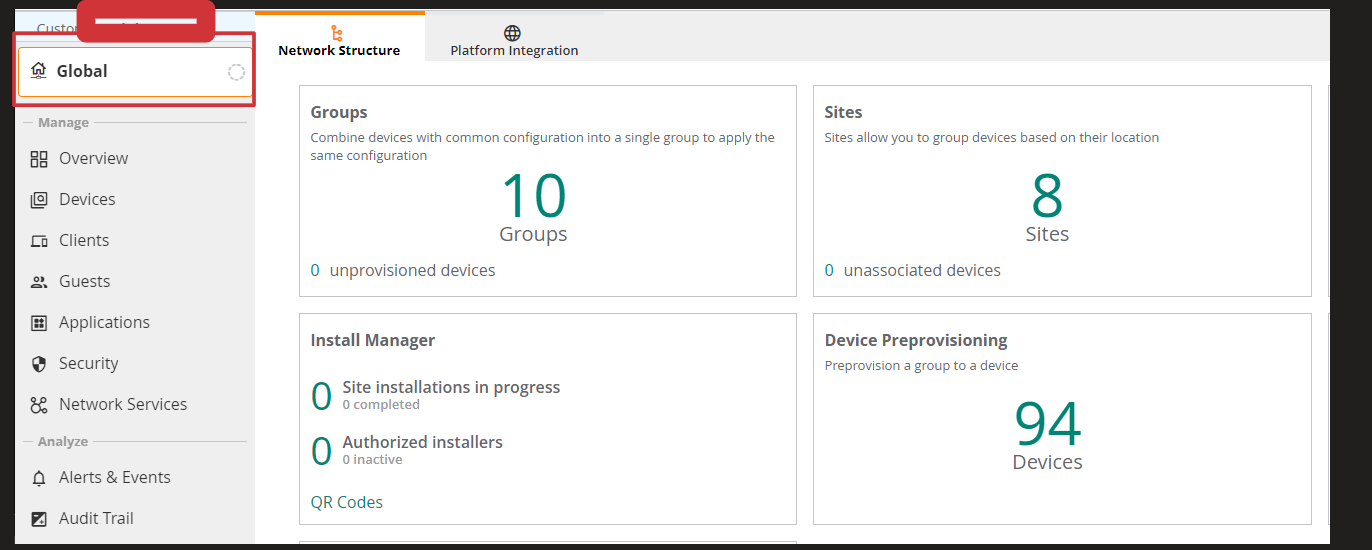
Go into the group management, either by clicking in the screen you showed on the big number 10 (Groups), or through the Group Selector, then select the 'Groups' label there:
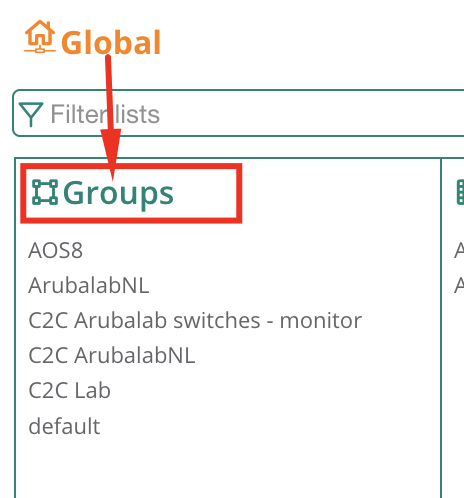
From that screen, search your AP, if you know where it is, or use the looking-glass to search it, or under All Connected Devices, then when you click the row with your device, an indicator appears that allows you to move the AP to another group:

If the AP does not show up in that list, make sure it is subscribed under device management.
------------------------------
Herman Robers
------------------------
If you have urgent issues, always contact your Aruba partner, distributor, or Aruba TAC Support. Check https://www.arubanetworks.com/support-services/contact-support/ for how to contact Aruba TAC. Any opinions expressed here are solely my own and not necessarily that of Hewlett Packard Enterprise or Aruba Networks.
In case your problem is solved, please invest the time to post a follow-up with the information on how you solved it. Others can benefit from that.
Original Message:
Sent: Aug 14, 2023 05:27 PM
From: Geraint
Subject: Moving APs between groups
Good morning all,
A 'newbie' question but how do I move an AP between groups? The AP is assigned to a group under 'device preprovisioning' but there's no option in there to reassign it or remove it from it's current group. The AP doesn't appear in 'Groups' but it appears as online if I look under 'Global' and select the group from there.