I am testing this new feature with a Test SSID, however, when deploying a Test SSID (tunneled, with auto-site-cluster-mgw), all my SSID's go offline.
So to OP: be very careful "testing" this feature in a production environment.
What exactly does the card "GW Clustering Orchestration" do? Because clustering is supposedly done on Device Group level, however, this new card is available at Library under Services, and you mention to apply it to a site (for example).
My cluster is currently made with on the Device Group level, under the High Availability card, which only allows for auto-group clustering.
I suspect this is why my tunneled SSID with "auto-site-cluster-ngw" isn't working. However I also don't think it's fair that all my other WORKING SSID's go offline because of 1 faulty non-working SSID......
EDIT: I went a step ahead and broke my cluster. I created the Services "GW Clustering Orchestration" profile, assigned it to my SITE.
Nothing seems to happen...
It looks like the gateway is actually learning of this auto cluster profile, but it's not doing anything.
(GW1-9114) *#show lc-cluster group-membership
self-ip 10.10.10.10 not present in lc-cluster group-membership auto_cluster_mgw_46040432. So cluster disabled
Original Message:
Sent: May 05, 2026 09:28 PM
From: AP-e172d8
Subject: New Central Centralized Gateway Configs
ok got it, auto clustering should be enabled/available for a number of accounts. One way to see if it is enabled for you is by having "Gateways Clustering Orchestration" card. If you don't see this card, please contact your HPE Networking SE and he can look into it for you.
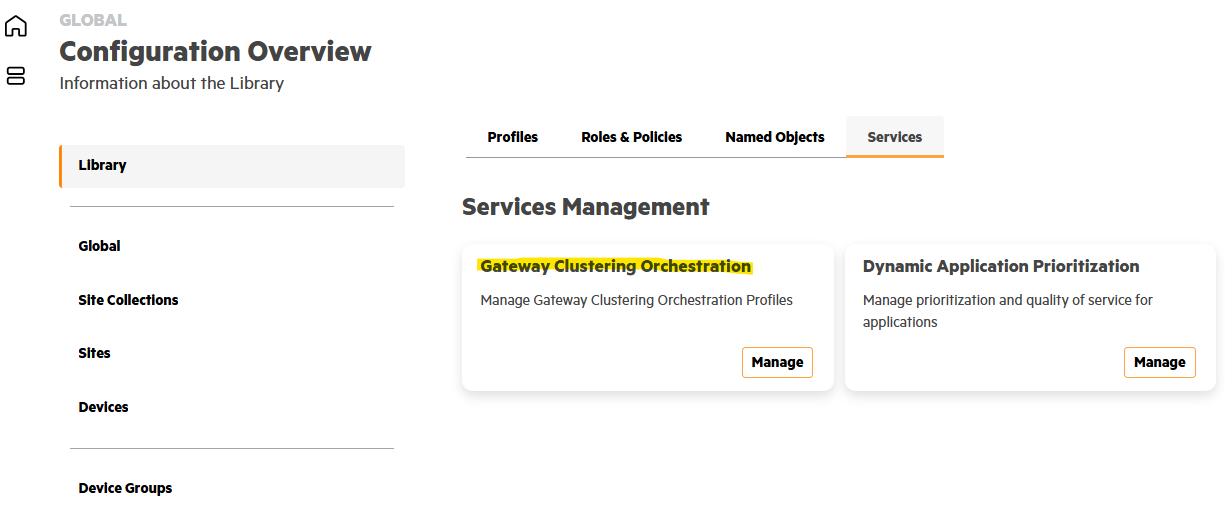
From there you can create a profile and enable "Auto-Site"
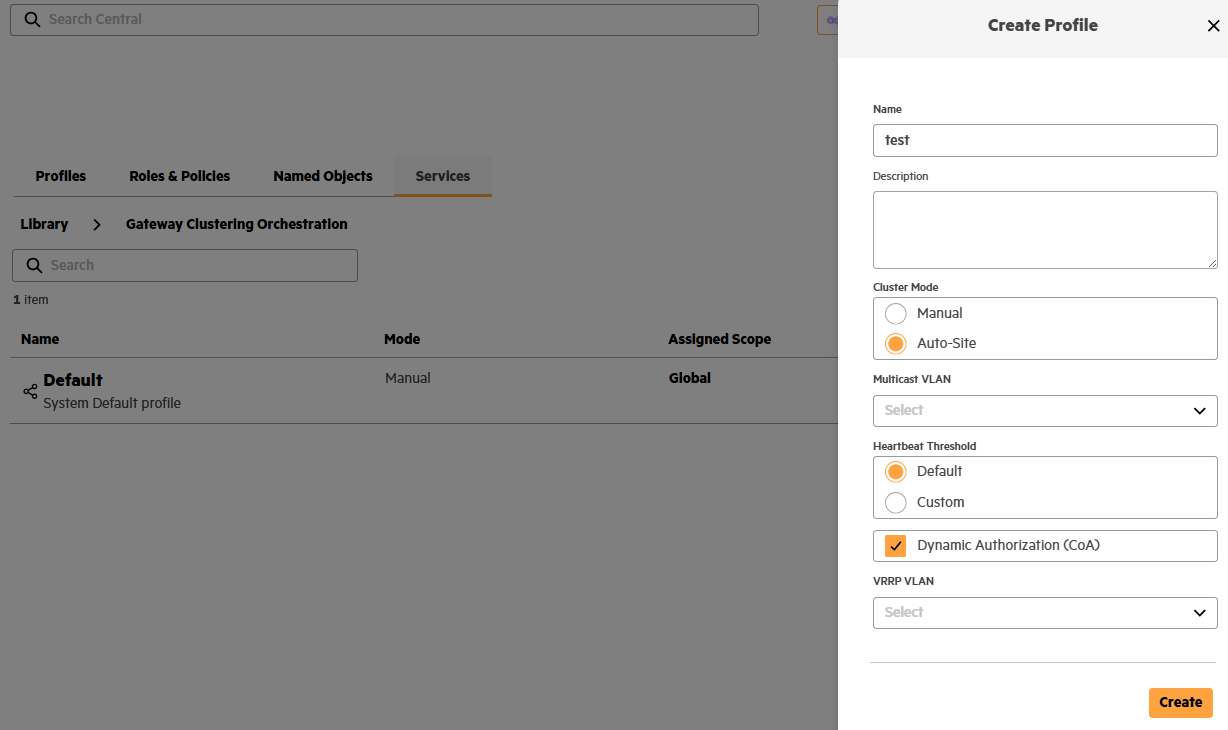
so if you have this card, you can configure the clustering profile before gateways are onboard as well. and you then assign it to a scope - global, site collection, or site.
Now in the WLAN profile you can select "AUTO-SITE-CLUSTER-MGW" as the gateway cluster.
------------------------------
If my post was useful accept solution and/or give kudos.
Any opinions expressed here are solely my own and not necessarily that of HPE or Aruba.
------------------------------
Original Message:
Sent: May 05, 2026 08:29 AM
From: ascott
Subject: New Central Centralized Gateway Configs
@AP-e172d8 Thanks for the reply. I am familiar with this structure but maybe I left out a few details that will make a difference. I have four wireless networks and all four are found globally on 150 clusters. The APs are in "tunnel" mode. I understand the Library and folder structure/assignments but the issue is with tunnel mode you have to manually assign a cluster to each WLAN profile. And the only place to do that is at the device level. Which based on what I was told I have to recreate my WLAN profile 600 times and have possibility non matching standards with each one.