Hi Kris,
Since PSM doesn't seem to support the RADIUS Message-Authenticator field, I had to implement LDAP instead. I've found that PSM doesn't support LDAPS, or I don't know how to get it working. LDAP over StartTLS is available though, even if slightly less secure.
The POSIX values mentioned in the screenshot don't work with Microsoft AD. The 1.119.1-T user guide shows a screenshot with working values:
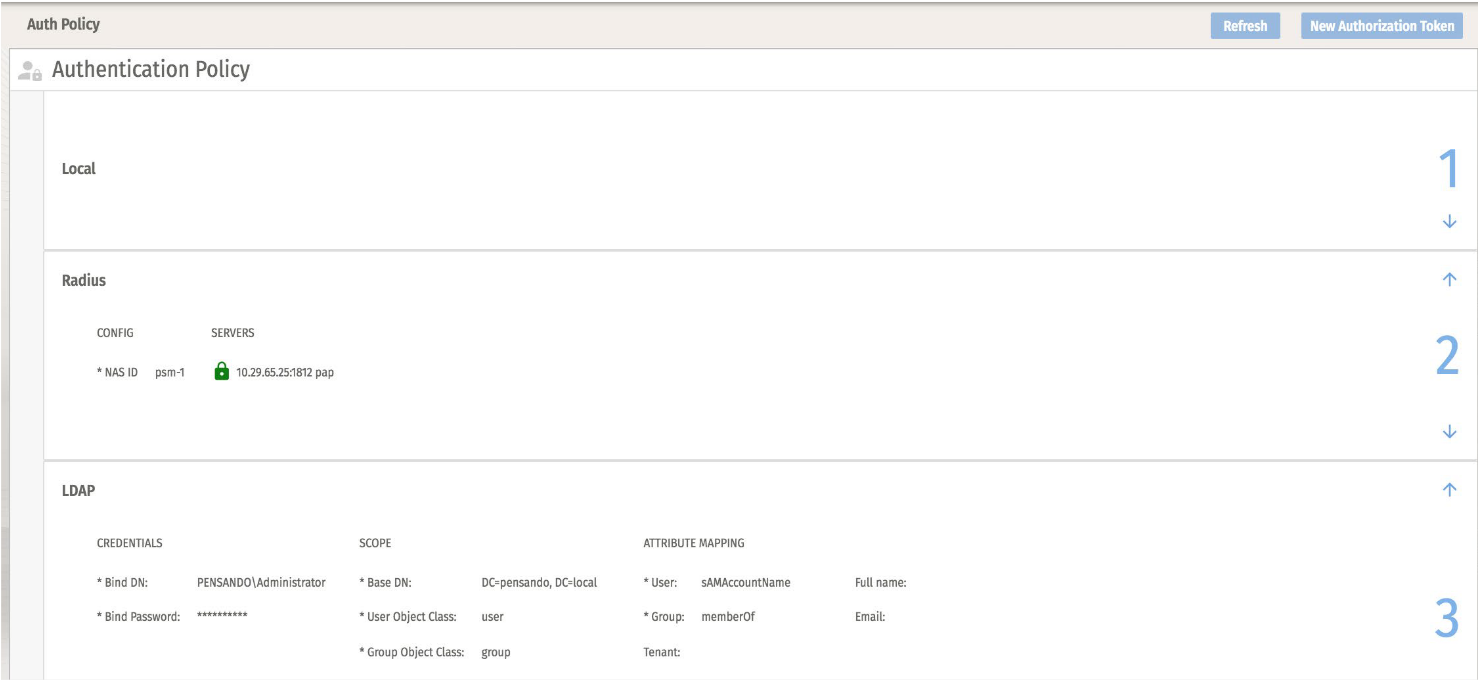

I've used slightly different input:
*Bind DN: "CN=adreader-psm,OU=Service Accounts,DC=pensando,DC=local"
*Base DN: "DC=pensando,DC=local"
*User Object Class: "user"
*Group Object Class: "group"
*User: "sAMAccountName"
*Group: "memberOf"
Full name: "displayName"
Email: "mail"
Server:Port: 192.168.71.153:389
Use TLS: Enabled
Verify Server Certificate: Enabled
Server Name: dc01.pensando.local
Certificate: Root CA-cert signing the domain controller in PEM format
-------------------------------------------
Original Message:
Sent: Apr 18, 2024 10:57 AM
From: KrisVe
Subject: Pensando Services Manager LDAPs to Windows AD
Hello,
Has anyone been able to correctly set up LDAPs to a Windows AD in PSM, I'm especially looking for the required settings for "Scope" and "Attribute Mapping" fields in PSM.
My issue is now that any domain user seems to be able to log in regardless of what I put into those fields... They do not get any Roles so they cannot do anything, but my configured role binding policy contains the same group as configured under LDAP auth policy; and this automatic mapping does not also not work.
As a side question: all of these users that log in are marked as "external user" under user management - is there a way to delete these from the interface?
Any screenshots of a working setup would be greatly appreciated, since in the PSM user guide the examples are for POSIX.
Kind regards,
------------------------------
Kris
------------------------------