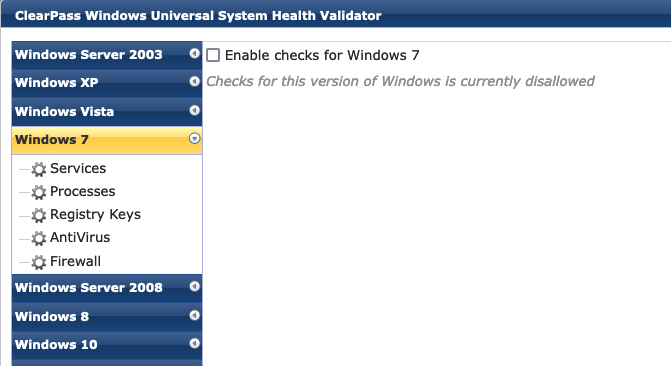
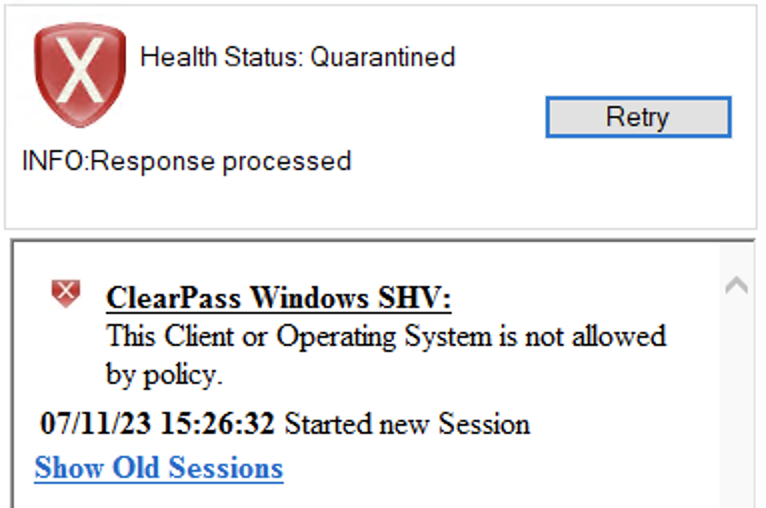
Yes, if you uncheck the 'enable checks' for a specific OS version, it fails the tests. Example to prevent Windows 7:
------------------------------
Herman Robers
------------------------
If you have urgent issues, always contact your Aruba partner, distributor, or Aruba TAC Support. Check
https://www.arubanetworks.com/support-services/contact-support/ for how to contact Aruba TAC. Any opinions expressed here are solely my own and not necessarily that of Hewlett Packard Enterprise or Aruba Networks.
In case your problem is solved, please invest the time to post a follow-up with the information on how you solved it. Others can benefit from that.
------------------------------
Original Message:
Sent: Jul 11, 2023 08:08 AM
From: AH18
Subject: Posture:WindowsSecurity:Automatic Updates UNHEALTHY
Can you allow only specific Windows versions through the "Universal System Health Validator"?
Now I am using the following:
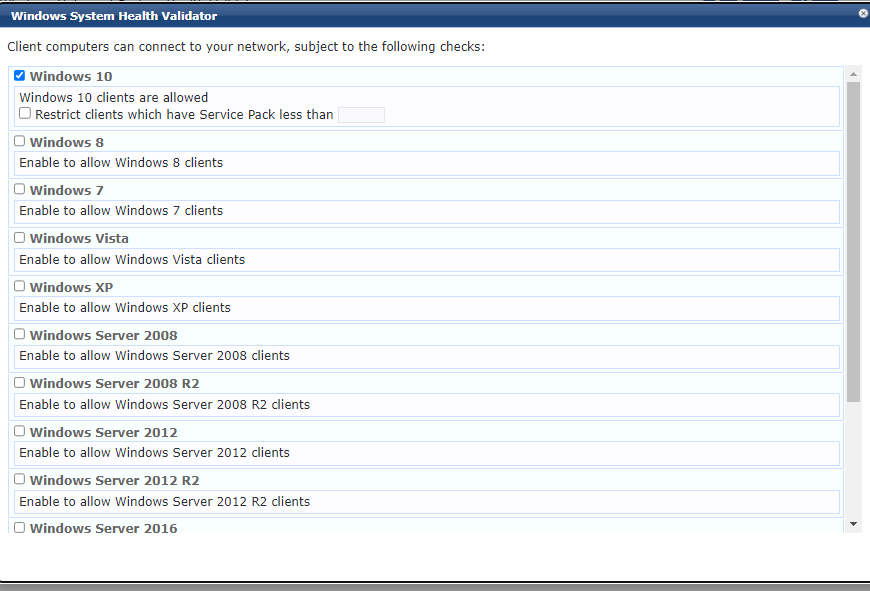
Which doesn't have a "Windows 11" option on it. which is another issue for me.
------------------------------
Best regards,
Alon Haber
Original Message:
Sent: Jul 06, 2023 07:11 AM
From: Herman Robers
Subject: Posture:WindowsSecurity:Automatic Updates UNHEALTHY
Yes, just use the Universal System Health Validator. It should have all the options available in the other two Windows Security plugins.
------------------------------
Herman Robers
------------------------
If you have urgent issues, always contact your Aruba partner, distributor, or Aruba TAC Support. Check https://www.arubanetworks.com/support-services/contact-support/ for how to contact Aruba TAC. Any opinions expressed here are solely my own and not necessarily that of Hewlett Packard Enterprise or Aruba Networks.
In case your problem is solved, please invest the time to post a follow-up with the information on how you solved it. Others can benefit from that.
Original Message:
Sent: Jul 05, 2023 02:09 PM
From: AH18
Subject: Posture:WindowsSecurity:Automatic Updates UNHEALTHY
Hi Herman.
I appreciate your help as always :)
Are you saying that you recommend unchecking those 2 Plugins in the picture?

------------------------------
Best regards,
Alon Haber
Original Message:
Sent: Jul 03, 2023 08:11 AM
From: Herman Robers
Subject: Posture:WindowsSecurity:Automatic Updates UNHEALTHY
Posture:WindowsSecurity:Automatic Updates is the status that is reported by the Windows Security Center and only supported up to Windows 10. Best is to check the client is not running Windows 11, and that the security center on the client itself shows that everything is ok (or not).
If you need more details, it's recommended to create similar checks with the Universal System Health Validator, which is more verbose.
------------------------------
Herman Robers
------------------------
If you have urgent issues, always contact your Aruba partner, distributor, or Aruba TAC Support. Check https://www.arubanetworks.com/support-services/contact-support/ for how to contact Aruba TAC. Any opinions expressed here are solely my own and not necessarily that of Hewlett Packard Enterprise or Aruba Networks.
In case your problem is solved, please invest the time to post a follow-up with the information on how you solved it. Others can benefit from that.
Original Message:
Sent: Jul 02, 2023 05:59 AM
From: AH18
Subject: Posture:WindowsSecurity:Automatic Updates UNHEALTHY
Hi,
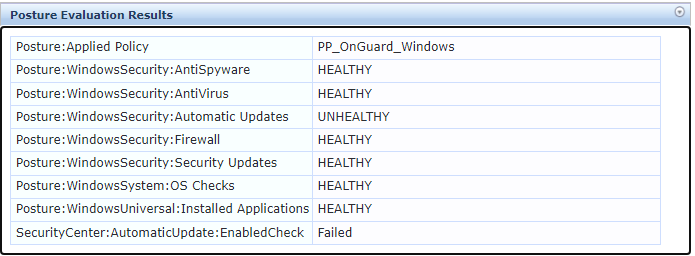
I setup clearpass on a customer's site and get this posture state from one of the End stations That have Onguard on it.
The Automatic updates service on the End station is active. So I have no idea what can cause this state of
Posture:WindowsSecurity:Automatic Updates - UNHEALTHY |
------------------------------
Best regards,
Alon Haber
------------------------------