I removed the EVPN from both pairs of 8360s, however the symptoms are still the same. I've booted both VSX pairs after removing the EVPN config in hope that that would do the trick, but unfortunately it did not.
Unfortunately the customer did not purchase support so I'm very much on my own here. I am loathed to create L2 links from the 6200s to the 8360s but I might just have to do that.
Original Message:
Sent: Dec 22, 2023 05:32 AM
From: Arne Opdal
Subject: Problem with client access over VXLAN network
From the VXLAN documentation:
"Configuring static VTEPs is not supported when EVPN is enabled."
From the drawing it looks like you have EVPN-VXLAN on the 8360, then you can't get them connected to the 6200 using static VTEPs. If you want to include the 6200 in the VXLAN you must use static VTEPs on the 8360s also.
------------------------------
Arne Opdal
Original Message:
Sent: Dec 21, 2023 07:17 AM
From: flatline
Subject: Problem with client access over VXLAN network
Hi,
I'm in the process of building a VXLAN network with 2 x 8360 VSX pairs and a stack of 6200F switches. These represent the core of the network. Attached to each VSX pair and the 6200F are other 6200F access switches.
The issue I have is that clients connected to the 6200F switch can ping the internet, they cannot browse it. As an example, I have a linux client which can ping google.com and even curl google.com. However, if I try and download a file over HTTP, it doesn't work.
Have a look at the diagram. Red links are L3, blue links are L2
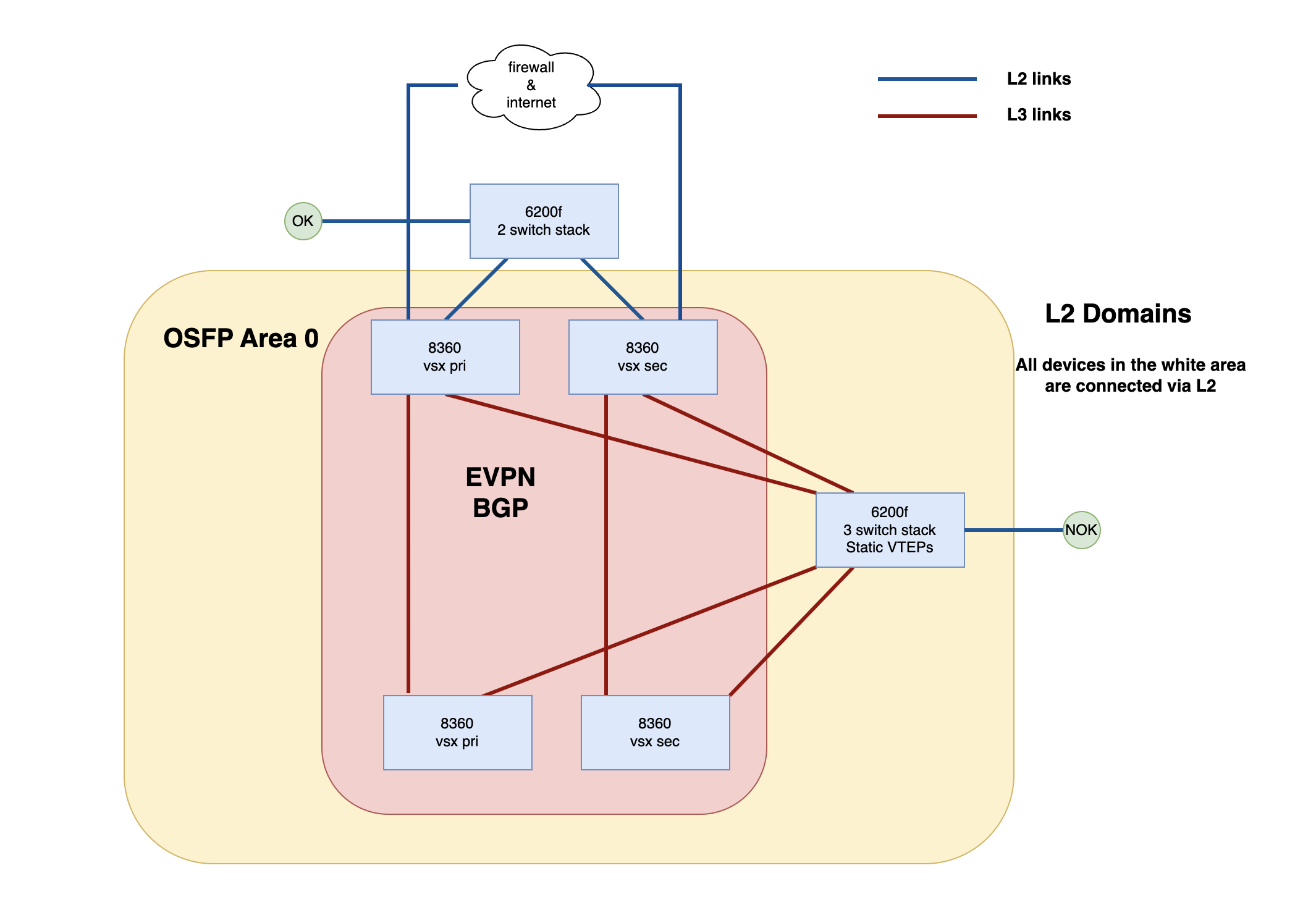
You see two green circles. These represent clients. Clients connected to the access switches connected to the VSX pair work fine - this client has OK in its circle. The green client connected to the 6200F core stack are not OK - it has NOK in its circle. It get's an IP address, can ping google and resolve via DNS, but it can't download files via http nor install packages with apt get.
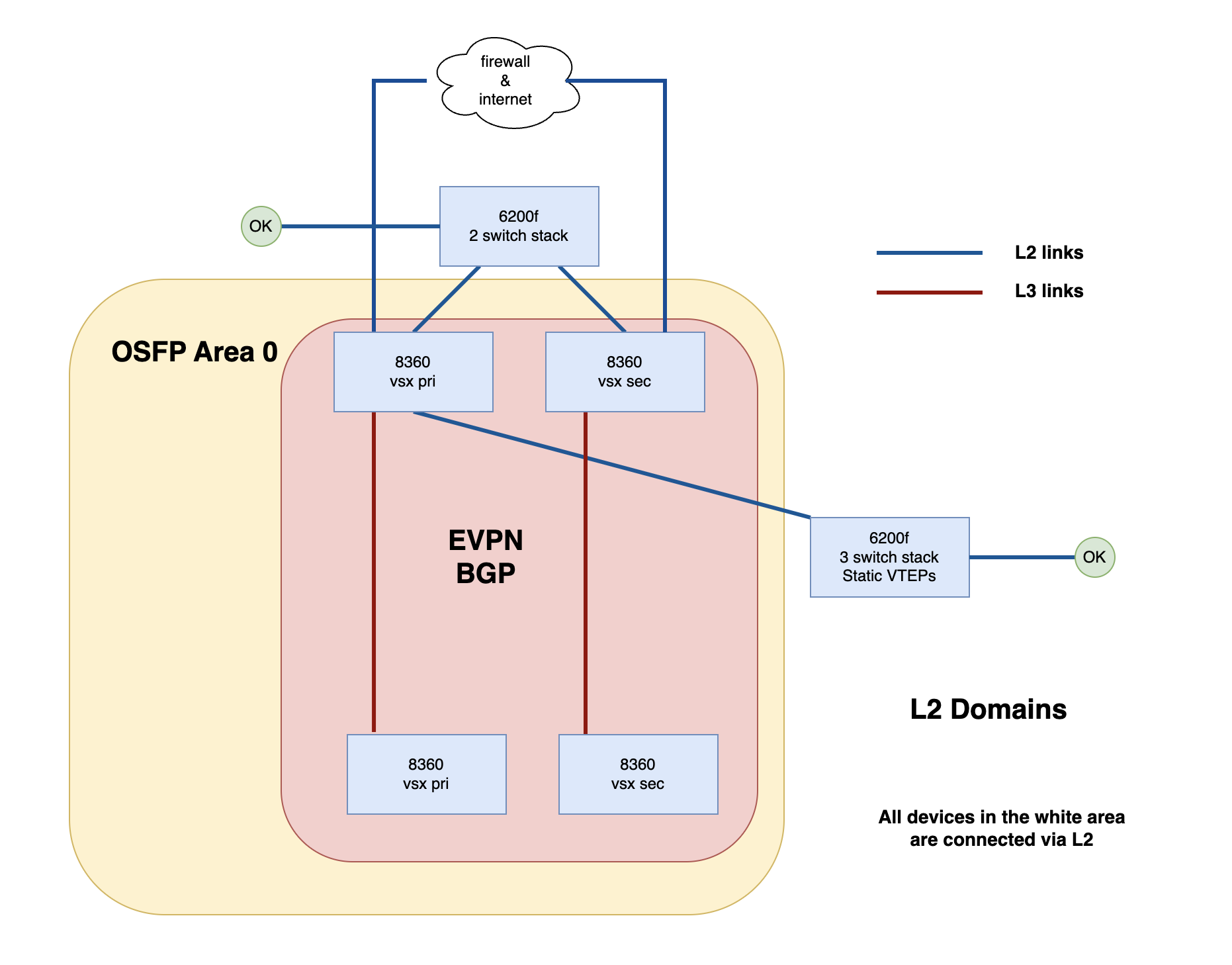
If I change the network to where the 6200F core stack connects to the network via L2 links, the client works - all problems solved.
In Summary:
When the core 6200F is using L3 links and VXLAN
- Get an address from DHCP
- Can ping google
- Can SSH to other network devices
- Can use Curl to access google
- Cannot use APT to install any packages - timeout
- Cannot use Curl to download something via HTTPS - timout
When the core 6200F is connected upstream with an L2 link
- Get an address from DHCP
- Can ping google
- Can SSH
- Can download files via Curl
- Can install packages with APT
- Everything works as expected
Regardless of whether I'm connected via L2 or L3 with VXLAN, traceroutes to google take the same path with the same number of hops.
I can't work out why the VXLAN setup is causing the problem, nor how it is causing the problem. Both questions I'm desperate to answer. That I get DHCP, can ping the internet and I can access the clients via SSH both internally and over a remote access VPN but I can't download files via HTTP or install packages with apt has me completely lost. As soon as I change the topology to the lower of the two diagrams, I can install packages with apt and download via HTTP.
During the change, all clients remained on the same VLAN and I haven't touched their access ports. All I've done is shutdown the L3 links and replaced one of them with an L2 trunk link. That's it.
I've checked that all my L3 links have an MTU of 9000 and I see dynamic MACs in the MAC table for all my clients in all the right places.
Is there anyone out there that has an idea of what is happening? Anyone been in a similar situation before?