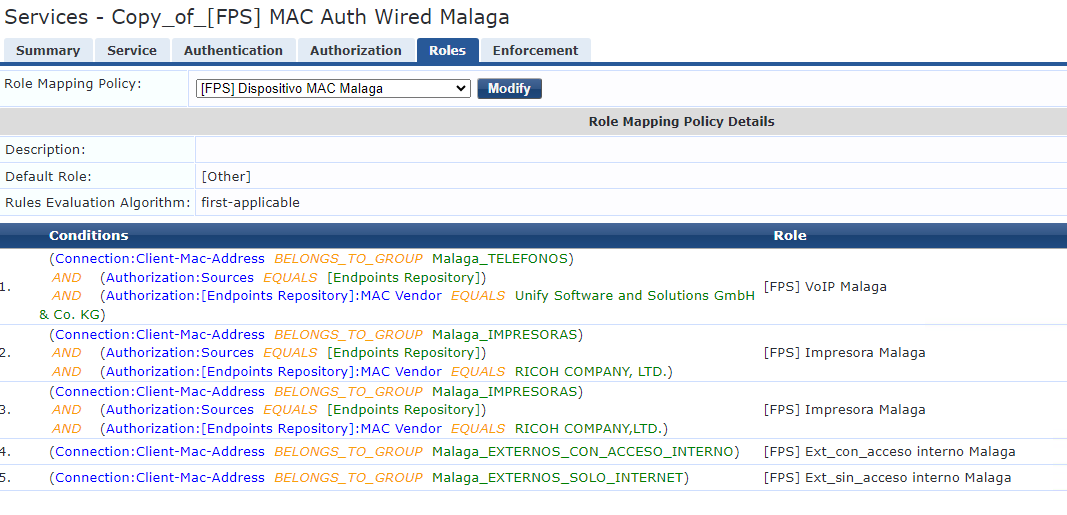
In fact, I use the Connection:Client-Mac-Address BELONGS_TO_GROUP XXX in order to know if the device is in my static host list:
I think in my enforcement the Tips:Role EQUALS [User Authenticated] is useless and I can delete them:
If so, can I use the Connection:Client-Mac-Address BELONGS_TO_GROUP XXX for knowing if the device is in my static host list. Is it ok like that? Or is better to use Authentication:Source EQUALS [FPS] MAC AUTH MALAGA?
Original Message:
Sent: Oct 09, 2023 05:23 AM
From: Herman Robers
Subject: Timeout when setting a quarantine VLAN
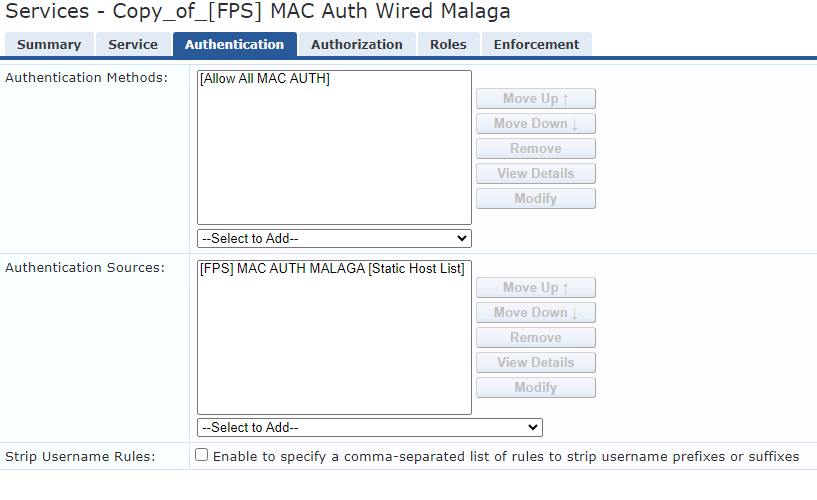
If you have the 'Allow All MAC Auth' authentication method, then yes that's correct because the authentication in itself succeeded (Allow All MAC Auth); in your example you reject by authorization.
You may use Authentication:Source EQUALS [FPS] MAC AUTH MALAGA; instead to Tips:Role EQUALS [User Authenticated] if you want to know if the device is in your static host list.
BTW, Static Host Lists are deprecated because they are poor to manage and hard to troubleshoot and if there is another way of doing the same, like adding an attribute in the Endpoint database or running an external SQL query would probably be better. They are still supported, so if they work fine for you and understand the limitations, it's not a problem.
------------------------------
Herman Robers
------------------------
If you have urgent issues, always contact your Aruba partner, distributor, or Aruba TAC Support. Check https://www.arubanetworks.com/support-services/contact-support/ for how to contact Aruba TAC. Any opinions expressed here are solely my own and not necessarily that of Hewlett Packard Enterprise or Aruba Networks.
In case your problem is solved, please invest the time to post a follow-up with the information on how you solved it. Others can benefit from that.
Original Message:
Sent: Oct 09, 2023 03:52 AM
From: fjulianom
Subject: Timeout when setting a quarantine VLAN
Hi Herman,
For the User Authenticated role, do you mean this role is given always the user does MAC authentication regardless if the PC's MAC is in my static host list or not?
------------------------------
Regards,
Julian
Original Message:
Sent: Oct 06, 2023 09:34 AM
From: Herman Robers
Subject: Timeout when setting a quarantine VLAN
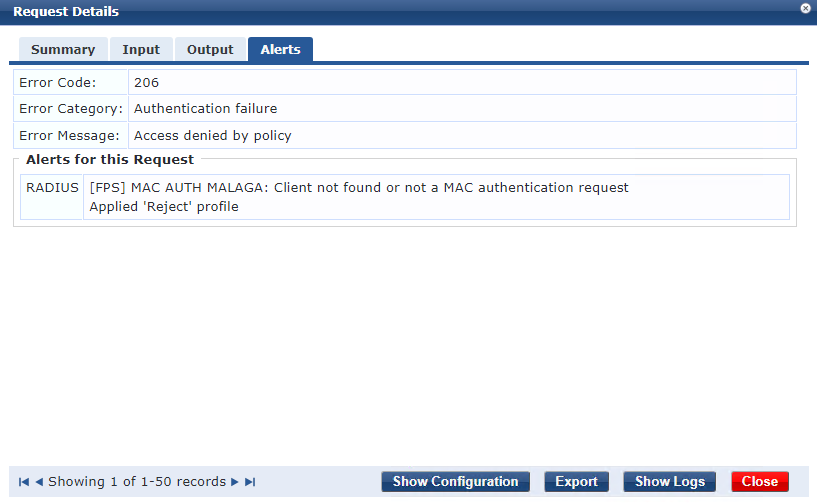
The [User Authenticated] is what I mentioned, there is an [Allow All MAC Auth] that 'successfully authenticates' the client, thus the [User Authenticated] role. There is a 'Denied by Policy', which means that the authentication of the client succeeded but the policy is Deny for that client.
The [Machine Authenticated] is expected when if in the last x hours (as defined in the Machine Auth Cache timeout) the same MAC address has authenticated as a computer (Windows). Also check in your role-mapping that you didn't by accident assign the role yourself, which may happen if you create a role mapping but didn't have the correct role at the moment and put that one in. If neither is the case, you probably best open a TAC case to find out where the role comes from.
------------------------------
Herman Robers
------------------------
If you have urgent issues, always contact your Aruba partner, distributor, or Aruba TAC Support. Check https://www.arubanetworks.com/support-services/contact-support/ for how to contact Aruba TAC. Any opinions expressed here are solely my own and not necessarily that of Hewlett Packard Enterprise or Aruba Networks.
In case your problem is solved, please invest the time to post a follow-up with the information on how you solved it. Others can benefit from that.
Original Message:
Sent: Oct 06, 2023 05:13 AM
From: fjulianom
Subject: Timeout when setting a quarantine VLAN
Hi Herman,
The Alert tab is like this:
For the service, Authentication tab
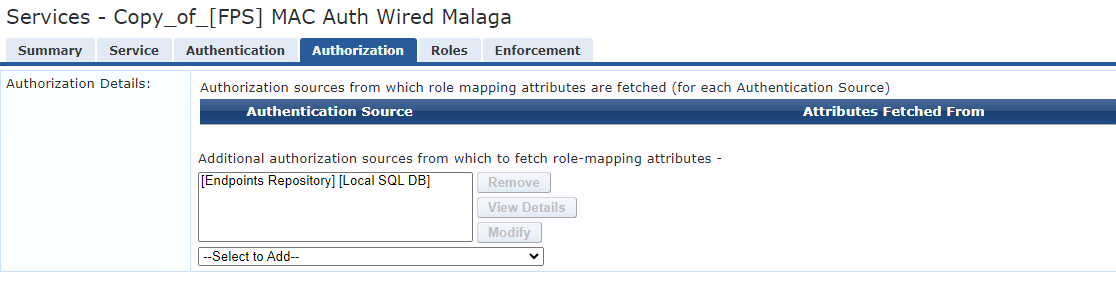
Authorization tab
Roles tab
Enforcement tab
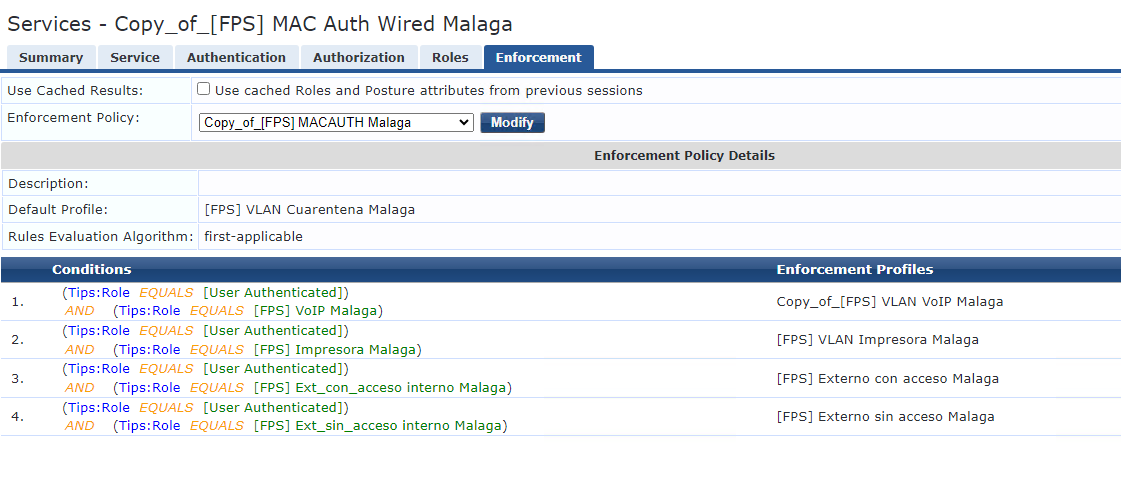
And you can see I am not using "Use Cached Roles & Posture". I don't understand either the Machine Authenticated role.
------------------------------
Regards,
Julian
Original Message:
Sent: Oct 06, 2023 04:58 AM
From: Herman Robers
Subject: Timeout when setting a quarantine VLAN
The [User Authenticated] role is assigned if the client passes the authentication method. With MAC Auth, the [Allow All MAC Auth] will apply the role even if by policy you reject the authentication. The authentication itself was okay. Could also be that you enabled 'Use Cached Roles & Posture' in which case the MAC Authentication gets the same roles as you had for a previous, other authentication like the 802.1X.
What does the Alert tab show? How does your service look like?
------------------------------
Herman Robers
------------------------
If you have urgent issues, always contact your Aruba partner, distributor, or Aruba TAC Support. Check https://www.arubanetworks.com/support-services/contact-support/ for how to contact Aruba TAC. Any opinions expressed here are solely my own and not necessarily that of Hewlett Packard Enterprise or Aruba Networks.
In case your problem is solved, please invest the time to post a follow-up with the information on how you solved it. Others can benefit from that.
Original Message:
Sent: Oct 04, 2023 04:05 AM
From: fjulianom
Subject: Timeout when setting a quarantine VLAN
Hi Jonas,
I tried according to your recommendation and it works very well, many thanks. Just one more thing, I was checking the logs and I realized when a device performs MAC authentication and fails, it gets a Reject message from ClearPass and is places in the quarantine VLAN, which is fine. But when I saw the log in the Access Tracker I also see the roles [Machine Authenticated] and [User Authenticated]:
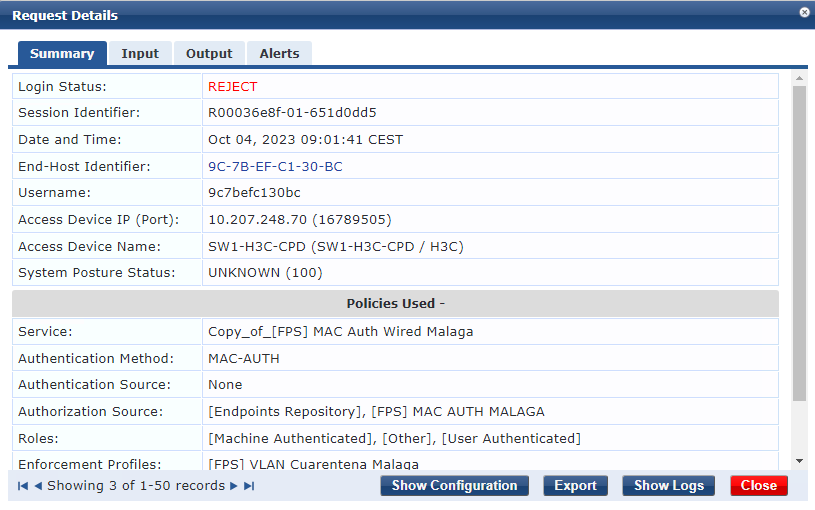
This PC was a domain PC before (and we took out of the domain for testing) ,and therefore it could be in the machine authentication cache, but my ClearPass has the default 24 hours for this timer, and this PC was a domain PC many days ago. So I don't know why it gets the Machine Authenticated role. I don't understand the User Authenticated role either, because according to the policy, the user fails authentication if it is not in the MAC static host list. Do you know why?
------------------------------
Regards,
Julian
Original Message:
Sent: Sep 28, 2023 02:50 AM
From: jonas.hammarback
Subject: Timeout when setting a quarantine VLAN
Hi Julian
For computers not joined to the AD you should focus on a MAC authentication instead. Otherwise the client configuration on these unmanaged computers will be a big challange for the end users.
Modify your MAC Auth service to place unknown devices on VLAN 50.
In the 802.1x remove the rules for non domain joined machines and deny access instead.
This way a computer with 802.1x enabled but not configured with the domain GPO will get a reject, without delay, and then continue with a MAC auth instead.
You will see the rejected 802.1x request in Access tracker but that's normal and nothing to worry about.
Only perform 802.1x for domain joined machines with configuration of 802.1x with a GPO, or other managed machines ie. managed from Intune.
------------------------------
Best Regards
Jonas Hammarbäck
MVP 2023, ACCX #1335, ACX-Network Security, Aruba SME, ACMP, ACDP , ACEP, ACSA
Aranya AB
If you find my answer useful, consider giving kudos and/or mark as solution
Original Message:
Sent: Sep 28, 2023 02:26 AM
From: fjulianom
Subject: Timeout when setting a quarantine VLAN
Hi dncastro and Jonas,
Yes, the authentication method is EAP-PEAP, but the machine is only configured for "computer authentication", and not "user authentication", so if the machine is not a domain machine should be place directly in the quarantine VLAN, no authentication with AD user credentials.
The client side 802.1X configuration is ok, also de Radius certificate from ClearPass, because when is a domain machine it authenticates correctly, and is assigned the correct VLAN.
I attach the switch interface settings and ClearPass policy. The switch has also mac-authentication commands, because I am also authenticating phones and printers (VLAN 21), service which works correctly as well:
SWITCH INTERFACE
interface GigabitEthernet1/0/3
port link-type hybrid
port hybrid vlan 21 tagged
port hybrid vlan 1 50 55 untagged
mac-vlan enable
poe enable
dot1x
undo dot1x handshake
dot1x mandatory-domain dot1x-auth
undo dot1x multicast-trigger
dot1x unicast-trigger
mac-authentication
mac-authentication domain mac-auth
mac-authentication timer auth-delay 15
mac-authentication parallel-with-dot1x
#
I have tried also adding the "dot1x auth-fail vlan 50" command, but with the same result.
CLEARPASS
Roles Tab

Enforcement Tab

Default profile (quarantine VLAN)

I repeat, when the client is a domain machine, it authenticates correctly and is assigned the correct VLAN (VLAN 1 untagged), no timeout errors at all. Also the phones authenticate correctly by MAC authentication, and get assigned VLAN 21 tagged. Any tip?
------------------------------
Regards,
Julian
Original Message:
Sent: Sep 27, 2023 04:16 PM
From: jonas.hammarback
Subject: Timeout when setting a quarantine VLAN
Hi Julian
By your description I assume that the authentication method is EAP-PEAP and the machine that is not a domain machine tries to perform an authentication with the user credentials in Active Directory.
One problem, beside the fact that EAP-PEAP is an old protocol with flaws, is that the client side configuration can be a callange and if the client doesn't have correct 802.1x configuration it will not accept the Radius certificate from ClearPass and the request will time out. Another issue can of course be that the client doesn't have 802.1x configured at all, and in that case you need to provide a MAC authentication service to handle the authentication for unknown machines and send back the quarantine VLAN, or configure the VLAN in the switch as a VLAN that the unauthenticated client is placed on.
------------------------------
Best Regards
Jonas Hammarbäck
MVP 2023, ACCX #1335, ACX-Network Security, Aruba SME, ACMP, ACDP , ACEP, ACSA
Aranya AB
If you find my answer useful, consider giving kudos and/or mark as solution
Original Message:
Sent: Sep 27, 2023 10:24 AM
From: fjulianom
Subject: Timeout when setting a quarantine VLAN
Hi community,
I am setting up a wired 802.1X authentication scheme with ClearPass and H3C switches. My policy says:
- If the machine is in the corporate domain (machine authenticated), it gets assigned VLAN 1 untagged and have network access.
- If the machine is not in the corporate domain, it gets assigned the quarantine VLAN 50 and doesn't have network access.
Point 1 works perfectly. For point 2, when I plug in a PC which is not in the corporate domain, I have a timeout response, I don't know why:

And got the quarantine VLAN 50 (because of the Default Profile in Enforcement tab):

According to me, the behaviour should be to get the quarantine VLAN 50 with a Reject response, instead a Timeout response.
Any ideas?
------------------------------
Regards,
Julian
------------------------------