Have you already created this user in the Guest User Repository? If you want to create the user during self-registration, you have to click on "I don't have an account". Then you can fill in the form and create a user.
Original Message:
Sent: Apr 22, 2023 10:43 PM
From: champ85
Subject: Using different Clearpass Subscribers for different guest SSIDS
Thanks Lord,
I have fixed routing issue... it was actually an issue with not enabling "NAt-inside" on the controllers ipv4 settings.
I can now see captive portal.
However, after that, 2 errors occur:
1. Access tracker
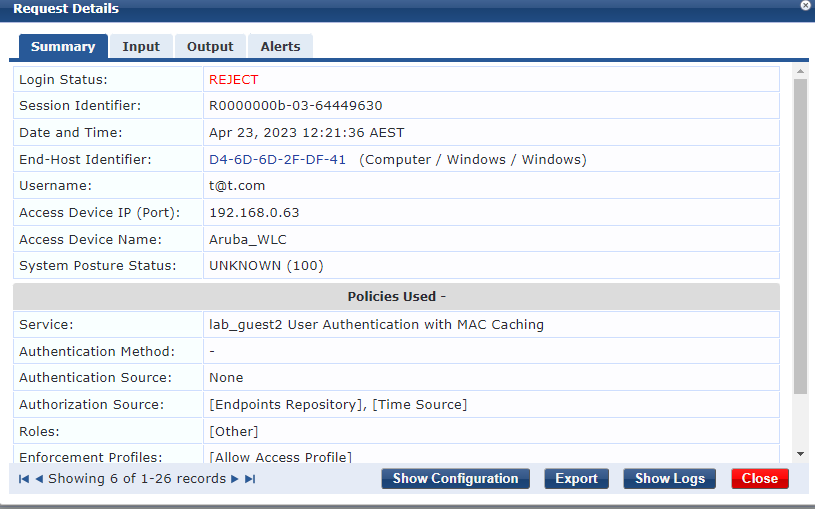
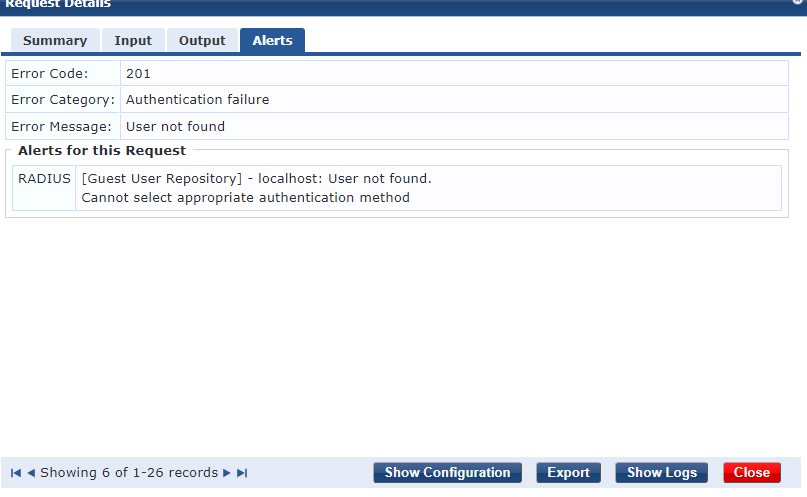
2. Captive portal now asks me for username and password instead of username and email
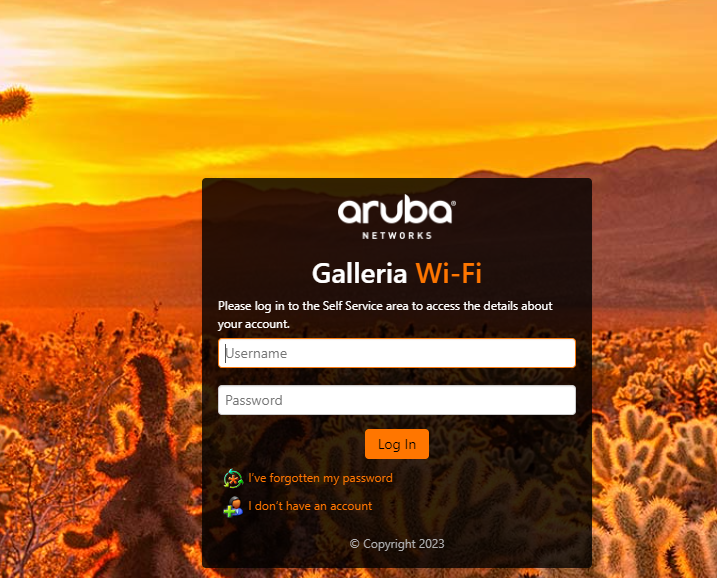 Any thoughts?
Original Message:
Sent: Apr 22, 2023 07:03 AM
From: lord
Subject: Using different Clearpass Subscribers for different guest SSIDS
Hi champ85,
let me summarize again.
The wizzard builds 2 services, one for user authentication and one for mac address authentication. First matched the mac-address-authentication service, you see the event in the access-tracker.

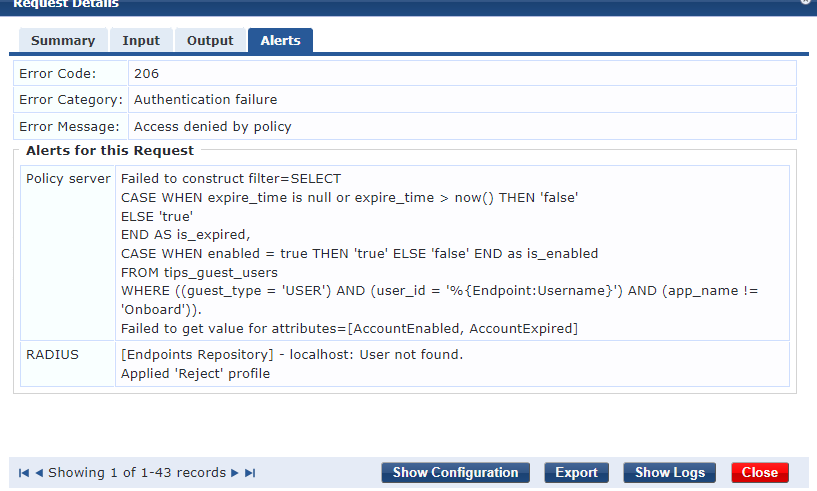
The mac-address-authentication service wants to check if the guest user is enabled and not expired and if "MAC-Auth Expiry" is already reached. But the endpoint with the mac-address does not exist yet or in the field Username no value is stored yet. ClearPass needs to check in the guest user DB if the user exists, expired or disabled. ClearPass uses the %{Endpoint:Username} value to do this. However, the value %{Endpoint:Username} does not exist yet. ClearPass cannot execute the SQL statement and cannot read the attributes AccountExpired and AccountEnabled. The Policy Server reports this with the error message (marked red).
The RADIUS server reports that it has not found the user in the endpoints repository - because the endpoint with the MAC address does not exist yet (marked purple). Because of these 2 messages the alarm tab is displayed in the access tracker. But these errors are not the reason for the reject. In the "Error Message" you see that "Access denied by policy" is (marked green). The enforcement policy forbids the access in this constellation and send REJECT.
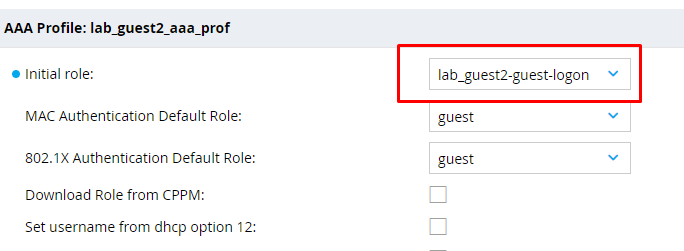
At this point, mac-address-authentication is complete. The WLAN controller must do the rest. On the Aruba WLAN, the user remains associated with the WLAN if MAC address authentication fails. In this case, the initial role from the AAA profile is assigned to him, so in your case lab_guest2-guest-logon. In this role, a captive-porttal-profile must be enabled to force the redirect to the landing page. In addition, this role must allow http/https access to the ClearPass IP address, DHCP and DNS as well. The rest of the traffic must be blocked.
You write that you can't launch the portal page manually either. The screenshot from the access tacker that you posted has nothing to do with it, with captive portal login matched the user authentication service. In the screenshot we see the Mac Authentication Service. The user authentication service matches only after you click OK in the portal page login.
You cannot open the portal page because the guest client cannot reach the ClearPass IP address. This means that either the controller or an upstream firewall is blocking the data traffic. Or it is a routing problem.
Therefore, check if the role is configured correctly. The clients from the guest IP network must reach the ClearPass IP. Check the routing and firewalls, if necessary.
After making sure that guest-user in the role lab_guest2-guest-logon can reach the landing page we need to check why the landing page is not opened automatically on the devices. The controller sends the HTTP 302 code to the guest client and thus start redirect. The URL from the captive portal is specified as the new destination. This means that the controller must be able to reach the guest client via its IP address. So at this point again routing and firewall configuration must be correct.
I hope it helps
------------------------------
Regards,
Waldemar
ACCX # 1377, ACEP, ACA - Network Security
If you find my answer useful, consider giving kudos and/or mark as solution
Original Message:
Sent: Apr 20, 2023 01:50 AM
From: champ85
Subject: Using different Clearpass Subscribers for different guest SSIDS
Hey Lord,
Tried all of that
Correct captive profile profile as per below:
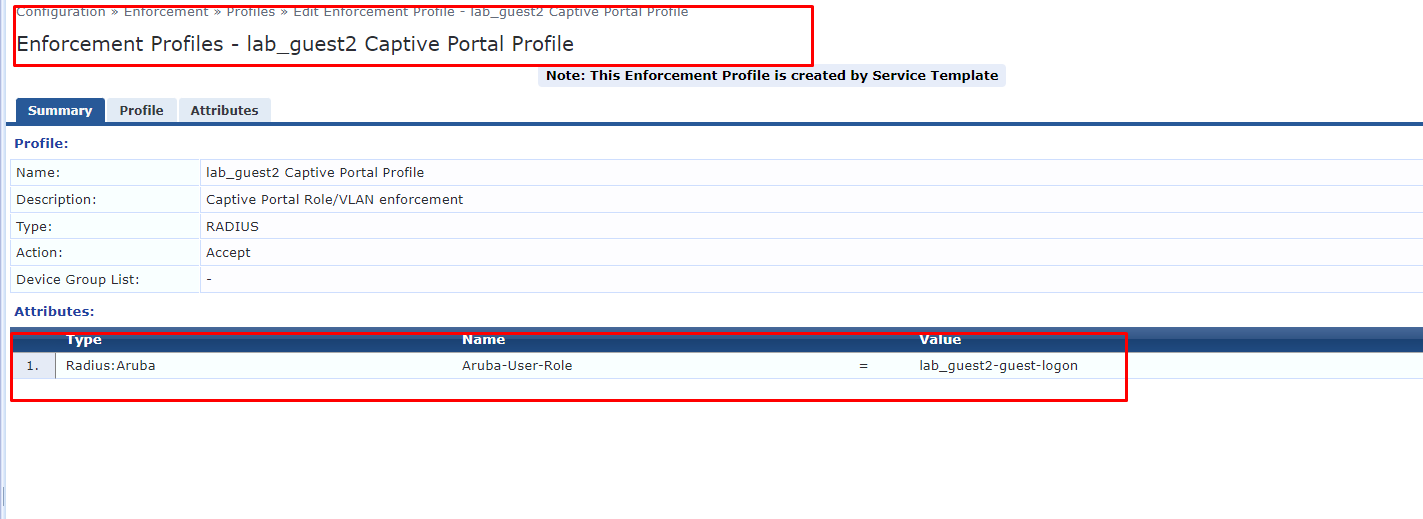
I cannot hit portal page though, even when I browse to it manually. the below error is what Access tracker shows:
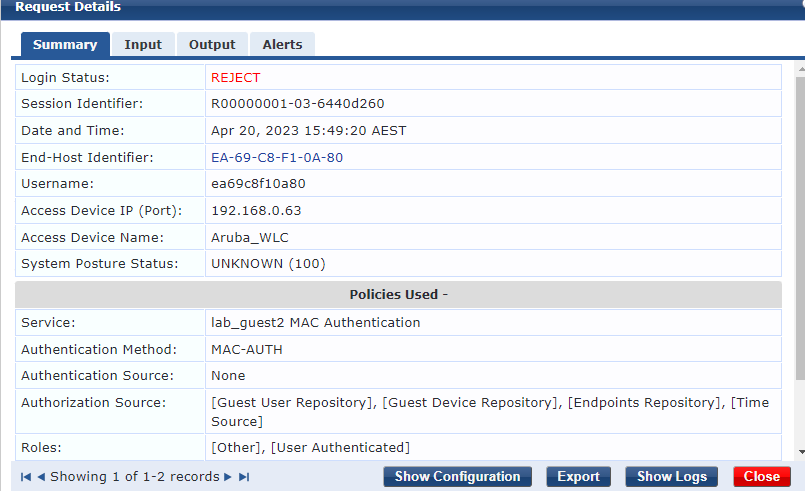
Any further tips, please?
Original Message:
Sent: Apr 18, 2023 04:40 AM
From: lord
Subject: Using different Clearpass Subscribers for different guest SSIDS
ClearPass sends reject because the endpoint does not yet exist or the caching attributes in the endpoint do not yet exist.
Your test device remains connected to the WLAN and uses the initial role from the aaa-profile used. Captive-portal must be active in the role. Which aruba user role was assigned to your test device?
You are using the IP address in the captive-portal-profile for redirection. It works, using the FQDN would be better choice.
Your test device must be able to reach the IP address from the captive-portal-profile via https or http. Does it do that?
Try to open the redirect URL manually on the testdevice. What happens?
------------------------------
Regards,
Waldemar
ACCX # 1377, ACEP, ACA - Network Security
If you find my answer useful, consider giving kudos and/or mark as solution
Original Message:
Sent: Apr 18, 2023 03:44 AM
From: champ85
Subject: Using different Clearpass Subscribers for different guest SSIDS
Hi Lord,
For the first ssid lab_guest ==> Publisher (lab_clearpass01) works fine as shown below


For the second SSID lab_guest2 ==> subscriber(lab_clearpass03) does not work as shown below,
Clients get dhcp ip.
However I cant hit cportal landing page

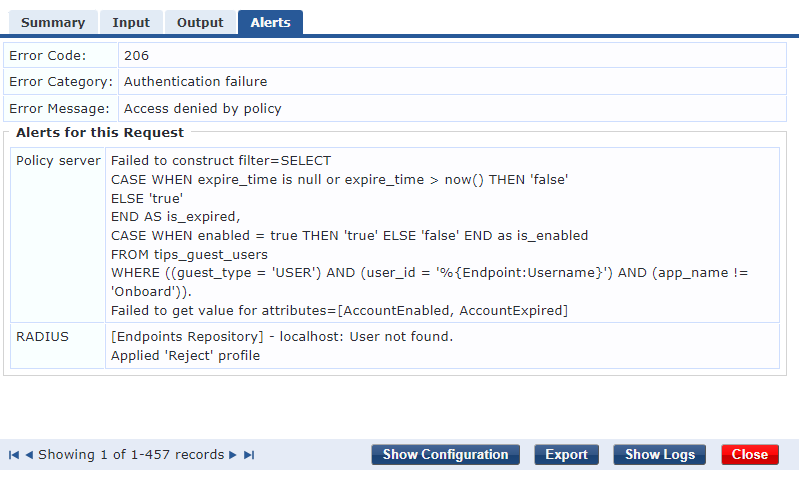
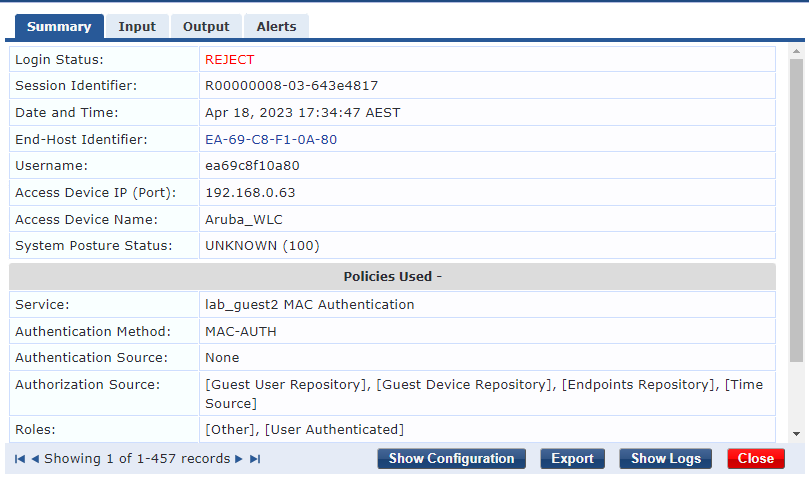
Controller config for lab_guest2
Lab_clearpass03 => 192.168.0.57<o:p></o:p>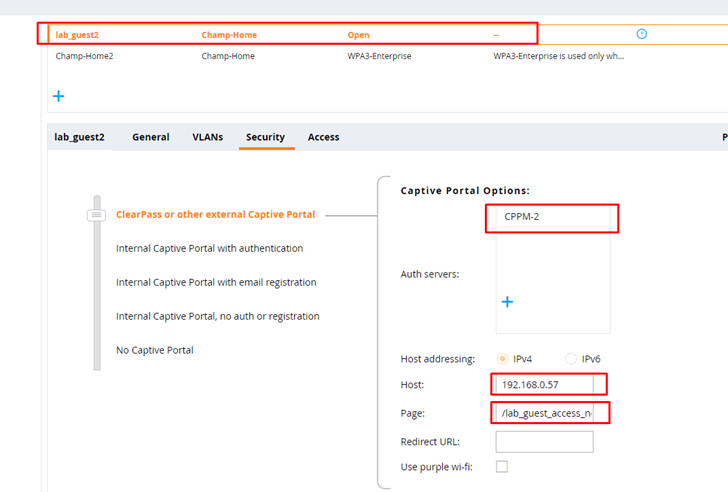
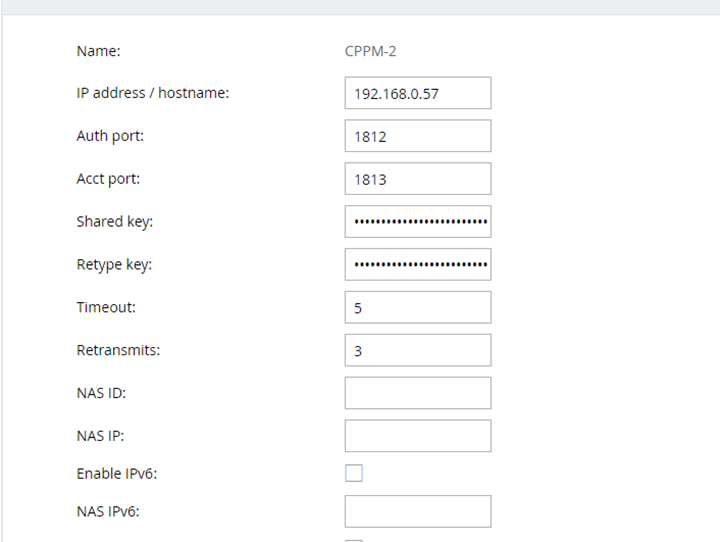
Hope this is enough info and I haven't overloaded you?
Basically, lab_guest2 wont even authenticate to portal, but gets dhcp.
Many thanks
Original Message:
Sent: Apr 17, 2023 08:05 AM
From: lord
Subject: Using different Clearpass Subscribers for different guest SSIDS
Hi champ85,
you don't have to configure anything specific because of the second SSID, the message you posted always comes when the device connects to the guest WLAN for the first time. No matter how many guest SSIDs and subscribers you have.
Tell me what exactly is not working?
Does the first SSID work?
Do the clients in the second SSID get IP addresses? Does redirect to the landing page work? Can the clients open the landing page in the browser?
------------------------------
Regards,
Waldemar
ACCX # 1377, ACEP, ACA - Network Security
If you find my answer useful, consider giving kudos and/or mark as solution
Original Message:
Sent: Apr 15, 2023 11:55 AM
From: champ85
Subject: Using different Clearpass Subscribers for different guest SSIDS
Hi lord,
Thanks for your reply.
I have re-read that response in the link you sent multiple times. but still cannot understand it.
Also, just to clarify I am using Aruba Aps and controllers, no ciscos.
Are you able to just tell me what I need to do to fix it in very simple terms, then I can kind of reverse-engineer it and re-reead that link again?
This way I can understand it fully.
So can you please just tell me what clearpass changes I need to make to get this working?
Original Message:
Sent: Apr 15, 2023 05:24 AM
From: lord
Subject: Using different Clearpass Subscribers for different guest SSIDS
Hi,
you can use the same guest self-reg portal in both SSIDs. If you want, you can also use different portals.
The alarm you see is not a real error message. It results from the SQL query used. For guest service with MAC caching, ClearPass tries to check if the MAC address has already been registered on the guest WLAN. The guest user name used for this is stored in the endpoint. When a guest device logs on to the guest WLAN for the first time, no endpoint exists for the device. ClearPass cannot read the username and displays the error message.
I have already explained the behavior in this article, I hope it helps you.
------------------------------
Regards,
Waldemar
ACCX # 1377, ACEP, ACA - Network Security
If you find my answer useful, consider giving kudos and/or mark as solution
Original Message:
Sent: Apr 14, 2023 04:12 PM
From: champ85
Subject: Using different Clearpass Subscribers for different guest SSIDS
Hi,
Thanks for your response.
However, how do I configure the guest self-reg portal for both subscribers on controller and clearpass? It seems like I am having a conflict.
I have one self-reg captive portal created for both publisher -ssid1 and subscriber-ssid2.
I tried server-group/AAA option already, however, I am getting an error in my guest self-reg login below, it looks like it is conflicting with the other captive portal service for publisher
See conflict below:

Original Message:
Sent: Apr 14, 2023 09:16 AM
From: ulises.cazares
Subject: Using different Clearpass Subscribers for different guest SSIDS
Hi, Yes, it is posible and you need to create different authentication servers and/or Authentication Server Groups and then assign those to authentica the especific SSID you want.
For an Aruba controller solution, this is one way to do it:
Every SSID has an AAA profile and in that AAA profile you have a Server Group to authenticate users.
If you create different server groups, asigning the different subscribers to those Server groups then you can apply them to the AAA profile correspong the SSIS you need to authenticate.
Just keep in mind the following:
Where in the hierarchy you are configuring so you change the AAA profile in the correct location.
I hope this helps
Original Message:
Sent: Apr 13, 2023 10:25 PM
From: champ85
Subject: Using different Clearpass Subscribers for different guest SSIDS
Hi all,
Does anyone have any documentation or videos on how to use different subscribers for different guest ssids?
Is this even possible?
I have been trying it but getting issues.