Okay Now I see VSF in Site level. Did not noticed that Site level can have such configurations in it.
Yes I agree w/ port profiles.. In fact it was one of the reason to transform from classic to cnx.
Well I think I'll get things working with current information
------------------------------
Jori Luoto
AV-IT Specialist
Audico Systems oy
------------------------------
Original Message:
Sent: May 22, 2026 06:26 AM
From: willembargeman
Subject: VSF Stack in CNX...
Hi Jori,
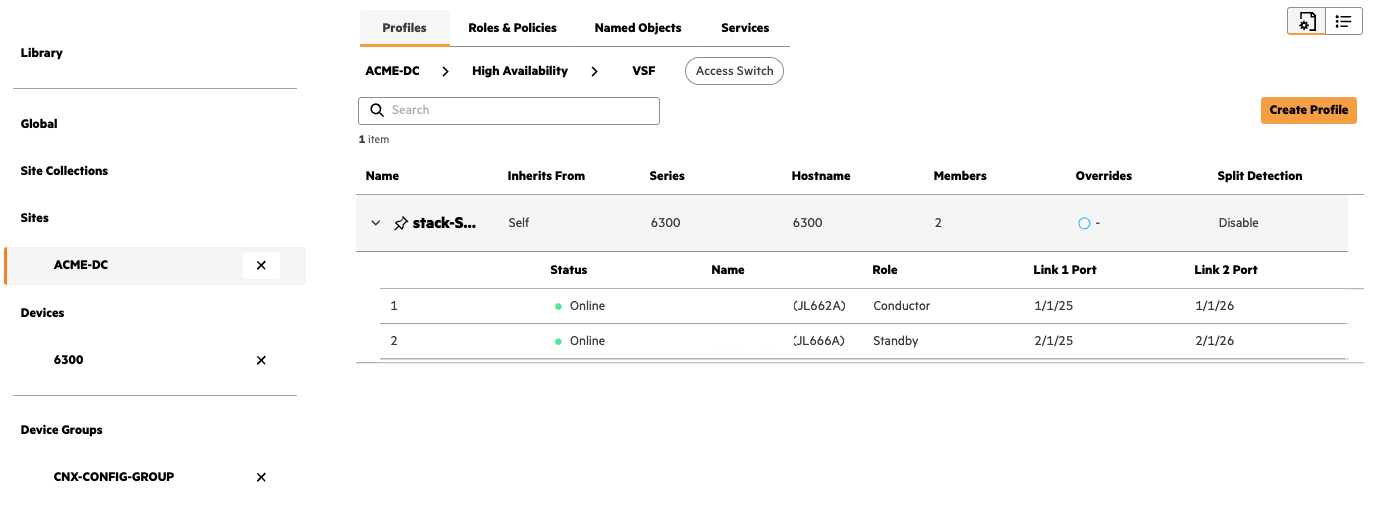
During stack onboarding, CNX will generate a stack ID. This is a logical ID that is being used. All members in the stack grouped together as a single device. So you will have 1 management IP per stack. Central is not changing the VSF behavior.
Hereby a screenshot from a VSF stack management via CNX / Central.
A few tips:
- VSF profiles are created a Site level and not at device level
- When configuring interfaces, use Port Profiles. This really helps to simplifies the configuration
- On top of that, you can use interface profiles to automatically assign port profiles to interfaces during onboarding
Documentation: https://arubanetworking.hpe.com/techdocs/new-central/content/home.htm
------------------------------
Willem Bargeman
Systems Engineer Aruba
ACEX #125
------------------------------
Original Message:
Sent: May 22, 2026 06:14 AM
From: JL24
Subject: VSF Stack in CNX...
Hello Willem
Great news! I have preloaded configurations already to switches for basic connection parameters and VSF stacking configs so that Classic Central can be used for onboarding but I decided to use CNX afterwards because I figure out how to roll devices from Classic to CNX without OOB/mgmt network or vlan 1 dhcp services.
One more question: While I see all members of VSF there in CNX device list, do I configure management vid only to Conductor? (I think yes but if you might know this... Site is quite large so I don't really want to test this ;) )
------------------------------
Jori Luoto
AV-IT Specialist
Audico Systems oy
Original Message:
Sent: May 22, 2026 04:51 AM
From: willembargeman
Subject: VSF Stack in CNX...
Hi Jori,
When a NEW stack is onboarded in CNX configuration a basic connectivity import is done. CNX will import the VSF configuration.
IMO this is also the most easy way to onboard VSF stack in Central. What I always recommend:
- Built the stack first (auto-stacking)
- Onboard stack in Central. VSF profile is auto created
In the documentation you can find more about what configuration is imported: https://arubanetworking.hpe.com/techdocs/new-central/content/get-started/onboard-cx.htm#Auto-Imp
For my self speaking. For new deployments I use New Central / CNX config.
Hope this will answer you question.
------------------------------
Willem Bargeman
Systems Engineer Aruba
ACEX #125