Wireless Access

 View Only
  • 1.  802.11a Basic rate and transmit rate

    Posted Oct 21, 2022 02:51 PM
    Edited by OESTech Oct 21, 2022 02:53 PM
    Hi all,

    Hoping this is a pretty straight forward question.  Maybe I can make this change this weekend.

    I've noticed and been surprised sometime about how our devices choose which AP is the best (roaming.)

    Some buildings are better than others.  But in our upper school building I'm seeing a few instances where an Apple TV will connect to an AP two classrooms away.  The Apple TV in my office is connected to the neighbor AP which is two walls and an mechanical/electrical room away!

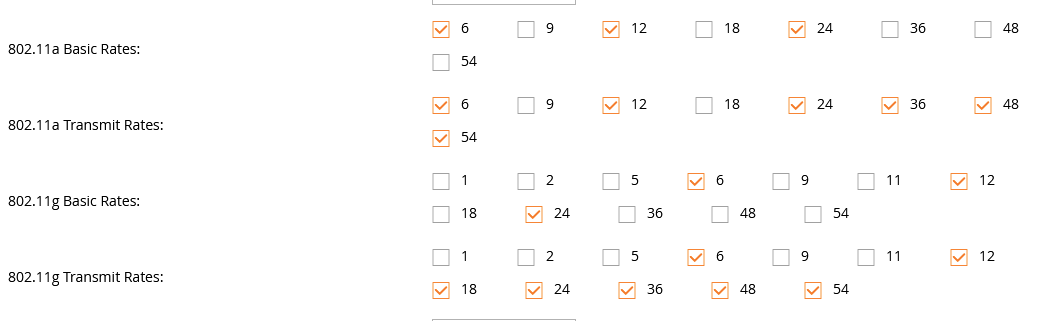
    I've done some work over the years with power EIRP and I believe those to be pretty dialed-in.  But I've seen several recommendations about setting basic rate to 12db for high density environments.  Our is set at 6db based on recommendations from professional services that helped setup our infrastructure.

    What do you think?  Here's how we are today:

  • 2.  RE: 802.11a Basic rate and transmit rate

    Posted Oct 21, 2022 02:57 PM
    Some more information.  Most of our buildings are two or three stories.  buildings are hallways with classrooms on each side..  There's an AP in each classroom.


  • 3.  RE: 802.11a Basic rate and transmit rate
    Best Answer

    Posted Oct 21, 2022 04:20 PM
    Roaming on a single floor with access points evenly spaced is fairly straightforward.  Roaming in multiple floors where the materials can vary quite a bit are more challenging.  There is no silver bullet with so many variables.  You would want your transmit power of your access points to be closest to the clients that you care about for the best performance.  After that, you can remove some of the lower rates and either do roaming tests, or compare the goodput of devices 24 hours after a change to determine your progress.

    ------------------------------
    Any opinions expressed here are solely my own and not necessarily that of Hewlett Packard Enterprise or Aruba Networks.

    HPE Design and Deploy Guides: https://community.arubanetworks.com/support/migrated-knowledge-base?attachments=&communitykey=dcc83c62-1a3a-4dd8-94dc-92968ea6fff1&pageindex=0&pagesize=12&search=&sort=most_recent&viewtype=card
    ------------------------------


  • 4.  RE: 802.11a Basic rate and transmit rate

    Posted Oct 24, 2022 06:35 PM
    Ok thanks.  so I'm guessing if I set my minimum basic rate to 12, then I also need to set my minimum transmit rate to 12.  Yes?


  • 5.  RE: 802.11a Basic rate and transmit rate

    Posted Oct 24, 2022 06:41 PM
    Yes, and your transmit rates to 12 and above.  Roam with your weakest client to make sure you don't have an issue

    ------------------------------
    Any opinions expressed here are solely my own and not necessarily that of Hewlett Packard Enterprise or Aruba Networks.

    HPE Design and Deploy Guides: https://community.arubanetworks.com/support/migrated-knowledge-base?attachments=&communitykey=dcc83c62-1a3a-4dd8-94dc-92968ea6fff1&pageindex=0&pagesize=12&search=&sort=most_recent&viewtype=card
    ------------------------------