Original Message:
Sent: May 10, 2026 09:10 PM
From: KingG
Subject: Changing Master-Redundancy VLAN procedure
Thank you very much for your help.
All works have been successfully completed.
Even after redundancy was removed, the active controller's license remained on the backup controller.
As you mentioned, it appears the license is being cached.
Thank you for saving me.
Original Message:
Sent: Apr 30, 2026 03:39 AM
From: Lord
Subject: Changing Master-Redundancy VLAN procedure
Hi KingG,
Here are the answers:
1. My additional question is: When should I change the default routing?
Should I change it when I change the controller IP?
You can change the routing before, during, or after changing the controller IP. This isn't directly related to changing the controller IP. Just keep in mind that once you do this, the access points may reboot. I would do this after changing the controller IP, once the access points have already been moved to the new controller.
2. Plus when I perform first and second procedure, before delete L2 redundancy,
could I change role master and backup by priority and make master to standby role and do second procedure?
There are two things that have to do with master redundancy and high availability.
a) The Master role-it determines which controller manages the configuration. The Master is always configured; it pushes the configuration to the Backup Master. This role is controlled via the VRRP instance. The VRRP owner is always the Master.
b) Controller role in the High Availability profile-it determines where APs terminate their active tunnels.
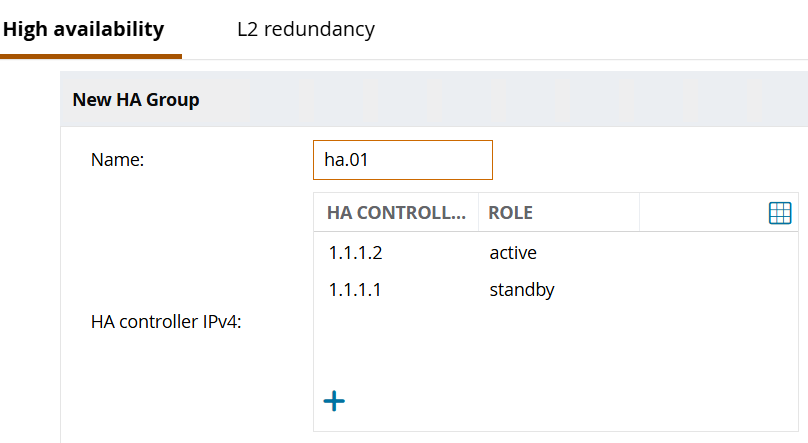
3. And re-provisioning means below right?? Change it to the New VRRP.
How are the APs connected to the controllers-via a Layer 2 or Layer 3 link?
If via a Layer 3 link, you must ensure that the APs can discover the controllers. This is done through provisioning or Layer 3 discovery.
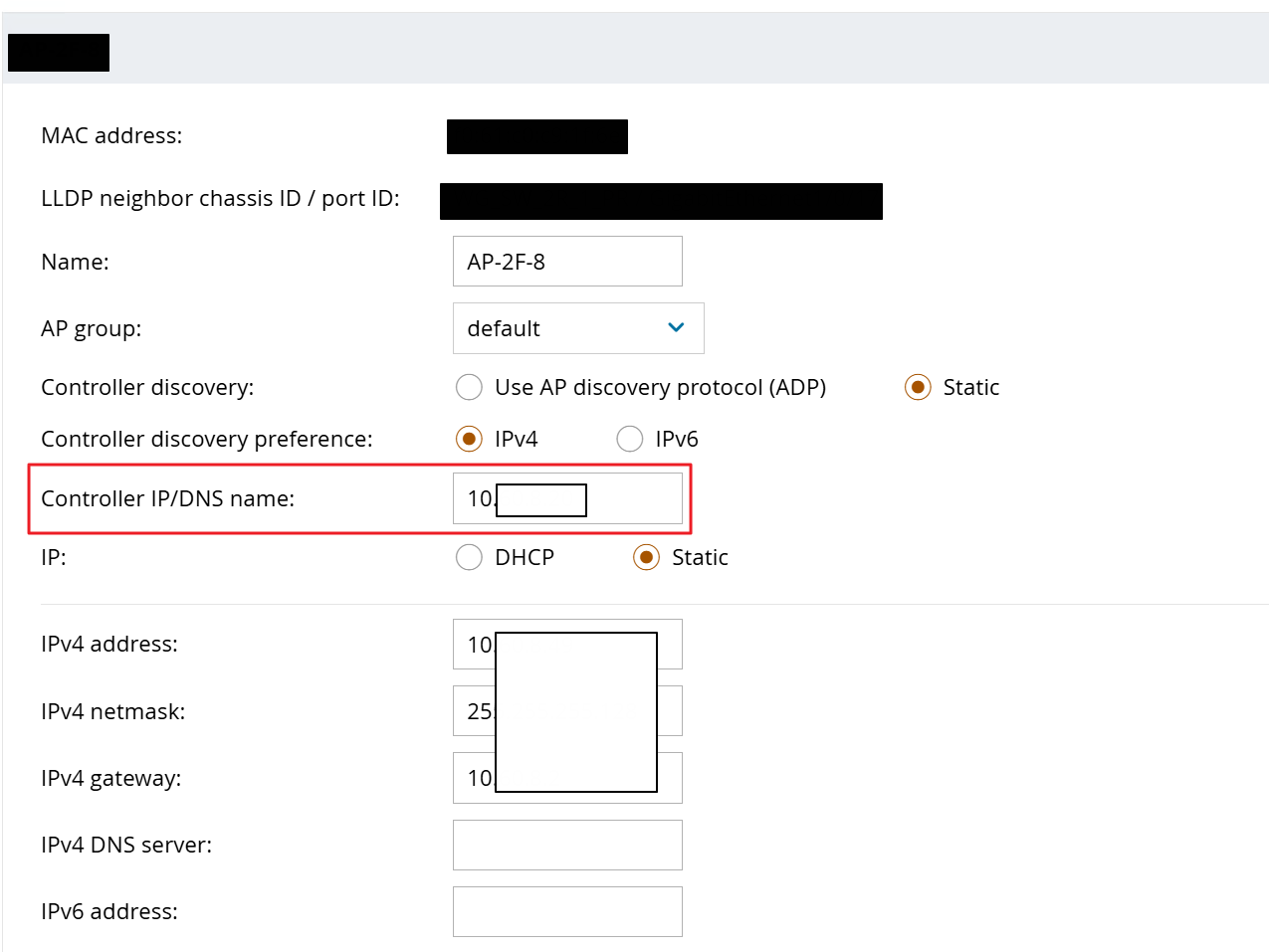
If you have already provisioned the APs, you must set the VRRP IP entry to the new controller VLAN.
If you are using L3 Discovery, you must set Option 43 in DHCP or the DNS entry for aruba-master (if you are using AOS older than 8.9.0.0) or aruba-conductor (if you are using AOS 8.9.0.0 or later) to the VRRP IP from the new controller VLAN.
------------------------------
Regards,
Waldemar
ACCX # 1377, ACEP, ACX - Network Security
If you find my answer useful, consider giving kudos and/or mark as solution
Original Message:
Sent: Apr 25, 2026 04:56 PM
From: KingG
Subject: Changing Master-Redundancy VLAN procedure
Thank you very much!
Sorry for I sended this post privately many times.. it was my mistake because I'm not used to this.
I will get demo license, and register it at my standby controller.
1. My additional question is when should I change default routing?
Should I change it when I change controller-ip?
2. Plus when I perform first and second procedure, before delete L2 redundancy,
could I change role master and backup by priority and make master to standby role and do second procedure?
3. And re-provisioning means below right?? Change it to the New VRRP.
I was very confused about the working procedure, but thanks to your answer, it has become very clear.
Thank you very much for your help
Original Message:
Sent: Apr 25, 2026 04:05 PM
From: Lord
Subject: Changing Master-Redundancy VLAN procedure
That's a very good question.
I can't say with 100% certainty what happens if redundancy is disabled on the master but not on the backup. I think the backup will remain in redundancy mode and perform a failover.
When redundancy is enabled, the backup controller caches the licenses for 30 days. Otherwise, the redundancy model wouldn't work.
Install demo licenses on the backup controller, and then you'll be safe.
------------------------------
Regards,
Waldemar
ACCX # 1377, ACEP, ACX - Network Security
If you find my answer useful, consider giving kudos and/or mark as solution
Original Message:
Sent: Apr 25, 2026 11:14 AM
From: KingG
Subject: Changing Master-Redundancy VLAN procedure
Thank you for your answers.
We provisioned APs statically with VIP of previous VLAN 20.
First, remove the LMS IPs, then L2 redundancy and HA configuration.
Next, delete the VRRP from VLAN 20 on the master and change the controller IP to VLAN 25. The controller must be rebooted during this process. All APs must remain connected to the backup controller because it takes over the VRRP from VLAN 20.
-> Is it possible if there are no licenses in standby controller? I understand that only active controller controll license, and L2 redundancy can make sharing license of active's. When I delete L2 redundancy and VLAN 20 at master controller, L2 redundancy will break and there are no license at standby. Am I wrong??
plus in this case, when should I change default routing?? Change it when I change controller IP??
Thank you very much for sharing your knowledge.
Original Message:
Sent: Apr 25, 2026 11:02 AM
From: Lord
Subject: Changing Master-Redundancy VLAN procedure
Basically, you need to remove the L2 redundancy and HA configuration, then change the controller IP, and finally set up redundancy and HA again.
Have you provisioned the APs with the VRRP IP so they can find the controller? Or have you configured DHCP Option 43 or DNS for L3 discovery?
First, remove the LMS IPs, then L2 redundancy and HA configuration.
Next, delete the VRRP from VLAN 20 on the master and change the controller IP to VLAN 25. The controller must be rebooted during this process. All APs must remain connected to the backup controller because it takes over the VRRP from VLAN 20.
Once the master is up and running again, you can re-provision the APs to the VRRP on VLAN 25 or adjust the L3 discovery settings. The APs will reboot and connect to the master.
Now it's the backup controller's turn - delete the VRRP from VLAN 20, set the controller IP to VLAN 25, and reboot the controller.
Once both controllers are running, redundancy and HA can be set up again. Dustin Burns has already posted the link to a guide in your other question.
Good luck
------------------------------
Regards,
Waldemar
ACCX # 1377, ACEP, ACX - Network Security
If you find my answer useful, consider giving kudos and/or mark as solution