No, we were having problems with the old DC as well. We reinstalled our DCs from scratch, thinking the DCs were faulty. But our problem continues.
-------------------------------------------
Original Message:
Sent: Sep 02, 2025 09:51 AM
From: chulcher
Subject: Clearpass - Active Directory Issue
Wired vs wireless is how your services appear to be separated, that's not the auth method. The auth method is as shown in your screenshots.
Did your problem start after you added the new DC? Was that the only change in the environment before things started not working? If so, you probably have something configured differently on that one DC vs the others and ClearPass isn't able too communicate with that DC consistently.
------------------------------
Carson Hulcher, ACEX#110
------------------------------
Original Message:
Sent: Sep 02, 2025 09:44 AM
From: dogukan35
Subject: Clearpass - Active Directory Issue
Which method should I choose, wired or wireless?
A new ADC was added to the existing domain. No new domain was created. We are using Windows Server 2022.
Original Message:
Sent: Sep 02, 2025 09:35 AM
From: chulcher
Subject: Clearpass - Active Directory Issue
You should probably figure out which auth method you are using and only enable that one or two methods rather than everything. If you aren't running a Cisco supplicant then you probably don't need EAP-FAST. Chances that you need 7 methods enabled on a wired service are low.
New DC added to existing domain? Or created new? What version of Windows?
------------------------------
Carson Hulcher, ACEX#110
Original Message:
Sent: Sep 02, 2025 03:01 AM
From: dogukan35
Subject: Clearpass - Active Directory Issue
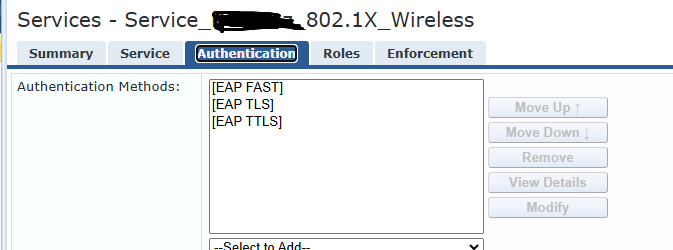
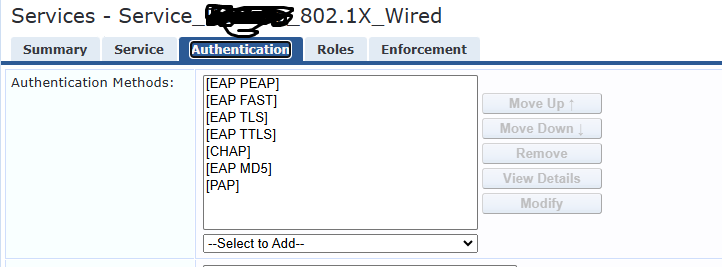
When I look at the event logs on AD, I don't see any error messages. I only left the connection types in the photo as the connection types.
Additionally, when ClearPass was running in the old version, it had a connection to the old DC. We set up a DC from scratch with a new network and new IP addresses. Everything was re-installed from scratch.
Original Message:
Sent: Sep 02, 2025 02:45 AM
From: Herman Robers
Subject: Clearpass - Active Directory Issue
First of all, you probably should not use MSCHAPv2 as the security of it has been broken for years.
It looks like your Active Directory has been modified/hardened in some way, it may be that the computer account that is created is locked/removed/has a mandatory password change. The message tells that ClearPass has no longer access to the Active Directory and it's a setting in in AD (Access Denied), not a network problem.
If you understand and accept the risks of using MSCHAPv2, including possible leak of AD credentials, you may check with TAC if there are additional logs on the AD Domain connection, or even increase logging to find better what happens. You may also have a look at your AD server, what the status is for the ClearPass server's Computer account when all works fine and when you see these Access Denied messages; and/or check the Event Log on your AD servers related to the ClearPass Computer Account.
------------------------------
Herman Robers
------------------------
If you have urgent issues, always contact your HPE Aruba Networking partner, distributor, or Aruba TAC Support. Check https://www.arubanetworks.com/support-services/contact-support/ for how to contact HPE Aruba Networking TAC. Any opinions expressed here are solely my own and not necessarily that of Hewlett Packard Enterprise or HPE Aruba Networking.
In case your problem is solved, please invest the time to post a follow-up with the information on how you solved it. Others can benefit from that.