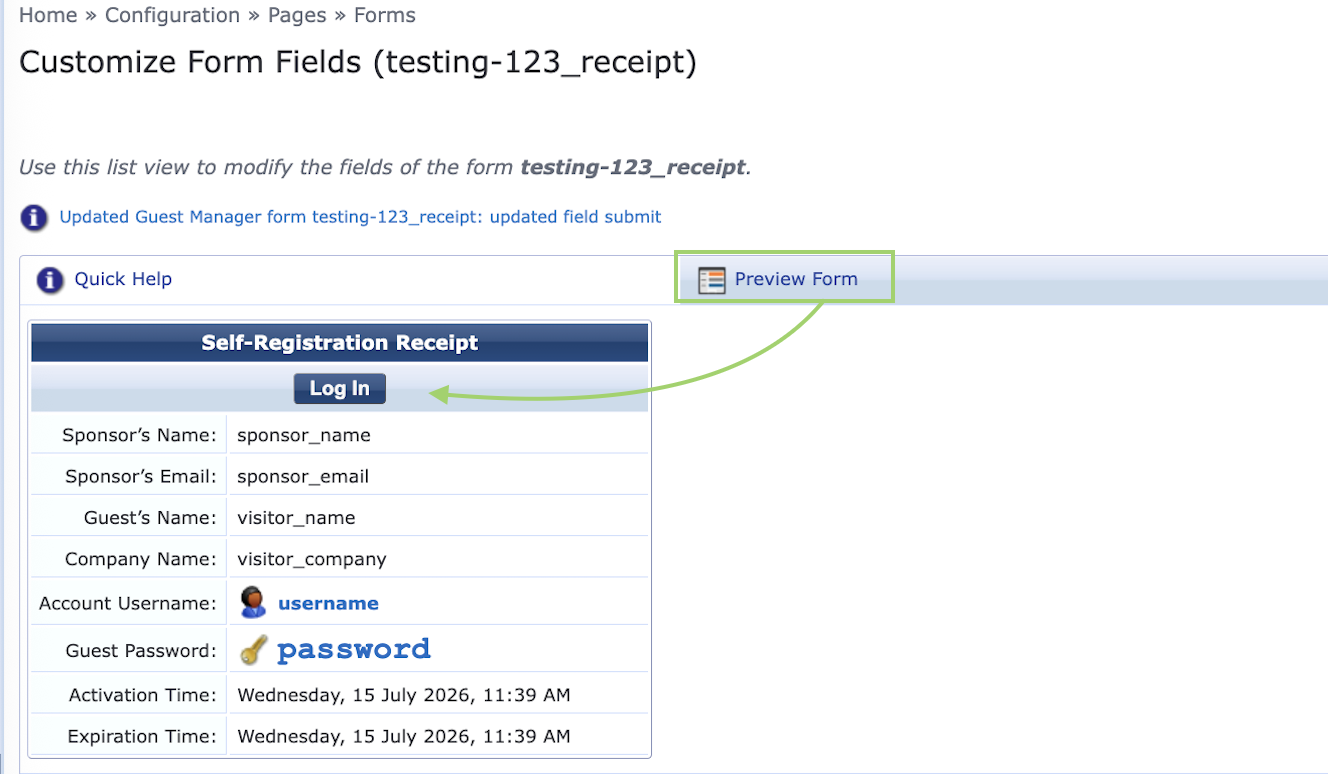
We moved the Log In button to the top of the form and added wording for user to wait for it to go active. Will see how this works for testing users.
Original Message:
Sent: Jul 15, 2026 01:22 PM
From: JK-90898a
Subject: Clearpass self registration form - resolution question
Its really up to your company on what you choose to display there.
Typically with self registration the password and username is passed when you hit the login button. Its part of the https form data. You only need to display that data ( as visible to end user) if you want them to write down the password or use it. Most of the time mac caching is coupled with the web-auth. This way the user does not need to remember the password while the account is still active. It really depends on what features you want to provide. If you want them to be able to use this user/pass on mobiles as well then an email receipt may be better to display vs on the screen.
If you really had a reason to display all this data on the page there you can also do that an look at adjusting the HTML/CSS. Other options can be done by creating a new self-reg page and using this as parent. From there you will have different forms and fields. This could allow you to have one view on mobiles and another on computers. I do try to suggest to keep it as simple as possible. If the data is not necessary to display due to your logical work flow. Just hide the fields.
If I was going to deploy this feature for a customer. I would probably modify this receipt page before they had even seen what was there. The fields can be made as hidden, and this will keep the data in the form data. It will just not take up visible space on the page the client sees.
- Sponsor Name or Email
- Expiration Time
- Account Status
- Login
Hopefully this info helps you make a better decision on how you want to proceed.
Original Message:
Sent: Jul 15, 2026 11:50 AM
From: BB-null
Subject: Clearpass self registration form - resolution question
I did not know it was called the receipt page until I started looking into this issue. I attached a screen shot of what the receipt page looks like for the end user. It basically cuts off at the white part and they have to scroll down to see the login button and other details. If they scroll down to see the button and the screen refreshed it drops back down. Management is saying this is confusing to the end user and causes them to simply close the window not knowing there is detail to scroll down to. Just trying to see if can change the situation.
------------------------------
Aruba Newbie
------------------------------
Original Message:
Sent: Jul 15, 2026 11:42 AM
From: JK-90898a
Subject: Clearpass self registration form - resolution question
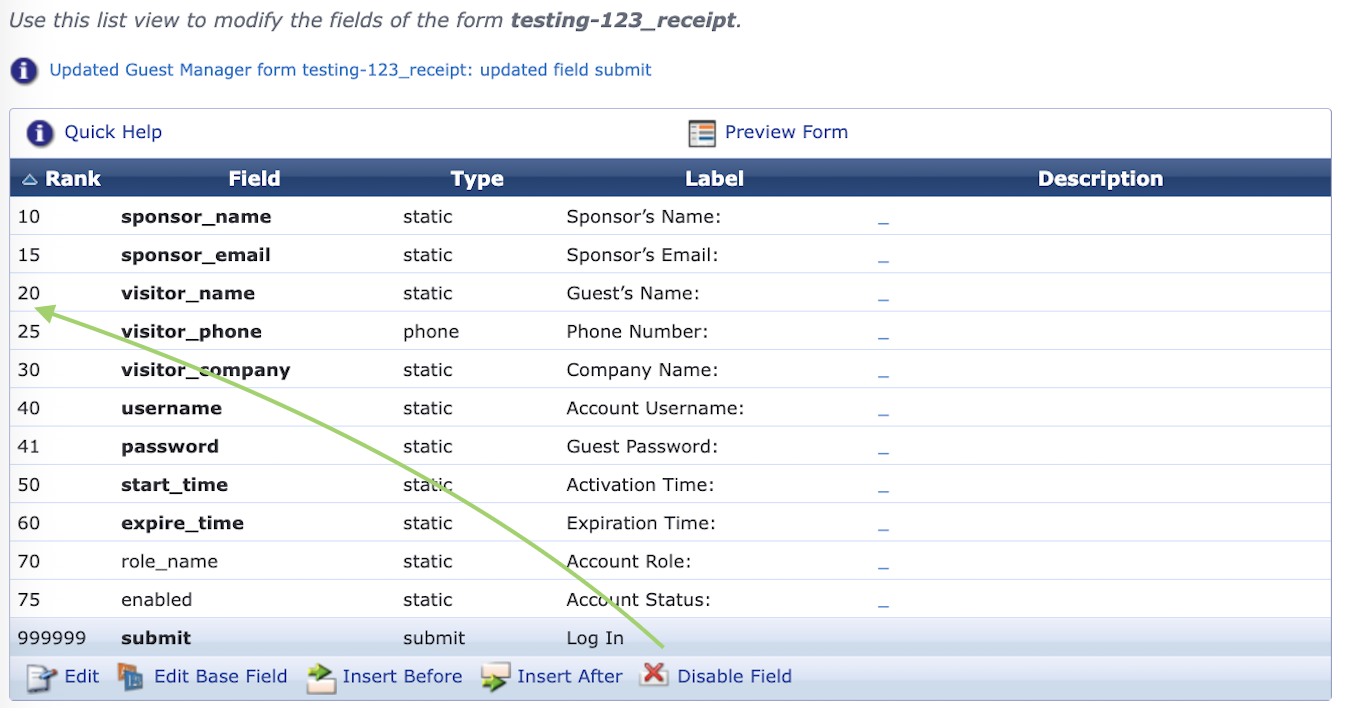
You did not mention this was the view from sponsor approval page. I just checked and there is a receipt page. You can change fields on your receipt page so they may be hidden or removed. You can change the order of operations of the fields by editing them and adjusting the rank numbering. You can technically move the "login button" to the top of the form by changing the rank to 1.
As to recommendations on what you actually want. I cant assume anything and this is just an example of shortening data on that receipt page, or moving fields around.
Just some advise for when you modify forms and views. I would not edit the base field unless you want a global change to be pushed out to every form using that field. I would only modify the field that is part of that form.
Guest -> Config -> Pages -> Forms -> Self Reg w/ Sponsor (Receipt Form)
Original Message:
Sent: Jul 15, 2026 10:32 AM
From: BB-null
Subject: Clearpass self registration form - resolution question
I only have a basic form. Sponsor e-mail drop down in addition to user name and e-mail. It is the next screen that the user gets while waiting for the sponsor to authorize that updates every 30 seconds or so. The actual log in button only shows up if the user scrolls down everything the page refreshes. Going to see what I can discover from AP-e172d8 above and see if I can figure out the CS / HTML code. Not my forte but will figure it out. This has been a learn as I go journey anyway.
Thanks ...
------------------------------
Aruba Newbie
------------------------------
Original Message:
Sent: Jul 09, 2026 09:10 AM
From: JK-90898a
Subject: Clearpass self registration form - resolution question
The more fields you have the larger the layout will be. You can minimize your required fields to just username and email address. If you have items that you want hard coded like account age. You can set this as a hidden field with default value. Some other options are to use different self-reg forms for mobiles vs computers. I suppose it depends on the requirements.
As to your SSID disappearing. It could be for many reasons. I cant comment as they could be cloud AP's with a setting to disable the SSID if uplink goes down, or it could be a gateway with tunneled AP's and the transit path being a problem. You can check the uptime and bss-table on the AP itself. IF the tot column on the bss-table is showing a low uptime, then the ssid is going away for some reason and coming back.
Most of us use mac-caching after a successful captive portal. This way the user is not prompted to re-login. The mac caching would have the same age as captive portal self-reg.
Original Message:
Sent: Jul 08, 2026 01:48 PM
From: BB-null
Subject: Clearpass self registration form - resolution question
Follow up .. I also have a test user that says the SSID kept disconnecting and prompting him to log back in. Trying to see what I can fond in logs.
------------------------------
Aruba Newbie
------------------------------